
daveybuoy
Inspiring
January 7, 2020
Answered

Premiere Pro 14 won't startup in OSX Catalina without deleting a folder every time

  • January 7, 2020
  • 4 replies
  • 2597 views

Ever since I upgraded OSX to Catalina, I have to delete the "14.0" folder from "/Users/x/Documents/Adobe/Premiere Pro" or it won't launch.


How do I make this pain in the butt stop?
This topic has been closed for replies.
Correct answer daveybuoy

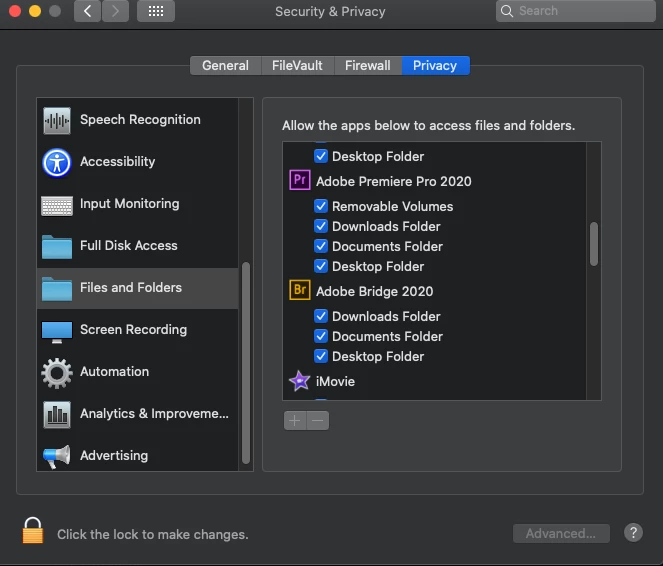
Hi everyone.  In case anyone else is struggling with the permissions sinc ethe upgrade to Catalina (as in you didn't give it permission when it prompted you for the downloads, desktop, documents, or removable drives), and you want to change your mind, I figured it out,


Go to your settings, security and privacy, and click on the tab named "privacy" on top.


Select "Files and folders" on the left hand menu and there it all is.  You can select or deselect which applications have which permissions.


4 replies

daveybuoy
daveybuoyAuthorCorrect answer
Inspiring
April 3, 2020

Hi everyone.  In case anyone else is struggling with the permissions sinc ethe upgrade to Catalina (as in you didn't give it permission when it prompted you for the downloads, desktop, documents, or removable drives), and you want to change your mind, I figured it out,


Go to your settings, security and privacy, and click on the tab named "privacy" on top.


Select "Files and folders" on the left hand menu and there it all is.  You can select or deselect which applications have which permissions.


Participant
June 30, 2020

When I go into this tab, everything except for Premiere Pro will show up. It doesn't let me allow PP to have folder access and therefore doesn't even let me open PP, because every time I do that it asks me to give it folder permissions, and I can't even do that (running macOS Big Sur)

Legend
June 30, 2020
Bigsur hasn't been released yet. If you expect premiere to run on it you're
making a mistake
Legend
January 10, 2020

you say folder permissions are ok, but you can't always tell if they are actually ok or not.  And these sort of issues are more likely to happen after an OS upgrade.  As Nishu Kush suggested, creating a new user with administrator privileges may help you see if permissions are actually an issue.   It's also sometimes useful to do a complete clean install of the OS and apps. 

nishu_kush
Community Manager
Community Manager
January 7, 2020

Hi @daveybuoy,


Thanks for reaching out. As @mgrenadier mentioned, this could be a permission related issue. Here's how you can change the permissions for the folder: https://support.apple.com/en-in/guide/mac-help/mchlp1203/mac

If that doesn't help then create a new user account with admin rights and check the issue in it.

Let us know how it goes.


Thanks,

Nishu

Legend
January 7, 2020

Have you checked the permissions for the folder?  From the finder, select the folder and hit command-i.  And then go to the bottom of the window for sharing and permissions.   Make sure your active user has full permissions.  

daveybuoy
daveybuoyAuthor
Inspiring
January 9, 2020

The folder permissions are okay, but I do remember after the Catalina update that the system did randomly start asking if premiere could have permissions to different folders and I denied it.


Is there a place I can adjust whatever those prompts were for?  My user has full access but I'm not certian the application does.