


Participant
Apr 15, 2021 7:25 AM UTC
Answered

Premiere Pro 2021 update - Hindi subtitles no longer working

Hi there,

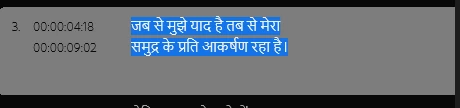
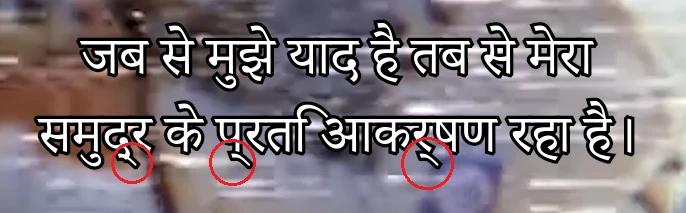
The most recent version of Premiere Pro has completely altered how subtitles are handled. As a result, Hindi text no longer displays or renders correctly, showing strange lines beneath the text, although it still appears correctly in the text editing panel.


Image 1. This is how a Hindi .SRT file appears in the editing panel, as open captions (no strange lines):

Imagine 2. This is how it appears in the preview panel and when rendered (I've drawn red cirlces around the lines):


I'm a UK-based Windows 10 user. My team member in the US is a Mac user and has the same issue.  We've tried changing Premiere's language settings in Preferences>Graphics, changing our computers' language settings, clearing the cache, importing sequences into new projects, and I've tried every single Hindi-compatible font in Adobe's library. Nothing has worked and we're out of ideas. It's looking like our only option will be to revert to the 2020 version of Premiere.

Any advice or assistance gratefully received.

In kindness,

Chris.

Stan Jones
Stan JonesCorrect answer
Community Expert
Apr 15, 2021 11:58 AM UTC

There is a new caption track setting that you do not describe checking. But I don't recall your particular issue being reported.


See this post:

https://community.adobe.com/t5/premiere-pro/arabic-characters-not-joining-correctly-in-the-new-captioning-tool/m-p/11912711#M336357


"Do you have South Asian and Middle Eastern set in your Caption Track Settings? Right-click on the Caption track header, choose Track Settings... and then under Styling Options > Text Engine, click button for South Asian and Middle Eastern. Then click Ok button."


Does that fix this?


Stan

6 replies

Participant
Sep 1, 2021 7:53 AM UTC

Dear Friends, 

I was able to solve this problem in a different way, made one video on this.  - https://youtu.be/WdDCIm1t8Yg "How to import Hindi SRT to Adobe Premiere Pro? Adobe Tutorials" hope it will be helpful. 

Regards. Rajesh. 

Translate
Stan Jones
Community Expert
Stan JonesCommunity ExpertCorrect answer
Community Expert
Apr 15, 2021 11:58 AM UTC

There is a new caption track setting that you do not describe checking. But I don't recall your particular issue being reported.


See this post:

https://community.adobe.com/t5/premiere-pro/arabic-characters-not-joining-correctly-in-the-new-captioning-tool/m-p/11912711#M336357


"Do you have South Asian and Middle Eastern set in your Caption Track Settings? Right-click on the Caption track header, choose Track Settings... and then under Styling Options > Text Engine, click button for South Asian and Middle Eastern. Then click Ok button."


Does that fix this?


Stan

Translate
Participant
Apr 15, 2021 12:37 PM UTC

Hi Stan,


This seems to have solved the issue. We were not aware that captions have their own (well hidden) language styling settings distinct from Premiere's global settings. I can't thank you enough for bringing this to our attention. I'm a little surprised the Adobe tech support didn't suggest this fix during our marathon session this morning - we could have saved ourselves half a day.


For anyone reading, you find the Caption Track Settings here:


And select 'South Asian and Middle Eastern' under 'Text Engine' here:


Thanks again, Stan! You're a star.


In kindness,


Chris.

Translate
Stan Jones
Community Expert
Community Expert
Apr 15, 2021 12:43 PM UTC

Thanks for confirming the fix and for providing those helpful screenshots.


The first version of the reference guide was available right away, but it is missing some important info, as you discovered.


Stan

Translate
Participant
Apr 15, 2021 10:02 AM UTC

UPDATE: I spent about 4 hours in a troubleshooting chat with Adobe today. They've confirmed this is a "known error" with Premiere Pro 2021 and will email me when they have a fix. No information on when that could be. If anyone else has a solution in the mean time, please feel free to share it here. For now, we're rolling back to Premiere Pro 2020, which works perfectly. Thanks,

Chris.

Translate