Known Participant
Mar 18, 2021 5:36 PM UTC
Answered

Arabic characters not joining correctly in the new captioning tool

Hi all,


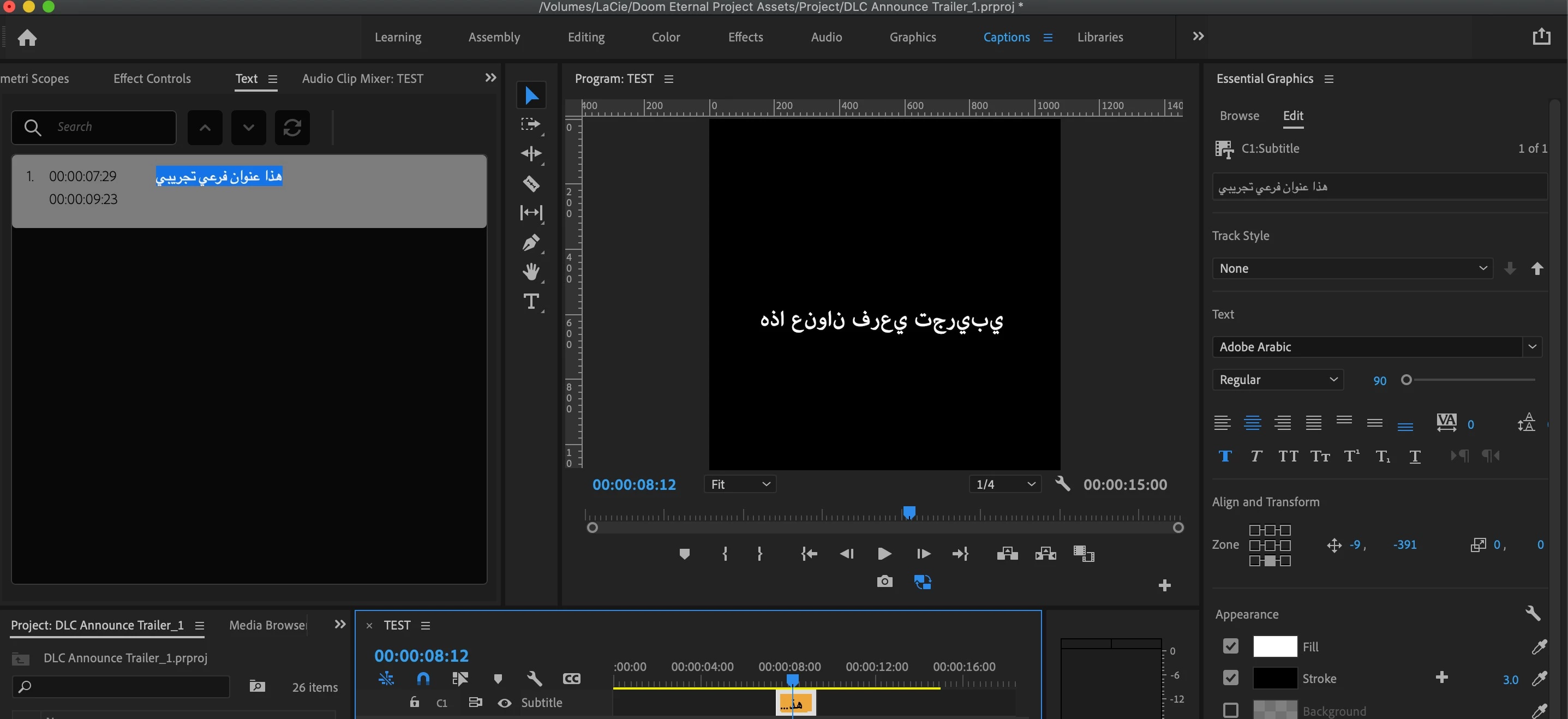
Since the latest update with the redesigned captioning tool, Arabic characters show correctly in the caption editor, but are not rendering correctly in the program monitor. I have "South Asian and Middle Eastern" checked under Text Engine in Preferences. Screenshot below


Stan Jones
Stan JonesCorrect answer
Community Expert
Mar 20, 2021 11:24 AM UTC

See the correct answer from staff (Trent Happel via Kevin Monahan):

https://community.adobe.com/t5/premiere-pro/srt-import-with-right-to-left-language-e-g-hebrew-arabic-text-is-reversed/m-p/11909031#M335759


"Do you have South Asian and Middle Eastern set in your Caption Track Settings? Right-click on the Caption track header, choose Track Settings... and then under Styling Options > Text Engine, click button for South Asian and Middle Eastern. Then click Ok button."


Interestingly, I don't think you need to set the regular preferences to South Asian and Middle Eastern as long as you set the caption track. But when I set the regular preferences to that and created a new track, it set the caption track to the same.


Stan

 

7 replies

Stan Jones
Community Expert
Stan JonesCommunity ExpertCorrect answer
Community Expert
Mar 20, 2021 11:24 AM UTC

See the correct answer from staff (Trent Happel via Kevin Monahan):

https://community.adobe.com/t5/premiere-pro/srt-import-with-right-to-left-language-e-g-hebrew-arabic-text-is-reversed/m-p/11909031#M335759


"Do you have South Asian and Middle Eastern set in your Caption Track Settings? Right-click on the Caption track header, choose Track Settings... and then under Styling Options > Text Engine, click button for South Asian and Middle Eastern. Then click Ok button."


Interestingly, I don't think you need to set the regular preferences to South Asian and Middle Eastern as long as you set the caption track. But when I set the regular preferences to that and created a new track, it set the caption track to the same.


Stan

 

Translate
Inspiring
Mar 20, 2021 11:34 AM UTC

Thanks!  That worked for me.  I don't think I would have ever found the track menu w/o you pointing it out.

Translate
Stan Jones
Community Expert
Community Expert
Mar 20, 2021 11:40 AM UTC

Yes. I sure didn't find it until I saw Trent/Kevin's answer.


And no, it is not in the documentation yet...


Stan

Translate
Inspiring
Mar 19, 2021 4:03 PM UTC

I'm having the same issue.  My graphic preferences are set correctly and I'm even using the English-Arabic version of the software.  Similar to above, my Arabic text appears correctly displayed (R-L) in the captions window but in the timeline/Program monitor is displayed incorrectly L-R.  The text direction toggles in Essential Graphics are disabled.  Hopefully I'm missing something but my guess is the fuctionality doesn't exist yet.

Translate
Known Participant
Mar 19, 2021 4:29 PM UTC

Yeah they worked for me in older versions of Premiere captioning tool so I presume something broke / wasn't included in the new update. I think installing older version is the only solution for now 

Translate