
Participant
March 16, 2023
Question

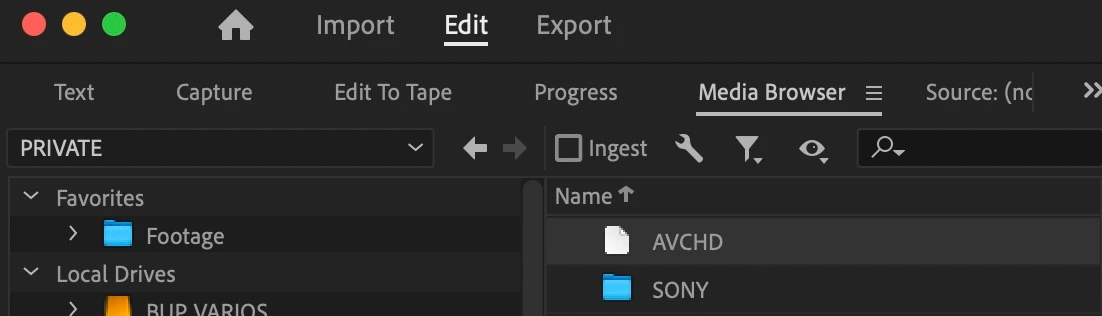
Premiere Pro 23.2 Media Browser not reading .MTS files

  • March 16, 2023
  • 2 replies
  • 626 views

Hi!

May you help me? When I want to watch the .MTS files of AVCHD,  I click or double click on the require AVCHD QuickTime symbol to show me the clips before impoirting but I don't see them. With the past versAll I can do is import by drag and drop. Any ideas for help with this?  Before the last update it worked perfectly, I did not have this issue until I update to Adobe Premiere Pro 23.2. I also update to Ventura 13.2.1 but it still does not work.
 

Mod note: I changed the title of your post slightly. I hope that's OK.

This topic has been closed for replies.

2 replies

Kevin-Monahan
Community Manager
Community Manager
April 6, 2024

Hello @Alex Chain,

Thanks for the message. It’s been a long time since you filed this bug, and I apologize for the lack of a response. Are you still having this issue? If so, the team will need more information from you to reproduce the bug. Can you provide the information required here? How do I write a bug report?


I'll move your post to the Discussions board while we await your information.


Thanks,


Kevin

Kevin Monahan - Sr. Community and Engagement Strategist – Adobe Pro Video and Audio
kglad
Community Expert
Community Expert
March 16, 2023

in the future, to find the best place to post your message, use the list here, https://community.adobe.com/


p.s. i don't think the adobe website, and forums in particular, are easy to navigate, so don't spend a lot of time searching that forum list. do your best and we'll move the post if it helps you get responses.


<moved from using the community>