
KlausKi
Inspiring
June 11, 2024
Answered

Premiere Pro 24.4.1 creates the "AppData" folder at a wrong position

  • June 11, 2024
  • 7 replies
  • 1089 views

The latest Windows version of Premiere Pro creates the "AppData" folder at a wrong position:
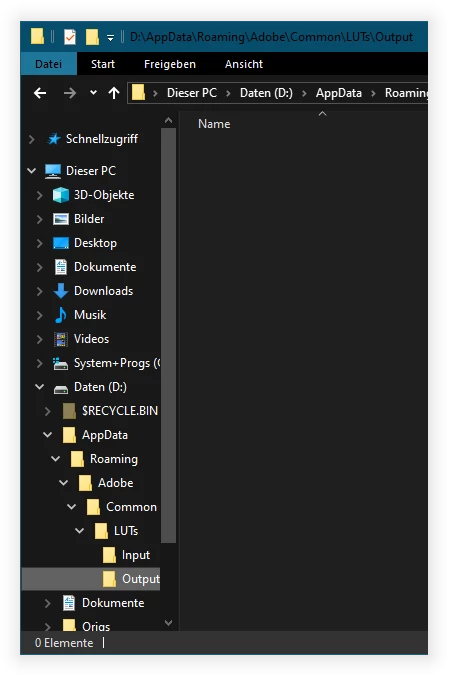
"AppData" is a user folder, supposed to be stored at "%USERPROFILE%".

Whenever I start Premiere Pro on Windows, this folder is re-created by Premiere Pro at the wrong location.


Where can I report this bug?

This topic has been closed for replies.
Correct answer KlausKi

Hi Kevin,


actually I did a number of re-installs in a blank virtual machine, but the issue re-appeared all the time.


However, I now updated to the latest version an the issue doesn't seem to occur anymore.


Thank you for all your efforts.

7 replies

KlausKi
KlausKiAuthorCorrect answer
Inspiring
August 23, 2024

Hi Kevin,


actually I did a number of re-installs in a blank virtual machine, but the issue re-appeared all the time.


However, I now updated to the latest version an the issue doesn't seem to occur anymore.


Thank you for all your efforts.

KlausKi
KlausKiAuthor
Inspiring
June 15, 2024

Hi @Kevin-Monahan,


thank you for your reply. Sorry for getting back on this issue so late. I'm back at my home machine now.


I tried to investigate further on the issue using Microsoft ProcMon. I guess, the LUTManager.dll or the LUTEngine.dll are resolving the path wrong. See this ProcMon log excerpt:


 Im currently using Premiere Pro 2024, v24.4.1(2):


Kevin J. Monahan Jr.
Community Manager
Community Manager
August 23, 2024

Hi @KlausKi,

Are you still seeing this issue? Did you try Ann's potential solution? Please report back so we can help you further.


Thanks,
Kevin

Kevin Monahan - Sr. Community and Engagement Strategist – Adobe Pro Video and Audio
Kevin J. Monahan Jr.
Community Manager
Community Manager
June 12, 2024

Hi @KlausKi,

I'm Kevin, one of the moderators here. Thanks for the bug report. The team may need more information. See: How do I write a bug report?


I hope the team can help you shortly.


Thanks,
Kevin


Kevin Monahan - Sr. Community and Engagement Strategist – Adobe Pro Video and Audio
Ann Bens
Community Expert
Community Expert
June 12, 2024

I would deinstall Premiere

Use cleaner tool and reinstall.

I too have Documents on 😄 but AppData is on C where is should be.

R Neil Haugen
Legend
June 12, 2024

That folder is at the location it's supposed to be on my Win10 system also. And no, it's not on my D drive, period. Yes, I do know how to verify folder/file location and other data.


So ... is there a permissions problem for that drive or folder for Premiere on your machine?

Everyone's mileage always varies ...
KlausKi
KlausKiAuthor
Inspiring
June 12, 2024

What does PowerShell return if you enter:


[System.Environment]::GetFolderPath('MyDocuments')


It returns D:\Documents on my machine. If you don't have this setting, you cannot reproduce.

Stan Jones
Community Expert
Community Expert
June 11, 2024

Win10. PR 24.4.1 installs in AppData in usual location.


Stan