



AndrewTheGreat
Known Participant
December 5, 2024
Question

Premiere Pro 25.1 - iGPU stopped decoding my footage

  • December 5, 2024
  • 68 replies
  • 52902 views

Ok, just updated to v 25.1 opened my projects in progress to find out that none of them uses my iGPU to decode.

Went on checking it with different formats that are decoded (h264 8-bit 4:2:0, h265 8-bit 4:2:0, h265 10-bit 4:2:0, h265 10-bit 4:2:2) by the iGPU - all of them show 0% load.
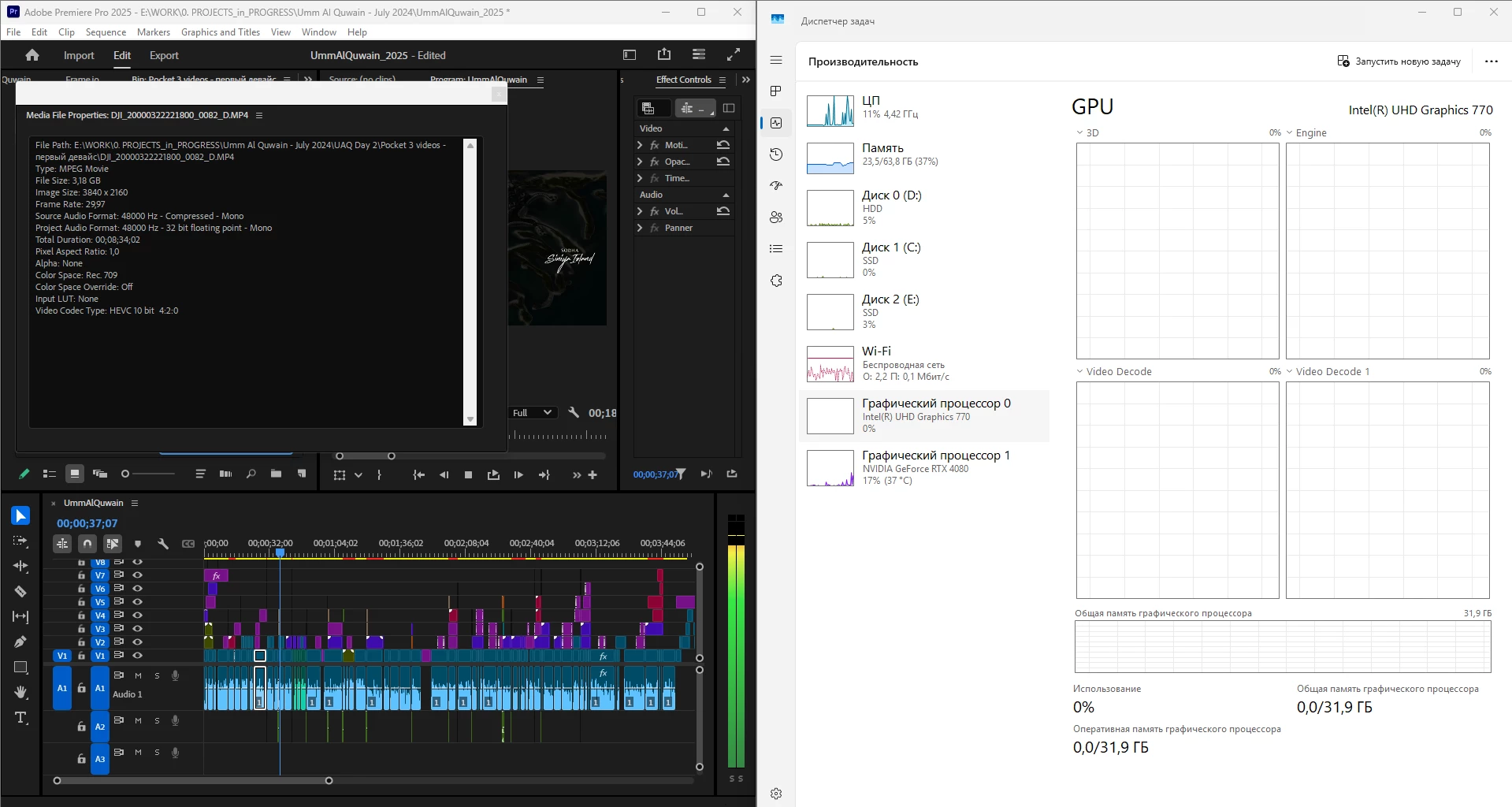
 

What is going on, guys? Why is it "new version - new bugs" thing every time? My CPU immediately started being loaded more, like by 60% all the time, even though my GPU does the decoding, whereas on the previous versions the average CPU load was 20-30% with the iGPU doing all the decoding job.


Yes, I tried reinstalling both Premiere Pro (as well as resetting its cache, preferences and plugins via the start+shift menu) and all the drivers. 


Steps to reproduce? Open a project or create one, import a knowingly decoded video, put it on your timeline, press Play. Watch the the Windows Task manager - Performance graphs.


i7 14700K, RTX 4080, 64 Gb ram, SSDs, Win 11 24h2

68 replies

JonesVid
Community Expert
Community Expert
June 18, 2025

@andreik18371608 

Well it was only a slim chance the windows graphics settings would have any effect.

The fact that 25.0 works and later versions don't is so weird. 
Don't you get any activity at all on your Nvidia GPU?.

I think at this stage I would log a support ticket with Adobe. Not sure if any of the Dev team look at this long thread anymore.

Another user has started another separate thread saying his Nvidia GPU is dead on 25.3 as well.

Fergus H
Community Manager
Community Manager
June 18, 2025

"Not sure if any of the Dev team look at this long thread anymore."


We definitely do! As mentioned, we are still planning on making changes GPU prioritization in the future and we're still keeping an eye out on this forum for any situations / projects where a customer seems a performance issue on a real-world project. 


@andreik18371608 we've not had any other reports like yours. I'd be happy to get on a phone call with you to help diagnose the issue. Feel free to send me a DM if you're interested. 


Regards,

Fergus

MyerPj
Community Expert
Community Expert
June 18, 2025

I'm still getting decent Task Manager reporting both Intel and Nvidia (4070) feedback just opening a projected and scrubbing the h.264 timeline. Saw 60%+ on the Intel.

Win11 24H2 clean install - PP 25.4 b54. Saw an 88% just now going in to get the PP (beta) version build number. Plus my PP is loading in seconds.

Participating Frequently
June 18, 2025

Have you had problems with other versions of Premiere?

MyerPj
Community Expert
Community Expert
June 18, 2025

Not in performance, it's been pretty good. Well, let me say, my PP was taking 20 seconds to load, and if it got to the home screen somewhat quickly, the seconds ticked away after a project was selected. But that was clearly on my machine, as it wasn't happening, then it started too. Quickbooks also... just get a cup of coffee once the icon is clicked. So, as usuall the clean install takes care of those things.

JonesVid
Community Expert
Community Expert
June 17, 2025

Hi @andreik18371608 


You must be really steaming after all that effort in rebuilding Windows 23H2 and 24H2 from scratch.

All what you have done sounds totally logical.

From your description there appears to be some obscure reason 25.3 is not picking up your Nvidia GPU at all.


So first things - I have deliberately avoided latest drivers on NVidia for my 4080 Super and Intel for my 13900K.

@Alex367466572b5i correctly points out more recent Intel drivers have some issues, but whether these cause your issues is unknown.

Also @MyerPj provided some info about later NVidia drivers (for 5000 series) causing issues on 4000 series GPUs. Again we don't know what exactly or if later more recent drivers are OK. It would seem though that NVidia releases drivers for Blackwell 5000 cards are released very regularly with Hot Fixes etc. Hope these don't affect 4000 cards.


I have therefore stuck with 566.36 for my 4080 Super for last few 4K projects and all seems OK.

4K 10 BIt HEVC 50fps Media - smooth on timeline.

Intel 32.1.101.6647 for iGPU on 13900K.

These work fine on 25.2.3.

I'm avoiding 25.3 at present as I'm in middle of project.

Final bit is info that Thomas Yang of Adobe gave for people with blank screens on Laptops. Not your issue I know, but it is a tip to ensure Premiere is selecting NVidia as the preference GPU and also the Adobe GPUsniffer.exe programme is set to NVidia as priority with High Performance setting. GPUsniffer can be set to Windows making the preference - so ensure you force it to Premiere Pro.

GPUsniffer.exe is in the same  Adobe PremierePro folder as PremierePro.exe.

See settings on my Windows 11 24H2 under Display Graphics.


Worth looking at that.


[Moderator: we removed the name and email address of an Adobe employee who was helping customers with an unrelated issue that was affecting multiple customers.]


MyerPj
Community Expert
Community Expert
June 17, 2025

That's an interesting screenshot @JonesVid, I've not seen those options before. 🙂

Did you see any performance advantage by using it? 

JonesVid
Community Expert
Community Expert
June 9, 2025

Hi @Alex367466572b5i 

Thanks for your heads up on the Intel driver 6874 for Ultra and Core Processors.

I'm running driver 6647 on a 13900K and that is working fine, but on a Desktop, not Laptop.

I have not upgraded recently due to requiring stability during a main Project edit.

The Intel release sheet only mentions occasional failure to import footage on Premiere Pro under known issues for driver 6874..


If you have bugs that can be replicated easily on Premiere Pro with the driver you mention - suggest you post on the Intel Community as well. May be other users have done this?.

As you can imagine, it is difficult to keep up with every driver release.


Known Participant
June 9, 2025

@JonesVid 

Intel Core Ultra Series 2 with built-in Intel Arc GPUs:

Adobe Premiere Pro may experience an intermittent application crash.
Adobe Premiere Pro may fail to import video. Mitigation is to use Intel NPU Driver version 32.0.100.3717 or lower.

JonesVid
Community Expert
Community Expert
June 7, 2025

HI @andreik18371608 

So if i de-select NVidia in Media/Prefs and just ensure all decoding on iGPU (I.e. forcing all decode on iGPU)  then on 25.2.3 the iGPU jumps into life

All encoding still on NVidia .

CPU load is lower 20% ish

The only other thing I can suggest is using the 'CleanUp'  tool that NVidia do. 

Clears all traces of NVidia then re- install it.

Maybe something worth trying if you hadn't already.


I see latest Intel Graphics driver now Version: 32.0.101.6874  Release date: May 30, 2025


Known Participant
June 9, 2025

@JonesVid these drivers have two bugs related to Premiere and Ultra 200

Participant
May 22, 2025

i also got the same error when i upgraded to v25.1 since then it made me upset and went back to v25.0 after many times i tried to upgrade to the latest version v25.2.3 and turn off Nvidia then strangely both GPU and IGPU are working

Participating Frequently
June 17, 2025

I have exactly the same video card in my home PC and I can't get it to work in versions higher than 25.0. The processor does all the work, the graphics just output the image. But as soon as I install 25.0, encoding starts working and the timeline works much smoother. I like version 25, in general it has everything you need, but it has damn bad lumetri, and they fixed it in version 25.1, in which encoding on the GPU is simply disabled. To be honest, I'm looking at a MacBook and Mac Mini, because it's unbearable to wait more than half a year for fixes from Microsoft and Adobe. My laptop is 2.5 years old and it works great with 4K games, but I can't edit 4K on it - that's crazy.

MyerPj
Community Expert
Community Expert
May 12, 2025

Hey @JonesVid 

Good stuff there. I don't like Handbrake much, but I did see it nudge some iGPU activity. 

I'm back to the uncheck Nvidia on the Media preference page. Thus I am getting both to work. 

It seems pretty good so I'll be happy with this and any improvements Adobe can make for performance.


Fergus H
Community Manager
Community Manager
April 16, 2025

Hi everyone,


We've been following the discussion on this thread and I wanted to let you know that we are actively working on improving performance on systems with multiple, different GPUs. Our current focus is on more granularly determining whether an NVIDIA or Intel GPU should be prioritized for decoding. We will announce any public beta releases related to these changes in this thread.


@JonesVid Regarding performance testing tools, while we use internal tools, PugetBench is a good public option. For testing GPU decoding (HEVC & H.264), the paid version offers specific tests (12, 13, and 14) that are relevant to this thread. 


Finally, we are still interested in hearing about any real-world projects that played smoothly in v25.0 but exhibit performance issues in v25.1. If you're got a project like this that you'd be willing to share, please let us know. 


Thanks,

Fergus


JonesVid
Community Expert
Community Expert
April 17, 2025

@Fergus H 

Thank you for the update on this. It is reassuring to know you continue to look at improving the decoding priorities and potential flexibility for a user to choose which GPU to choose.

As a side note, I noticed even Handbrake encoder lets you do that and the current version is extremely fast

I did run the Puget Test Bench on Premiere 25.1 some time back, (documented in this thread earlier on) but found the Premiere 25.1 Application actually crashed.

Also ran the stacked 9 x 4K H264 video test that several users tried on 25.1 and found multiple Video frames dropped on my system, whereas my older Intel 9900K system with 25.0 ran perfectly well.

Since then I have updated my BIOS on my current PC platform  to very latest and also updated the Intel graphics driver.

On the other hand I have gone backwards with the NVidia GPU driver to user an older version (just as a try out).

@MyerPjspotted some articles on that mentioning newer drivers optimised for NVidia 5000 series were upsetting 4000 series GPUs and posted).

I'm still using that on projects and found it runs better versus the later versions. Why .... who knows?.


I'll re-run all tests on 25.2.1 and see how we go.


As concluded by some other users, Windows 11 24H2 may have introduced 'anomalies' with H265 media as well.

Users on Windows Community report this, also on Da Vinci Resolve. There appears to be little information coming from Microsoft on this, hence my decision to stick on Win 11 23H2.


In summary, over the last 3 to 4 months PC/Windows users have had to juggle muliple releases of Intel drivers, NVidia drivers, Windows 11 updates and then the new Premiere releases on top of that.

Achieving the right combination can drive anyone nuts !


Timeline editing/export performance of Premiere Pro is fundamental  to ensure we continue to have a smooth editing process even for modest video footage demand.

This user experience is what hits you immediately after loading a new Premiere Pro version, not all the other new bells and whistles.


Participating Frequently
April 17, 2025

I have my personal project for which I periodically check the performance of Premiere. I check after each Windows update or the release of new drivers. And I can say that 25.2.1 did not bring anything good to the speed of the timeline. It is still very bad and slow compared to 24.6 and 25.0. No work of iGPI and GPU - all coding occurs on the processor. It is a pity that now there is no opportunity to switch to 23h2 - I suspect that everything is fine there. All these problems suggest the idea that Adobe has no close connection with Microsoft. Because the companies left their users with the problem alone for almost half a year. And all I see is that users (I saw a lot of messages on the forums of Intel, Nvidia, Microsoft, Adobe) do everything to prove and show the problem, but there is no result from the companies. This is sad and extremely unprofessional. Okay, we are users with huge experience - we knew and have already experienced a lot of problems and errors of Premiere. But a young editor who bought a new PC with the new Windows and installed the new Premiere - he simply won't be able to work, he will either give up his work, because it is unbearable and not everyone can do such nonsense as constantly reinstalling programs in search of a working version. Or this person will leave this software manufacturer.

Participant
April 9, 2025

Now I checked it on version 25.2.1 and beta 25.3, everything worked. Hevc (h.265) is decoded as before. I checked the video Engine loading in the GPU-Z utility. Nvidia 3070 card. Apparently, everything was fixed

JonesVid
Community Expert
Community Expert
April 9, 2025

H265(HEVC) footage has always continued to be decoded by the iGPU in 25.1 and the beta versions.

It is H264 footage that is affected, as those were the changes they targetted in 25.1


Participating Frequently
April 9, 2025

I sincerely do not understand what Adobe has been doing for 4 months, but in 25.2 everything is the same - the absolute majority of frames are processed by the processor. This is some kind of nonsense. You just broke a normally working program. I have fresh drivers. I have not weak computers (12700k / h, 3080 / 3070ti), I have a fresh clean Windows. And still - everything works and spins very poorly. I have the usual for today 4k25/50 8/10 bit frame rate with Lumix, GoPro and DJI. The processor is loaded by 60-100%. Video cards are loaded little and do not show code / decode loads. It was not like this! Bring back how it worked in 24.6. There was a weakly loaded processor, loaded iGPU and GPU. The fans on my laptop were spinning at normal speed and the video was easily spinning on the timeline. How can you not understand that what you did in the latest updates does not work! It works poorly! Let's teach your program to work normally on pre-top PCs with video, because it is (imagine) a VIDEO editor, and then we will add Ai and other things to it. I am tired of playing with these versions of Premiere - this is not what I want from a professional program.

MyerPj
Community Expert
Community Expert
April 9, 2025

Is yours a PC desktop or laptop? Dual GPUs in a desktop?

Participating Frequently
April 9, 2025

I already wrote here that I have a PC 12700k 3080 and a laptop 12700h 3070ti. In both cases, on versions 25.1 and 25.2, everything is VERY bad. All processing is on the processor. On versions 24.6 and 25.0 - everything just flies and works perfectly. From the banal on 25.1 and 25.2 in the dispatcher there is an empty code / decode graph. On versions 24.6 and 25.0 there is a line on the graphs and the timelan works perfectly.