



AndrewTheGreat
Known Participant
December 5, 2024
Question

Premiere Pro 25.1 - iGPU stopped decoding my footage

  • December 5, 2024
  • 68 replies
  • 52902 views

Ok, just updated to v 25.1 opened my projects in progress to find out that none of them uses my iGPU to decode.

Went on checking it with different formats that are decoded (h264 8-bit 4:2:0, h265 8-bit 4:2:0, h265 10-bit 4:2:0, h265 10-bit 4:2:2) by the iGPU - all of them show 0% load.
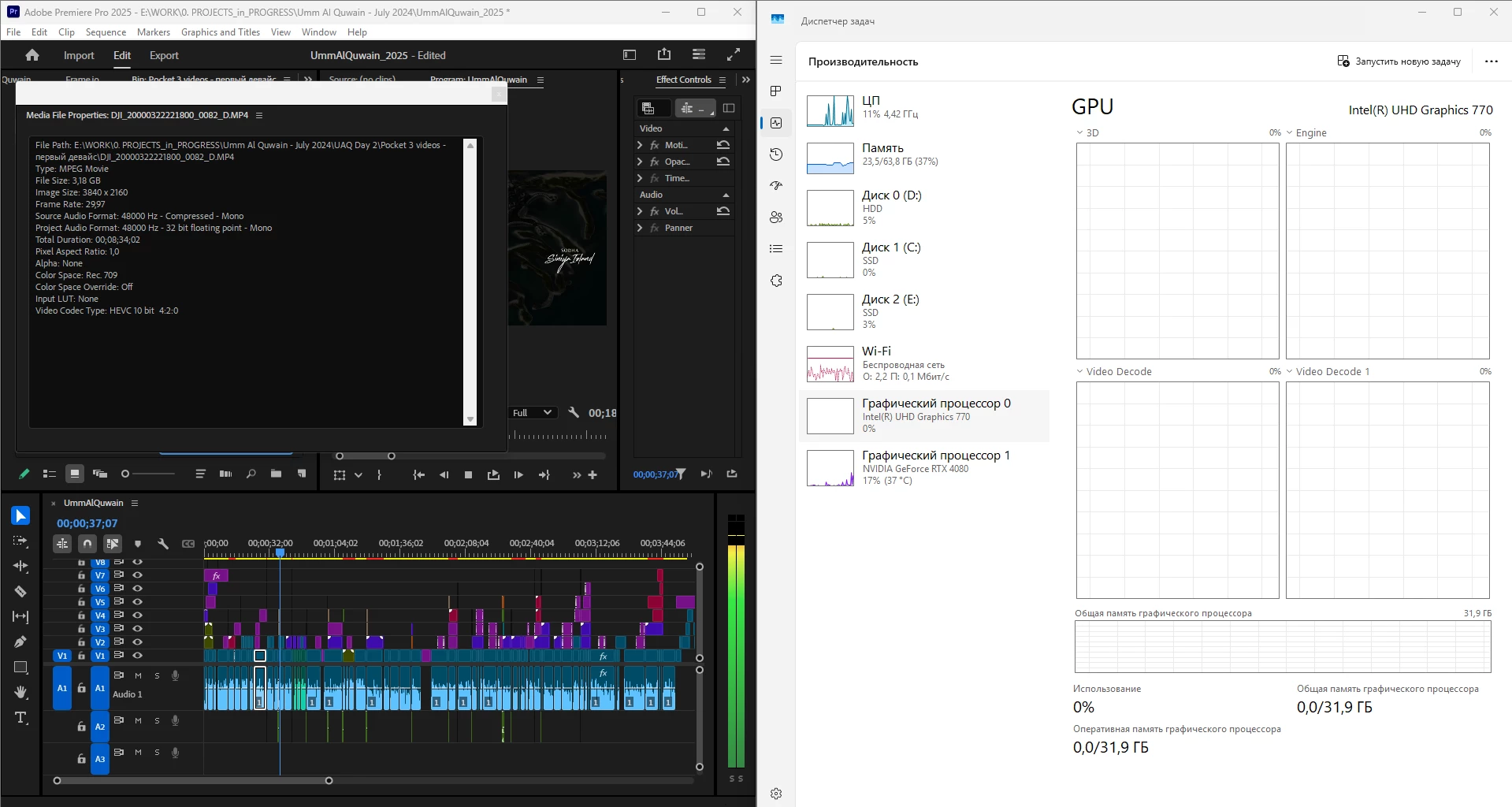
 

What is going on, guys? Why is it "new version - new bugs" thing every time? My CPU immediately started being loaded more, like by 60% all the time, even though my GPU does the decoding, whereas on the previous versions the average CPU load was 20-30% with the iGPU doing all the decoding job.


Yes, I tried reinstalling both Premiere Pro (as well as resetting its cache, preferences and plugins via the start+shift menu) and all the drivers. 


Steps to reproduce? Open a project or create one, import a knowingly decoded video, put it on your timeline, press Play. Watch the the Windows Task manager - Performance graphs.


i7 14700K, RTX 4080, 64 Gb ram, SSDs, Win 11 24h2

68 replies

MyerPj
Community Expert
Community Expert
April 4, 2025

BTW: My most recent screenshot above seemed way easier to achive in v25.2 than 25.1, so maybe they tweaked the balance a bit. Works well!

MyerPj
Community Expert
Community Expert
April 2, 2025

BTW: I saw an article today regards the game version nvidia driver, and the article recommended users go back to 566.36. The theory being the updates for the 5000 series have comprimised 4000 and probably 3000 users. It's on my tablet, I try to drag it out later.


I've been running 572.16 for a little while, (Studio of course) with no instability issues.

JonesVid
Community Expert
Community Expert
April 4, 2025

Hi @MyerPj  

Did you get any more info around the articles on NVidia drivers?


I see this whole topic of GPU drivers a bit of an unknown dark art

NVidia constantly release updates (mainly focused on Gamers fixing gaming glitches ) but then Studio drivers appear a bit later which, one would hope, have undergone some more extensive testing and validation focused on interoperability with creative apps.

Exactly what Adobe & NVidia Teams test we don't  know. It would be good to know this however ......

Stability under load and Real time Performance under load (with selected Codecs) are key areas.

But then you have multiple options of  type of GPU, operating system etc.

So one assumes tests are very limited ?.


I think we just have to continue playing the end user lottery game of installing new software and new drivers and hope it all works (properly), and what surprises might hit us again.

Keeping each other updated and sharing experience of App versions/ Driver versions  seems the best way these days.


MyerPj
Community Expert
Community Expert
April 2, 2025

I'm pretty happy with this, a 1 hour multicam, going backwards at full tilt, 3 cams of all h.264, 1 UHD, PP 25.2, Win11 23H2


Participating Frequently
April 10, 2025

Most likely the answer lies in WIn11 23h2... for the most part those who do not experience problems did not update windows to version 24h2

AndrewTheGreat
Known Participant
April 2, 2025

Can anyone explain this? This is one and the same project my friend is working on. Nothing is changed - the project is opened in 25.0 and then in 25.2. See the dropped frames during the playback. This is exactly the thing I was talking about when I added screenshots of Puget bench test a couple of pages ago, comparing the performance of 25.0 and 25.1. Now as we can see the performance drop is even worse. 

As far as I can judge, this new priority system is beneficial only to NVidia 5000 cards, making the older ones perform even worse.

AVC 4k 420 8 bit 

One thing to consider. It doesn't matter what the project consists of, how my pal edited it and with what tools. What does matter is there's a risk - has been since v. 25.0 - to update Premiere Pro now that every new version drops the performance more and more. 

Community Manager
April 2, 2025

Hi @AndrewTheGreat ,

Thanks for bringing this up. This issue doesn’t appear to be related to the 25.1 changes we’ve been discussing in this thread.

Based on the screenshots you shared, the drop rate in 25.0 (Dropped/Total: 138/140) is 98.5%, while in 25.2, it’s 84.1%. This indicates that 25.2 is actually performing better than 25.0, not worse.

That said, we’d like to investigate further. Please share the project and media files so we can take a closer look.

Thanks,
Mayjain

Participant
March 31, 2025

I found this thread deeply insightful. I currently use an ASUS Z890 ProArt motherboard with an Intel 285K CPU, DDR5 6400MHz 64GB RAM, an NVIDIA 5070 Ti, and an Intel Arc B580 — yet only the 5070 Ti is doing all the work. It’s frustrating to see such a capable system being underutilized.

One thought that keeps coming to mind is that Adobe shouldn’t lock users into rigid functionality. The ability to define processing priority based on each user’s specific setup is essential. That kind of flexibility is what a creative-focused company like Adobe should stand for. If better performance can be achieved through multi-GPU configurations, users will absolutely take advantage of that — even if it means pushing their PCs to the limit.

As AI workloads and dual-GPU systems become more common, I sincerely hope Adobe provides users with the freedom to set priorities and better utilize multi-GPU setups for increased efficiency.

Wishing you a great day!

Community Manager
April 2, 2025

Hi @G.H_ ,


Thanks for sharing your thoughts. Have you noticed any performance issues in the latest Premiere Pro? If so, please share your Premiere version along with the project and media files so we can verify the behavior on our end.


Just to clarify, as mentioned earlier in this thread:

"In Premiere Pro 25.1, we’ve updated the decoder priority order to Nvidia > Intel specifically for H.264 4:2:0 8-bit files. This doesn’t mean the Intel iGPU won’t be used; rather, it prioritizes Nvidia, with Intel stepping in only when Nvidia reaches its capacity."


To further illustrate this, I previously shared a recording showing how both Intel iGPU and Nvidia GPU are utilized during high-speed playback of multiple files in a sequence. You can check it out here: https://f.io/8EtSq_Nb.

A similar behavior can also be observed in a multi-track UHD project.


That said, we will continue to discuss the concerns raised in this thread and consider possible actions in the future.

Thanks,
Mayjain

JonesVid
Community Expert
Community Expert
April 2, 2025

Hi @mayjain7130546 

So as of today Adobe have still not demonstrated the actual higher efficiency of your newly coded method for H264 handling for 4.2.0. Its a claim but it it a fact?


I made a constructive suggestion that we should all be using a standardised 'Tool/ Project (or whatever method)  to conduct tests.

Asking individual users to go off and conduct random tests is not the correct way to arrive at meaningful results.

I've just looked at your video (shared in your link) again, but this only shows a rough indication of the iGPU kicking in from time to time. I dont get much meaningful information from it.


I'll repeat my questions above -

1) How have you determined in your development tests (by what test method, platform and setup) that by diverting  H264 4-2-0 footage for decode to NVidia dGPU is more efficient than allowing Quicksync to do its job.

2) Can we have a test project/procedure from the Adobe team that all users can use so we all have a common base from which each users tests can be compared.


If we all go off doing our own thing again it will be a mess.


JonesVid
Community Expert
Community Expert
March 5, 2025

@Fergus H @R Neil Haugen @jamieclarke @AndrewTheGreat


Hi all, just got back from 17 days away and see my email has been doing overtime on this discussion thread !.


Taking a step back and looking at all this it seems that many users who look at what their editing platforms  are doing (more closely) have agreed 25.1 versus 25.0 and 24.6.3 performance seems to go backwards for them (including myself).


What we lack here is a standardised tool for comparing apples with apples.

The Premiere team say that they do not see a performance degradation versus 25.0 - but exactly HOW is this conclusion being derived?.

It is opposite to what some users are seeing on this thread. The platforms we have are nothing too weird, in fact fairly standard type of build.


What we need is a standardised Adobe Premiere tool that everyone runs.

We have used Puget Benchmark Systems test - but  from what I see this has not really revealed a true comparison on this discussion thread topic.

A number of us used the 9 video matrix  test which revealed many dropped frames on 25.1 versus 25.0. In fact my old i9900K machine out performed my current platform with an much inferior dGPU runnng 25.0 versus 25.1 on my current machine.

This was a sobering revelation.

At the moment we are not comparing Apples with Apples ...or even bananas with bananas....


For me selecting which GPU to use for decoding H264 or H265  is not the answer. Intel iGPU is still very good at that and I want my dGPU dedicated to other tasks for faster encoding.


I know the team went away to look at this, but I feel we are still lacking a standardised way which helps define a finite performance measurement that aligns with what the dev/support teams are doing.

We otherwise risk having an infinite discussion thread on this topic.


Conclusion -

1) we don't have a solution yet to see 25.1 perform as good as 25.0 and 24.6.3 using iGPU/dGPU and

2) an 'agreed standardised way' to measure performance between future Premiere Pro releases in the future

R Neil Haugen
Legend
March 5, 2025

This thread is another which to me illustrates a very difficult part of the pro video post app development at this time. There is such a wide array of hardware all down the chain, cameras to computers ... and media ... not even counting what various software apps may be on any particular machine.


And then throw in OS updates ... both PCs and Macs have had OS updates recently that really bit some users ... and it's difficult to see how you can predict everything everywhere.


My main rig is a 3960X with 128GB of RAM, twin Nvme drives one for OS/programs, the other for all cache files ... and a 2080Ti. It is doing fab with 25.x, all versions. I've seen another very close rig to mine on another forum, where the user was having troubles even with some larger/deeper ProRes files.


Those scream through on mine ... as does BRAW and ProRes RAW and even some long-GOP 1080 mp4 files. I'm wondering though, if I would notice a difference if I was working with Fx3/Fx6 XAVC files, which are a mildly nasty form of long-GOP. I haven't had a chance to test any of that stuff.


It's enough to drive ya around the bend, trying to sort why so often nearly identical setups get wildly different behaviors. 

Everyone's mileage always varies ...
JonesVid
Community Expert
Community Expert
March 5, 2025

Yep - so many parameters to juggle

In fact, I just realised I also omitted to mention that Windows 11 24H2  introduced yet another dimension of confusion which for some users (and gamers on Microsoft Community) messed up their graphics completely.

This did affect H265 decoding for some users as well. Intel have since released more driver updates.

I've not seen any new release notes on Win 11 24H2 addressing graphics fixes where iGPU is used.

I have still stuck with Win 11 23H2 for now


If we stick to H264 media performance comparisons for now - that narrows down the field as that is the media that has been affected by 25.1 re-work. It would seem the 25.1 change affects Intel users most using Processors with an 'on board iGPU'. The performance drop is not counteracted by a more powerful GPU. Even an NVidia 4080 Super doesn't do it for me when exporting a timeline with H264 media and encoding into a different codec.

I still therefore cannot understand the claimed 'performance improvement for H264' on 25.1.


Running say a 3960X and one dedicated GPU I assume you are unlikley to see much difference in H264 decoding running on Premiere 25.0 or 25.1 as there is no integrated GPU in the 3960X.


남수김68798891
Participant
March 5, 2025

I am experiencing the same issue. I am using an AMD 5900X and an Nvidia 3070. While editing in Premiere Pro version 25 or higher, the video RAM fills up, reaching 100% usage, causing the editing process to halt. Once this issue occurs, editing becomes impossible until I restart Premiere Pro.

Thinking it might be a system issue, I replaced my graphics card with an Intel Arc B580 and tested it, but the same issue persisted, making editing impossible. I even reinstalled Windows 11, but the problem remained.

In the end, I downgraded to version 24.6.3, and now everything is very stable, allowing me to edit quickly and smoothly.

Fergus H
Community Manager
Community Manager
March 5, 2025

@남수김68798891 the issue you describe is unlikely to be related to the issue described in this thread. I would encourage you to make a new post about what you are experiencing, following the instructions in this post: https://community.adobe.com/t5/premiere-pro-bugs/how-do-i-write-a-bug-report/idi-p/13361863


Regards,

Fergus

Participating Frequently
February 20, 2025

Just read through this duscussion and I'm having all these symptoms except that I don't  care for the iGPU working or not - if Adobe think the dGPU should be the main decoding device, let it be - I have notice drastic performance gap between the old Premiere Pro 24.6.3 and the new 25.1. The performnance is horrible. I have all the same workflow, all the same materials from 3 different cameras, have had these for years already, and in version 25.1 I cannot work at all. Simple things I used to do in version 24.6 are now making my system struggle. I guess I'll have to install version 24 and work in it or swith to some other software.

Fergus H
Community Manager
Community Manager
February 20, 2025

@midjournalist_7435 Performance issues can be caused by many different things and quite possibly not related to the thread here. I'd request that you create a new post, following the directions here: https://community.adobe.com/t5/premiere-pro-bugs/how-do-i-write-a-bug-report/idi-p/13361863


Regards,

Fergus

Participating Frequently
February 21, 2025

I did go back to version 24.6.3 and somehow I do not have either lags ar freezes, my timeline is always responsive and the export times are fast. I haven't come across any problem I had with the 25.1, in particular there hasn't been a single time when I would have a "rendering audio files" problem that these forums are full of. Also there's no transform effect bug (with the footage jumping to the left hand corner when you change its position with this effect, the problem people have complained about too). I don't even have any problems with the dynamic link I had in 25.1 when AE comps become unlink on loading the project ar return an error. Everything is perfectly fine. I'll stick to v. 24 for now... Too many problems and too power hungry the latest version is.

Fergus H
Community Manager
Community Manager
February 13, 2025

Hi all,


Thanks to everyone who contributed to this thread and thanks to those people we’ve spoken to via video call.


I’d like to summarize the changes we made in v25.1, the impact, and possible changes in the future.


As @mayjain7130546 has mentioned, in v25.1, we changed GPU priority so that an Nvidia GPU will be given priority over an Intel GPU when decoding H.264 in 8-bit 4:2:0. Note that in more complex sequences, Premiere Pro uses both GPUs, splitting the load between them.


Based on our testing and feedback while this change was in beta, this is a good change for most Windows computers where the Nvidia GPU is more powerful than the Intel GPU.


However, it is not always the best choice, and we have seen some cases where the Intel GPU is more powerful than the Nvidia GPU. We have seen this in some laptops and in cases where a customer has built a new computer, with a recent CPU but has kept their older GPU.


It is possible to simply disable the Nvidia GPU, via Preferences > Media, forcing all decoding to be done on the Intel GPU. However, on complex sequences like the test project @Raman275720276xpc  shared, this means that the load can no longer be split between the GPUs and performance will suffer.


We are considering adding an option to Premiere Pro to let you choose which GPU should be given priority. On a computer with both Nvidia and Intel GPU, the default priority would be Nvidia, but you could change that.


So, in summary, while we have data that shows the GPU priority change was a good change for most Windows customers, we know that some customers can see worse performance and we’re on a way to mitigate that.


Regards,

Fergus

R Neil Haugen
Legend
February 13, 2025

Thanks for the very thoughtful and informative reply, Fergus ... that made this all make sense. Not that anything is ever perfect, of course. But at least quite understandable.

Everyone's mileage always varies ...
AndrewTheGreat
Known Participant
January 31, 2025

And here goes the famous and most trustworthy PugetBench test from Puget systems:

Premiere Pro 25.1:

Premiere Pro 25.0:


The result is catastrophic... 


14700K, RTX 4080, SSD (7600\7300 speed), 64 Gb of ram at 5600 Hz.

Legend
January 31, 2025

That first result is about the same score that I got from my i9-14900K system with an RTX 4070 Ti GPU and 64 GB of DDR5-6400 RAM (also running 25.1). However, my system only got 14300-ish to 14500-ish scores with 25.0 in the same PugetBench testing.


This seems to indicate that the i9-14900K is less affected by the 25.1 changes than lesser Intel CPUs are. It also indicates that my PC's performance is more GPU-bound than CPU-bound.


And the i7-4790K that I had from 2014 to 2019 would have choked badly on 25.1, given how poorly (relatively speaking) it would have run on versions 24 to 25.0.