


Participating Frequently
November 8, 2018
Question

Premiere Pro CC 13.0.1 corrupt color problem.

  • November 8, 2018
  • 14 replies
  • 4749 views

Hello,

I'm having a color problem while playing the sequence or when randomly jumping from frame to frame in timeline.

I keep jumping from frame to frame till it becomes normal.

It's only a playback issue, it doesn't export movies like this. It also happens sometimes when i change color options in Lumetri.

Sending you a sample frame here.

Thanks.
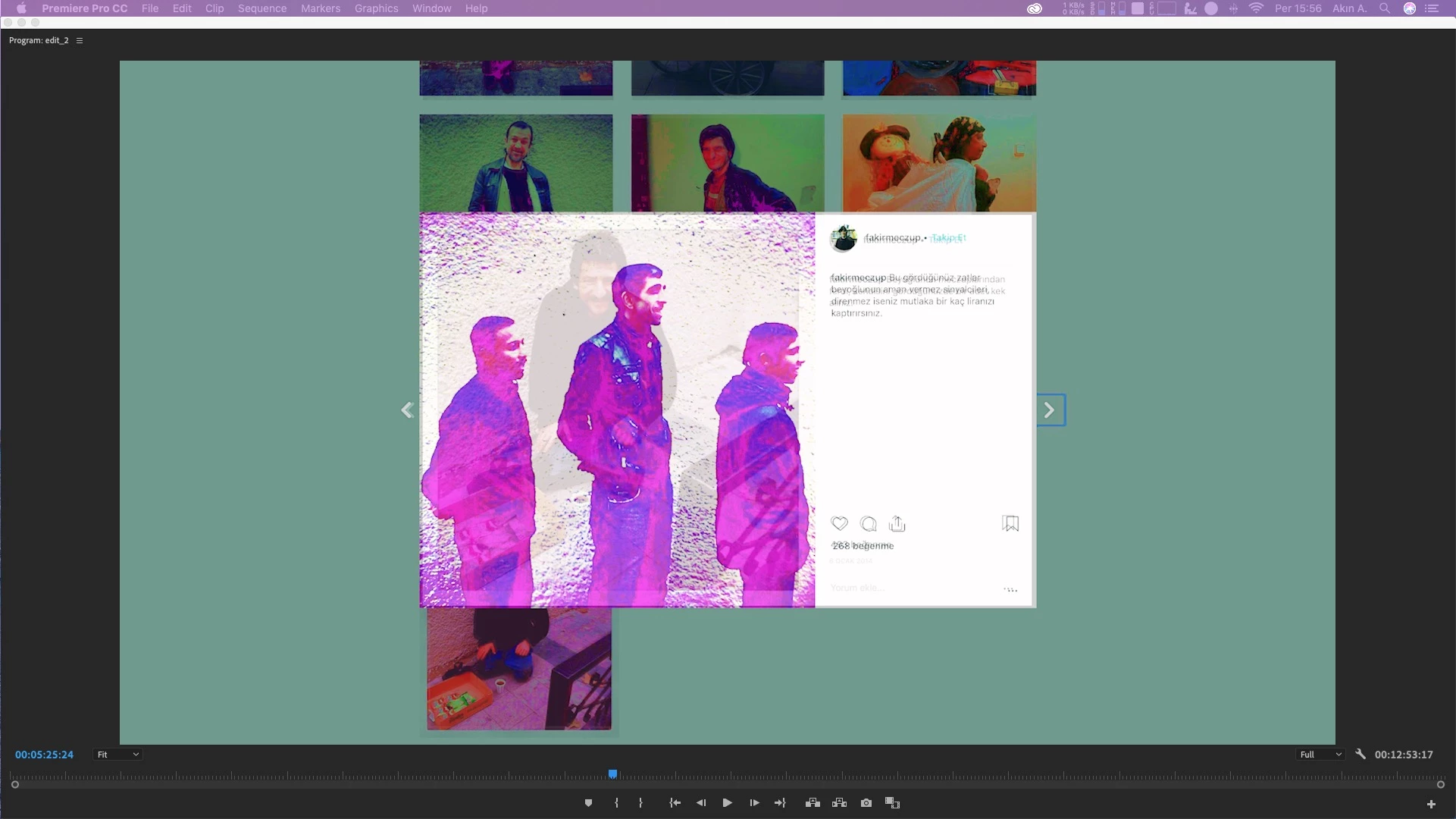
This topic has been closed for replies.

14 replies

froydian_slip
Participant
December 4, 2018

wow, i am so glad i'm not the only one affected by the 13.0.1 update. having these same issues with color correction, as well as exporting; i get "a low-level exception occured in: h.264 (exporter:9)"

running off:

windows 10 64-bit

intel i7-6700hq @ 2.60ghz

ram: 16gb

gpu: nvidia geforce 1060 (v417.22)

R Neil Haugen
Legend
December 4, 2018

Report this over on the UserVoice system ... anything posted there goes directly into the engineer's system.

Neil

Adobe UserVoice Bug /Feature form: https://adobe-video.uservoice.com/forums/911233-premiere-pro

Everyone's mileage always varies ...
Participating Frequently
November 19, 2018

Same issue here. Upgraded to newest version of Premiere and Lumetri is now completely unpredictable, especially in exports. Stop passing the buck and fix this issue please, this is affecting all of our livelihoods.

R Neil Haugen
Legend
November 19, 2018

" ... unpredictable especially in exports. "

How about some details,  what is unpredictable?

And what gear are you using it on? Especially the Lumetri workspace is affected by GPU'S and their drivers.

Neil

Everyone's mileage always varies ...
Participating Frequently
November 19, 2018

Thanks Neil. This is incredibly frustrating, and it seems as though a lot of the responses I've read on forums have offered no real solutions, other than trying to pick apart the queries or the users rather than the very real issue here. So I apologize if my comment came off harshly; there are many of us who have chosen to use this platform and paid into the thing for quite a while, so losing days of productivity while a client is waiting for a cut because I simply can't export a version that doesn't look completely terrible is really frustrating. That being said, here's my specs:

Premiere Pro v 13.0.1

macOS High Sierra 10.13.6

Model Name: MacBook Pro

  Model Identifier: MacBookPro14,3

  Processor Name: Intel Core i7

  Processor Speed: 2.8 GHz

  Number of Processors: 1

  Total Number of Cores: 4

  L2 Cache (per Core): 256 KB

  L3 Cache: 6 MB

  Memory: 16 GB

All the issues here began after updating from the last version of Premiere to this one. My guess is that the bug is involved in the new Selective Color Grading feature within Lumetri.

I've been trying to export to H.264, as that's the format my client is requesting. I've tried exporting through media encoder, and selecting "Software Encoding" as recommended by another user, with the same results.

While adjusting different values within Lumetri, the screen will flicker either between the proper graded Lumetri effect and the raw clip itself, or between the graded clip and an extremely contrasted (nearly inverted) clip. This happens with no real rhyme or reason, as far as I can tell. This is frustrating during an edit - but then after fixing all the affected clips and previewing with no errors, clips throughout the cut will exhibit the same dropping out/flickering. If I export three times, the Lumetri-graded clips will drop out at three different places.

martinc60817400
Participating Frequently
November 14, 2018

Yes, now we have a Windows guy with the same problem!!!!  Hope Adobe will address this more quickly instead of trowing the ball at IOS or Windows or AMD etc....

Lumetri has always been sketchy after an update...

R Neil Haugen
Legend
November 14, 2018

For many of us, Lumetri ​is ​running good ... in fact, the fastest and with the best grading depth & speed yet, way above previous capabilities. The new curves tools are wondrous ... I'm someone who typically uses 2-3 HSL's per clip if it's a difficult puppy, and have rarely used curves. They're not that fast on my Elements control, you know? But these new curves have led me to map a ball/ring control in the Curves tab to mouse emulation. I'm using very few HSL keys now, I can quickly do things with those curves.

Let alone having the ability to add & stack Lumetri instances from that dropdown, rename layers for what you're doing in them, and still use the Lumetri panel. There's a bug between the Elements control surface and PrPro right now though that limits the Controls to the last instance still, which ... is painful for me. Not for you though, I'd guess. Still, that new capability is so good at speeding up my work I'll wait for Tangent and PrPro teams to get that working. They will.

BUT ... for some users, there are painful issues. The majority have been resolved by either updating drivers (13.x forward require the newer generation of drivers for Nvidia) or in some cases, updating the card or going to Software Only for Mercury Acceleration as the older gear simply can't be updated.

There are some users though with new cards, even 2000 series cards, with new drivers, and still having issues. That's why sorting through all the details is very important in troubleshooting, trying to find where there's a commonality that can be then traced back through coding.

And yea, the older cards will not work now or in any future build, so checking hardware is a must for this.

Neil

Everyone's mileage always varies ...
Participant
November 14, 2018

I'm on a windows 10 machine, i7-4790 / 32G RAM / GeForce 980 - I get these weird color things, but the Program Monitor keeps going black on me when modifying Lumetri or trying to play video with Lumetri on it. If I disable the lumetri effect, it works again.

R Neil Haugen
Legend
November 14, 2018

That's an older four-core CPU but with good base processor speed ... but how much vRAM do you have on that 980? Is it a standard 4GB? If so, with the 2000 CUDA cores & 4GB of vRAM, it should be working decently.

What number is your GPU driver? That's a real bugaboo right now, some people with certain cards need to be at the newest, some need to be back a driver or two. But they must be very recent drivers to work properly with the 13.x builds and forward.

Neil

Everyone's mileage always varies ...
martinc60817400
Participating Frequently
November 13, 2018

If you use software GPU instead, your colors will be fine, but impossible to play the timeline.

kokmanos
Inspiring
November 14, 2018

I tried to rollback the drivers with no results. Same problem.

I've started a new discussion here.

martinc60817400
Participating Frequently
November 13, 2018

I've finished 3 projects using V13 premiere and when rolling back to a stable version (12.1.2) I need to start from scratch my color grading...

kokmanos
Inspiring
November 13, 2018

Yes, indeed, AME does export correct. So it somehow affects Premiere only.

I will try tomorrow to rollback nvidia drivers to the first acceptable version for 13.0.x

martinc60817400
Participating Frequently
November 13, 2018

I'm experiencing the same problem here.

The bug is GPU related.

The only way I could export my vids where if I queued them with media encoder.
If I use export function in Premiere I get those weird ramdom colors.

iMac 4 GHz Intel Core i7

Mojave 10.14.1
Premiere 13

kokmanos
Inspiring
November 13, 2018

Thank God, I though I was the only one experiencing this.

I'm having the exact same problem after version 13.0.1.

Randomly corrupting image while adjusting Lumetri parameters. It seems to be pretty random, but it happens A LOT!

For me applying a Lumetri with a speedlook (for example SL GOLD ORANGE) and trying to adjust exposure or temperature is a way to quickly reproduce it.

I tried reinstalling the latest drivers, dumping settings AGAIN, even clean install everything. It's still there.

If you change the renderer to software only, It seems to work, so I guess it's GPU related.

My workstation:

Windows 10 Version 1083

Intel i9 7960x CPU

Nvidia GTX 1080 Ti

R Neil Haugen
Legend
November 13, 2018

What a royal pain that would be.

Have you tried going back a driver or two or three?

Neil

Everyone's mileage always varies ...
handeilkAuthor
Participating Frequently
November 12, 2018

Is it possible to check mac drivers manually? I'm new to IOS, sorry.

R Neil Haugen
Legend
November 12, 2018

And I'm a many-year pc person ... so not sure how it's done, but yes you can do it manually. Hoping another Mac user jumps in to say how.

Neil

Everyone's mileage always varies ...