
Participant
June 9, 2018
Answered

Premiere Pro CC 2018 Freeze/Long Delay on click "File" Menu

  • June 9, 2018
  • 12 replies
  • 11751 views

I've encounter a strange problem.  Every time I start a new project in Premiere Pro 2018, import just 1 clip or JPEG file, put it on Source window.  After that, when I press "File" menu, everything freeze.  The App is not crashed, it just took a very long time to drop File menu.  If I select any Sub-menu in it, it choke again.  To verify this problem, I make a fresh install Windows 10 and fresh Premiere CC only installation.  The problem still occur.  I also try to use Cleaner Tool to uninstall everything and install it again.  It does not change anything.

To trace it, I install Windows Performance Recorder (WPR) and try to analyze it.  Following is the analytic result I get from WPR.  I did not include disk activity since I hardly see any disk IO in it.

It seemed it was choked in some MSG check.  However, the strange things are I have 2 computer with almost identical setup.

Computer 1: Xeon E3-1231 v3, GA-H97M-DH, 32GB 1600Mhz DDR3

Computer 2: i5-6500, Asrock H170 Pro, 32GB 2133Mhz DDR4

Only Computer 1 experience this problem.  Computer 2 everything goes fine.  I also use Process Monitor to see what happen after I click "File Menu".  Strange thing is I saw a lot FASTIO_LOCK and Unlock operation.  However, this change to lockfile and unlockfile in computer 2 and my fresh installation.

I think there should be some serious design flaws in Premiere CC which pass your QC or unit test.  Could you please release some update?
This topic has been closed for replies.
Correct answer KCDN

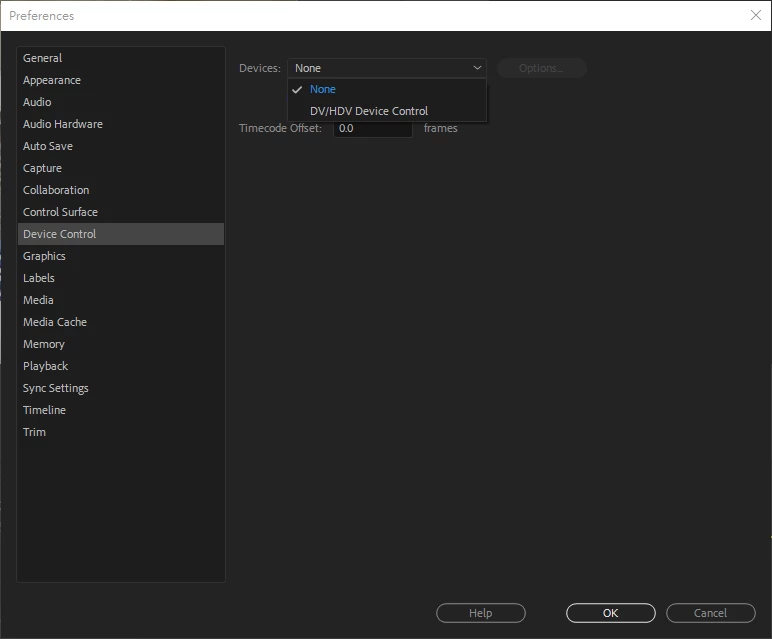
I solve it finally.  I change Preference -> Device Control from "DV/HDV Device Control" to "None" then everything went back to normal.

It looks like premiere is waiting for device response and put everything in halt.  It looks like a one time setting.  Once you change it, even new project will back to default "DV/HDV", the system still OK.

12 replies

Participating Frequently
July 30, 2023

It's August 2023, and I'm still having this exact same issue, with your fix being the correct action to take. Hey Adobe, Any chance you're going to.. y'know.... fix the thing someone did all the work for you on, and release a patch? Just curious.

Participant
April 29, 2023

Nearly FIVE YEARS later, and this issue persists... thank you @KCDN for posting this solution. Saved me so much frustration!

Participant
August 8, 2022

I make a lot of videos and had same exact issue for months. I just thought my computer was slow. So when I finally saw your solution I decided to create a video tutorial to help others fix clicking File menu freezing and taking too long  issue who are facing this. It can be really annoying!

Participant
September 1, 2021

Adobe Premiere Pro 2021 Version 15.4.1 (Build 6) here and this issue still exists. Luckily, I clicked on this article on my first search and it solved the issue.

RhynoG
Participant
November 5, 2021

Hmm, can't say I'm having the same success with 2022 version. 


I try changing that value to "none" and it won't hold the setting.  That laggy behavior still exists randomly.  Doesn't do it all the time, just every now and then.  New AMD 6700XT system with an AMD 5900 processor and 128 GB of ram, so it's not a resource issue. 


Any thoughts or insights appreciated. 


Cheers! 

Participant
August 9, 2021

Well chaulk another one up for SOLVED.  I have no idea how this setting chnaged, I never messed with it.

Adobe CC 2021

Thanks OP!

Ddub89
Participating Frequently
July 30, 2021

Thank you for solving this! I'm on Adobe CC 2021 having the same issue, and it was driving me NUTS. 

Michael Elmkjær Madsen
Known Participant
April 5, 2021

Adobe Premiere Pro 15.0.0 and this is STILL A PROBLEM. This fixes it but its clearly a bug a needs fixing -Come on Adobe! 

Awsam Life
Participant
February 20, 2021

Thanks so much for this. Just built a new editing rig and couldn't figure out why it was practically crashing EVERY time i clicked "File"

Participant
January 18, 2021

LIFESAVER, THANKS!!!!!!

Participant
November 20, 2020

THANK YOU!!! I've been searching for a solution to this problem for months...this worked immediately!