


Participant
January 6, 2018
Answered

Premiere Pro CC 2018 not exporting audio properly

  • January 6, 2018
  • 3 replies
  • 20067 views

I can not figure out what I'm doing wrong. When exporting video with multiple audio tracks Premiere seems to be dropping one audio track the and keeping other, then changing part way through. It's exports my music track (A2) but drops my natural sound (A1) for half the video, then exports everything for the second half. And my music sounds fine in Premiere then seems to be peaking when exported even though I have it at around -6db. I've included my current settings but sometimes I can export it properly and sometimes I can't. I've also uninstalled and re-installed Premiere, turned my computer off and back on again, the basics.
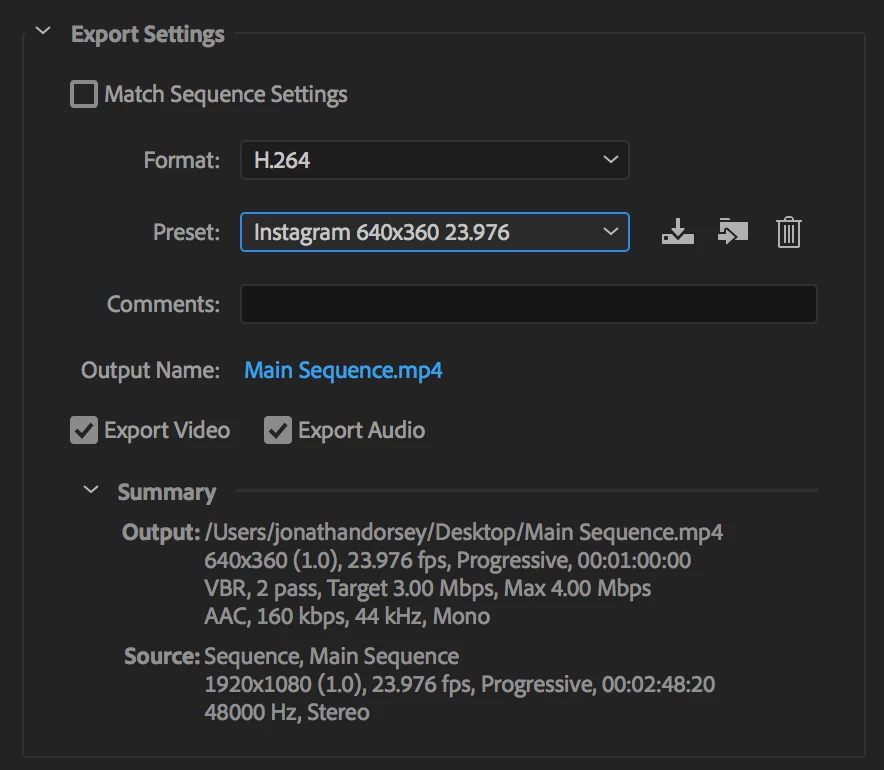
This topic has been closed for replies.
Correct answer excited_Genie16B8

Ok so I exported the video in stereo and that seemed to work. But when I airdropped it to my iPhone, I have the same missing audio problem when playing the video on the phone speaker. However when I plug in headphones I can hear the audio. So I'm really confused.

The video is of some woodworking (table saw, circular saws, etc) and it's sped up anywhere from 500% to 1000%. Could the audio be hitting a pitch/frequency that is just unreachable for some devices/speakers? That was my only guess as I'm far beyond my technical understanding.

This might be multiple issues and perhaps too complex to sort out here so I plan on calling Adobe tomorrow.


Audio Phase: Why You Need To Pay Attention To This - YouTube

3 replies

chrisg89166150
Participant
May 21, 2019

I don't understand how that is an answer. That video does not cover any Adobe Premier settings whatsoever. Some audio clips are randomly not exporting correctly. It has previously in other exports and now suddenly won't. What are the Adobe Premier Pro settings that need to be changed?

Participating Frequently
August 30, 2018

Hey Guys,

I have been having an audio export problem. I am shooting on a Panasonic GH5 at 29.376 fps with an external tascam 70d audio recorder.

As I edit my interviews for my client I am able to playback the audio in premiere pro, but when i export my file and try to post on Fb or IG I am left with this hissss sound all the way through instead of the talking head audio. Can someone please advise on this situation, this has been giving me hell for a week and half now. =|

I have tried multiple sequence settings as well as export settings, as well as running it through the media encoder. Things like this sometimes makes me want to switch back to final cut pro =(.

Are there any specific settings that you use that you think i should try.

Legend
August 30, 2018

How does the export sound when played back on your Reference system?

Legend
January 6, 2018

I'm not familiar with Instagram.  Is mono audio required?  What about 44kHz?  (That one's very odd.)

If not, export stereo.  If so, copy/paste everything into a new sequence with a Mono Master track at 44kHz.

Participant
January 7, 2018

Those were the settings I saw recommended for Instagram. I exported in stereo and it seems to have worked. Everything sounds good on my computer and phone so I'll see how Instagram likes it. Thanks!

I read about some others having trouble with exporting audio in Premiere 2018, and I had similar trouble with totally different settings on a project last week. Are there some known issues like this with 2018?

Legend
January 7, 2018

I don't have access to the full bug list, but I'm not aware of any known issues here.