
Participant
April 24, 2024
Answered

Premiere Pro Enhance Audio is adding audio artefacts to my clips

  • April 24, 2024
  • 14 replies
  • 6137 views

Dear Community - please help!


When I use Enhance Audio on my clips it adds audible 'gremlin' artefacts to the clip. They are not always visible on the waveform but here is an example where it is visible.


The first clip uses no enhancement, then I set it to 2, 4 and 7.
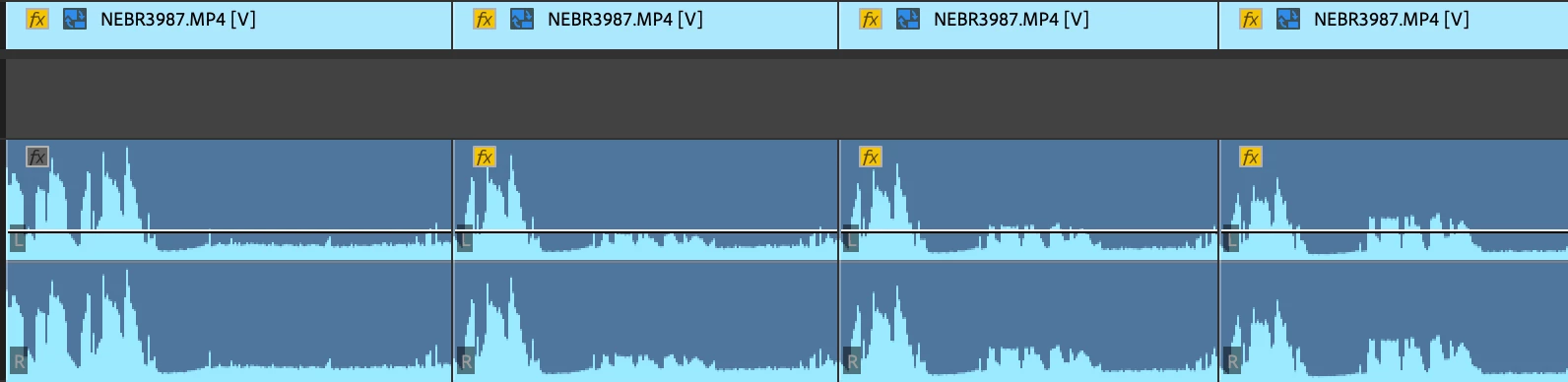


In this particular case, it would appear to be trying too hard to amplify/improve barely audible background noise or mic rustle as it gets worse the more I 'enhance' the audio. But this is the very opposite of what the effect should be doing, surely it should be squashing wind, rustles, noise?


This has also happened over spoken/ambient audio, and not affected the waveform - which is scary, as they are not always picked up in review!


This is happening over multiple Macs and always on the latest version of PP. The error is repeatable using completely fresh projects, sequences and clips. I have had to stop using Enhance Audio for fear of missing some of these glitches and them going live.


Here is the clip info:


Type: MPEG Movie

File Size: 6.49 GB

Image Size: 4096 x 2160

Frame Rate: 25.00

Source Audio Format: 48000 Hz - Compressed - Stereo

Project Audio Format: 48000 Hz - 32 bit floating point - Stereo

Total Duration: 00:05:47:02

Pixel Aspect Ratio: 1.0

Alpha: None

Color Space: Rec. 709

Color Space Override: Off

Input LUT: None

Video Codec Type: HEVC 10 bit 4:2:2


Audio:

Audio track 1 contains 1 type(s) of audio data: Audio data block #1: Format = 16 bit - Stereo Rate = 48000 Hz Compressor = sowt

Correct answer Graham Hutchins

Yep, add a fairly loose dynamics/autogate effect to the audio clip > render and replace > enable enhace speech seems to be working.

14 replies

Participant
October 16, 2025

I have experienced the same annoying problem, mostly at the end of audio clips.  I have *fixed* it by adding ambient audio under the end of the speech clip.  


L-Cut Productions
Participant
August 25, 2025

I'm having the same issue during silence. Luckily, it's a short video with a single person speaking. It didn't remove some room noise while the person was talking, but added an random, "hi!" during silence. Bizzare. I'm spending more time trying to get Enhance Speech to work as advertised than I would have spent manually cleaning up the audio.

Inspiring
March 12, 2025

Having the same issue now in PP 2025.1.0. Sent a 30min A-roll cut to client after adding the Enhance Speech tool, and client was like "wtf is this scary gremlin man talking at various points?" Embarrassing for me, and poor form from Adobe to include this as is in a production version of PP. 

@Kevin-Monahanany updates on this?

Kevin J. Monahan Jr.
Community Manager
Community Manager
March 13, 2025

Hey there, @Mattie P.,

I read about your issue. That's happened to me, too. It seems like certain environments seem to pick up artifacts where others do not. You might try running the clip through Adobe Podcast to see if you can get a better result. Let me know if it works.

Thanks,
Kevin


Kevin Monahan - Sr. Community and Engagement Strategist – Adobe Pro Video and Audio
Participant
March 13, 2025

Sad to hear this isn't fixed yet - I took am using the podcast tool.


Just yesterday Audio Enhance rescued a piece of audio that had wind noise and background all over it. Did an amazing job that I could never do manually on Audition - but then the gremlins appeared in 2 or 3 places that can't be removed 👹👾🧌


So frustrating 🙎 

Participating Frequently
February 6, 2025

Hopefully a new version of this with AI comes out, until then, I'm doing noise reduction in Adfobe Audition before I use the Premier Pro Audio Enhance, which reduces the amount. of artefacts.

Inspiring
October 26, 2024

Similar issue here with what is ostensibly silence in a pair of video chat recordings.  Weird aritfacting AI "hallucinations".  Maybe a noise gate would help?  Either with the raw audio exported with the noise gate applied or a setting in the enhance feature?

Graham HutchinsCorrect answer
Inspiring
October 26, 2024

Yep, add a fairly loose dynamics/autogate effect to the audio clip > render and replace > enable enhace speech seems to be working.

Participant
August 27, 2025

You just saved my audio, for real. Thank you so much, i've been stuck on this part of my project for hours. THANK YOU!

Participant
October 2, 2024

Hello,

Same issue.


Participant
June 21, 2024

Same problems here. It's still in beta, so I hope it will improve drastically soon. I have to go the traditional route for now and manually edit the audio.

dman3153
Participant
June 17, 2024

As much as I like the "Magic" of Enhanced Speech, let me join the chorus here and say "Great, but no cigar." Surely subsequent versions will be able to provide a slider/tool to control the threshold of those barely audible background voices that it currently insists on boosting. I undersatnd the corporate desire to get as much AI out as possible right now, but please get it better dialed in before pushing it to subscribers.

Kevin J. Monahan Jr.
Community Manager
Community Manager
June 5, 2024

Hello @Mr Nathan EB,

We haven't heard back from you for a while now. Are you still experiencing this issue? Please let us know. Please also provide any additional info you can so the team can reproduce the problem. See: How do I write a bug report?


I'll move your report into Discussions while we await your response.


Thanks,
Kevin

Kevin Monahan - Sr. Community and Engagement Strategist – Adobe Pro Video and Audio
Participant
July 12, 2024
  • Hi Kevin, yes, still experiencing it - thought I'd try again this week with a fresh project which consisted of spoken phrases with silence in-between. Enhance tool does not like silence! I'd supply that project to you again, but it was just like the example provided.
s.despins
Known Participant
May 17, 2024

Same boat, it's really annyoning - time consuming to review and catch the rouge pickups...

Adobe Premiere Pro | Version 24.3.0 (Build 59)