


Participant
April 10, 2025
Answered

Probleme mit mehreren Video Dateien

  • April 10, 2025
  • 5 replies
  • 259 views

Ich hab das Problem, sobald ich eine MP4 Datei mit Video und Ton in der Timeline habe, dass ich keine weiteren hinzufügen kann. Er erkennt diese dann immer als reine Audio. In der Vorschau geht es noch. Ich habe merhfach neue Projekte angelegt und das Programm neu gestartet ohne Erfolg. Hat jemand ähnliche Erfahrungen oder kennt eine Lösung für das Problem? 
Correct answer Dani_V.

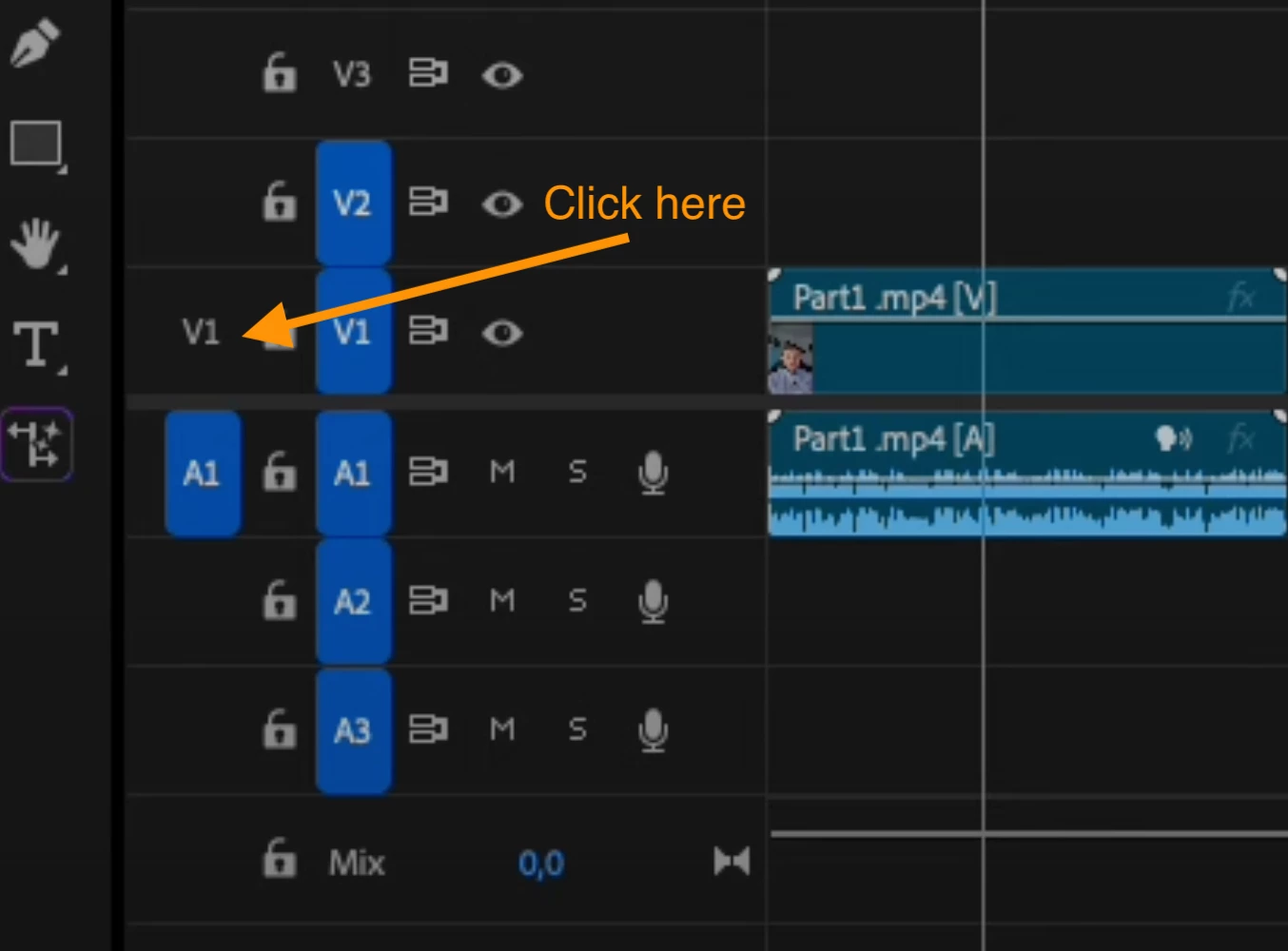
Thanks for the recording @lukpohl. It does seem like your source patching does not have V1 selected, if you click on the V1 on the left, it should turn blue and then your video will also be added into your timeline. Source patching controls where the audio and video from your source will be added into your timeline.


Here is an article that goes into more detail: Make precise edits using source patching and track targeting

5 replies

Community Manager
April 11, 2025

Glad that worked! @lukpohl 

lukpohlAuthor
Participant
April 11, 2025

Thanks, that solved my Problem! I felt a little bit stupid now but it´s oke 😄 

Dani_V.Community ManagerCorrect answer
Community Manager
April 11, 2025

Thanks for the recording @lukpohl. It does seem like your source patching does not have V1 selected, if you click on the V1 on the left, it should turn blue and then your video will also be added into your timeline. Source patching controls where the audio and video from your source will be added into your timeline.


Here is an article that goes into more detail: Make precise edits using source patching and track targeting

lukpohlAuthor
Participant
April 11, 2025

Hi I recorded my Problem, maybe you can notice my problem. 

Community Manager
April 10, 2025

Hi @lukpohl,


Sorry for the frustration. We need a few more details to try to help with the issue. Please see, How do I write a bug report?

Are the files you are trying to add also MP4s? Is it possible only your A1 track has its source patch highlighted (blue), and if so, are you able to highlight V1 as well?

Any screenshots or screen recordings of this happening could be very helpful.

Hope we can help you soon,

Dani