Participant
October 26, 2022
Frage

Problems with audio channels of MXF OP1a file in Premiere Pro 2023

  • October 26, 2022
  • 1 Antwort
  • 809 Ansichten

Problems with audio channels of MXF OP1a file in Premiere Pro 2023. When I export video with 4 channels of mono audio in an MXF OP1a file with Loudness Normalization effect, EBU R128 in 4 channels of mono or stereo audio, channels 2 and 4 are getting muted. I've done several tests and they don't work. When I do the same export in Premiere Pro 2022 version this problem does not happen. I'm using Premiere Pro 2022 and 2023 on Windows 10 operating system version 21H2, i7 9700KF 3.6GHZ processor, NVidia GTX1660 6gb DDR5 video card. Can someone help me?
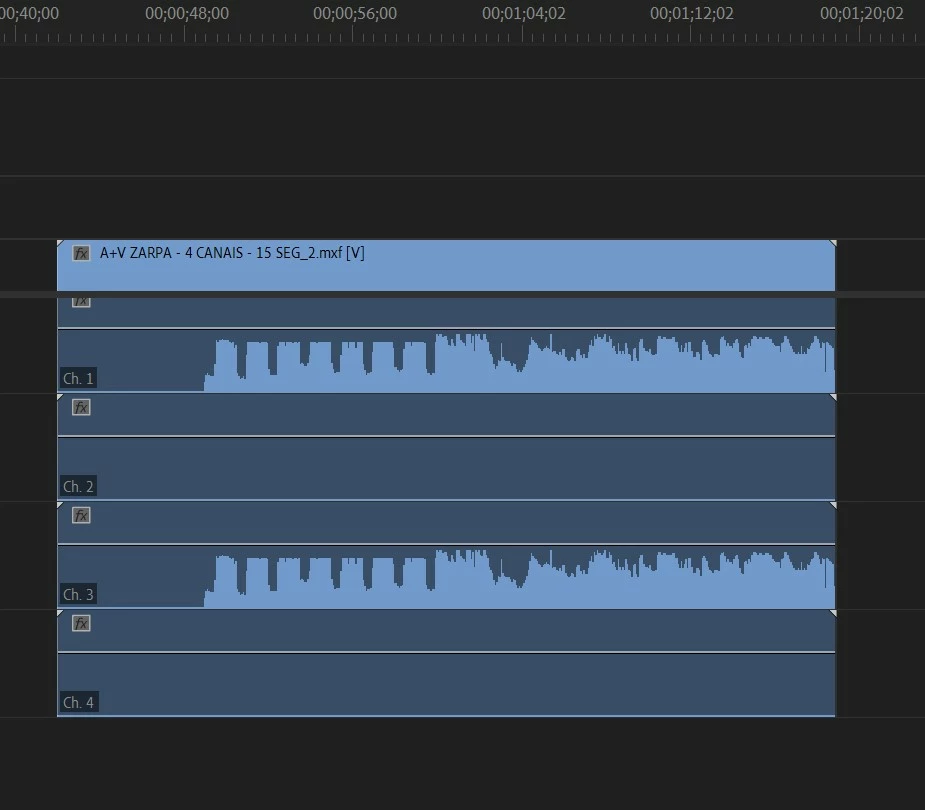
Dieses Thema wurde für Antworten geschlossen.

1 Antwort

Kevin J. Monahan Jr.
Community Manager
Community Manager
October 31, 2022

Hi Luiz,

Does this problem sound like the one you are experiencing? https://community.adobe.com/t5/premiere-pro-discussions/v23-0-now-playback-in-source-window-only-outputs-every-2nd-audio-channel/m-p/13299769


Let me know, and if so, I'll merge your thread with that one. I hope we can get this fixed soon.


Thanks,
Kevin

Kevin Monahan - Sr. Community and Engagement Strategist – Adobe Pro Video and Audio
Participant
November 1, 2022
Yes, it seems to me the same problem, the difference is that I am exporting in 4 channels. The problem happens when I use Loudness Normalization turned on and set to EBU R128, the resulting MXF file is muted on channels 2 and 4.


Ouvir
 
content_copy


share
 
 
Participating Frequently
November 20, 2022
Are there any suggestions for a solution?
I have the same problems.