AndrewTheGreat
Known Participant
March 6, 2024
Question

Render and replace feature does not work with vertical sequences

  • March 6, 2024
  • 5 replies
  • 646 views

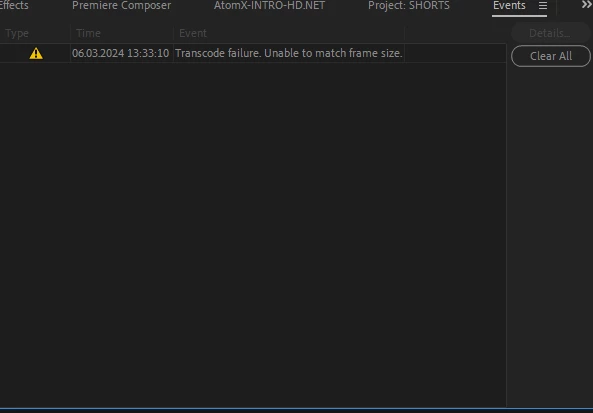
Hi, this may be a bug or a limitation of some sort but it really needs to be fixed. This is what I always get when I try to Render and replace a footage within a vertical sequence. 
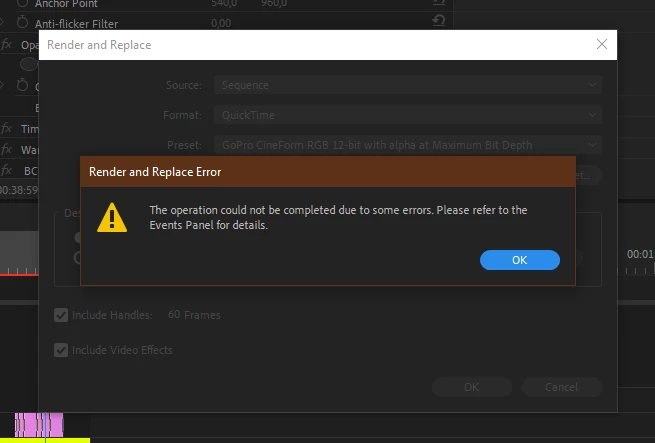
 

My footage here is horisontal and I'm trying to make it a vertical video for TikTok. As I understand Premiere Pro cannot render a horisontal video if it's used in a vertical sequence and this wouldn't have been a problem if Premiere Pro could Render and replace Nests but it can't either. So is there a solution or may it be fixed in the upcoming updates?

5 replies

AndrewTheGreat
Known Participant
July 20, 2024

Hi, @Kevin-Monahan Seems I cannot reproduce the issue in 24.5

Community Manager
July 23, 2024

Hi Andrew,

We've reported this to our product team to get it checked. We will keep you updated.
Thanks for your patience.

Sumeet

Kevin-Monahan
Community Manager
Community Manager
July 19, 2024

Hello Andrew,

Thanks for the bug report. Can you provide the team with more info? See, How do I write a bug report?


I hope the team can help you soon.


Thanks,
Kevin

Kevin Monahan - Sr. Community and Engagement Strategist – Adobe Pro Video and Audio
AndrewTheGreat
Known Participant
July 19, 2024

None of the formats works

Participant
July 19, 2024

Same problem, needs to get fixed asap

Community Manager
July 19, 2024

Hi everyone,


Sorry about the poor experience. We will get it checked. For Render & Replace, have you tried QuickTime Format with Apple ProRes 422 preset to check if it's working properly?


Thanks,

Sumeet

Participant
May 1, 2024

Same problem here, that's so weird