
gavinj85101077
Participant
March 2, 2022
Question

Render Error - Glitchy Product

  • March 2, 2022
  • 2 replies
  • 256 views

Hi,


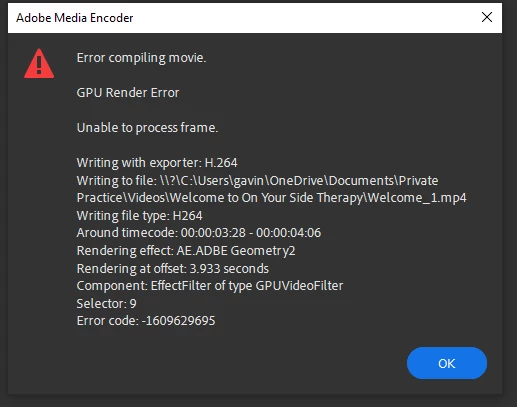
I'm getting a error message that doesn't tell me how to correct the issue. See the screen shot below.


I'm also struggling with projects not sharing between desktop & mobile, but I've just accepted that this just doesn't work.  (mobile (android) app says there's no internet connect, when there is).

Also, I start a new project in the desktop (windows 10) and the video preview is all black. This seems to be a know issue and I need to sync all of the files on to the creative cloud. 


It all feels very clunky for a product designed to be quick. But that's not my burning issue.


Can one explain how I get around this export issue?


Thanks

Gavin


This topic has been closed for replies.

2 replies

Peru Bob
Community Expert
Community Expert
March 2, 2022

Also,

  • GPU render error: the GPU you have installed cannot perform the GPU accelerated processes you applied


Try turning off Hardware encoding in the Video tab of the export settings.


See here:

https://community.adobe.com/t5/premiere-pro-discussions/faq-fix-error-compiling-movie-errors-in-premiere-pro/td-p/12757295


gavinj85101077
Participant
March 3, 2022

Hi,


I've tred this too.  Doesn't work. I've watched the video too, changed various aspects of the video.  Still giving me an error.


Life's too short to waste time on this issue.  It's a 1 minute video.  I'm going to try OpenShot instead.


Thanks for trying to help.


Gavin

Ann Bens
Community Expert
Community Expert
March 2, 2022

Try using local driver instead of one drive.

gavinj85101077
Participant
March 3, 2022

Hi Ann, 


That didn't make any difference.


Gavin