



andyR10
Known Participant
January 17, 2025
Answered

sequence within sequence

  • January 17, 2025
  • 2 replies
  • 367 views

For years I have been mixing my music layers in a sequence and then dropping that sequence into my main project sequence. It would show up in the timeline as an audio layer with the name of the sequence. From there I could keyframe levels for mixed music track.


Yesterday when I tried to drag a mixed music sequence into the main project, Premiere would separate out the individual layers within the mix (Bass Guiitar, Percussion, or whatever). I can't figure out how to get it to show up as just the mixed sequence. 


This is a step backwards for me in terms of the functionality of the app. But maybe someone can suggest a workaround?

Correct answer jamieclarke

Hi @andyR10 -  Thanks for submitting your bug report. We need a few more details to try to help with the issue.
Please see, How do I write a bug report?


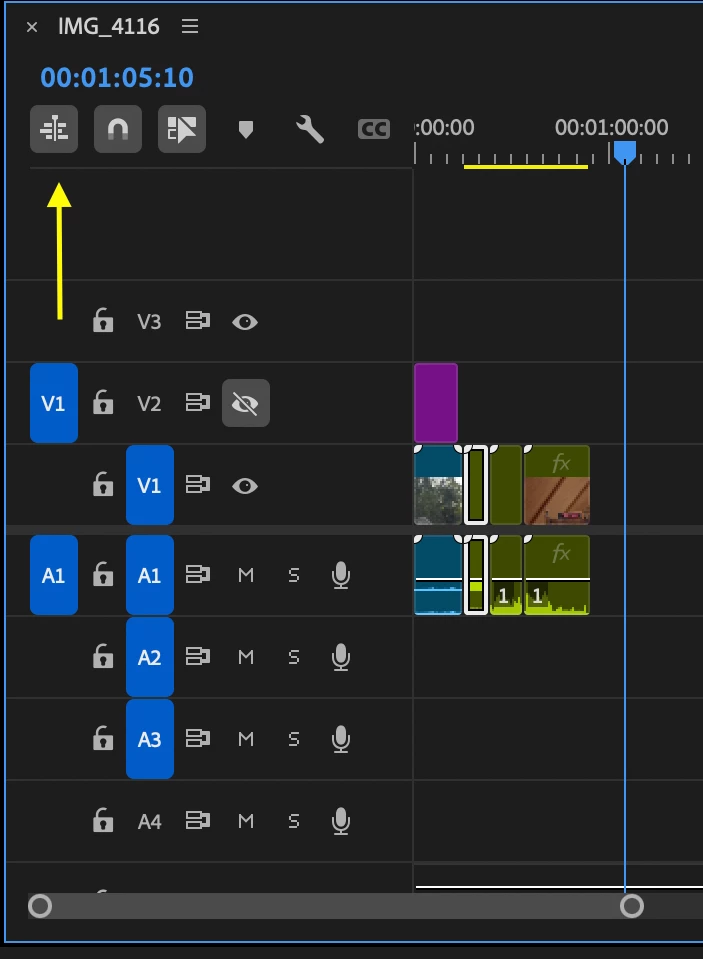
I believe you have the setting "Insert and Overwrite sequences as nests or individual clips" unchecked.  Please see the reference image attached and let us know if that helps your issue.

2 replies

andyR10
andyR10Author
Known Participant
January 17, 2025

OK, I feel stupid. That fixed it. Is that a new setting? Anyway, thanks for your help.

Ann Bens
Community Expert
Community Expert
January 17, 2025
quote

 Is that a new setting?


By @andyR10


Yes, and very confusing.

jamieclarke
Community Manager
jamieclarkeCommunity ManagerCorrect answer
Community Manager
January 17, 2025

Hi @andyR10 -  Thanks for submitting your bug report. We need a few more details to try to help with the issue.
Please see, How do I write a bug report?


I believe you have the setting "Insert and Overwrite sequences as nests or individual clips" unchecked.  Please see the reference image attached and let us know if that helps your issue.