

"Software Only" stuck on encode settings panel.... Premiere Pro CC 2018 latest update
Hi
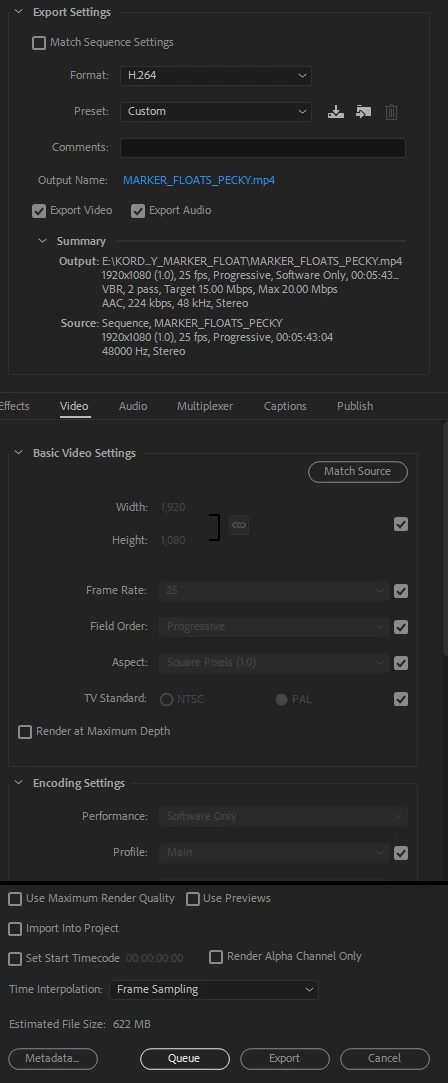
I am currently experiencing another strange bug since running the update to the latest version of PPCC2018. When I go to encode within Premiere I get "Software only" displayed in the summary area and the encoding settings within this panel are greyed out, as can be seen in the attached image. The encode was taking forever so I stopped it and went and checked and CUDA GPU acceleration had been changed to software only in the Project Settings, which I didn't do myself. I changed this back Mercury GPU Playback and the encode went a lot faster, as fast as I would expect when using GPU.
Now my problem is, whatever project I open I get "Software only" displayed in the summary, even though CUDA is enabled in both PP as well as Media Encoder. The project encodes SEEM to be going at GPU speeds but whatever I do the software only message remains. I have noticed that if I change the codec from H264 to MPEG2 for example, the software only message disappears. I am not now 100% sure if my CUDA acceleration is working correctly as the software only message is on every project I open and go to encode within Premiere. If I select to Queue the encode and use Media Encoder, the drop down menu at the bottom of the encode list says CUDA.
Has anyone else been experiencing this?
I have so far:
1. Re-installed PP CC 2018 latest update
2. Installed latest graphics cards drivers as a clean install
3. Tried opening a new project, saving that as CUDA enabled
But nothing has fixed this...
My setup:
Windows 7 Professional x64
Nvidia Quadro K5200
PP CC 2018 fully up to date
Any advice greatly appreciated!


 AdChoices