
Premiopolis
Inspiring
October 13, 2017
Question

Source side track-specific Audio muting and soloing

  • October 13, 2017
  • 3 replies
  • 3504 views

In posts going back to at least 2015 there seems to be an ongoing longing for convenient source-side muting.

For instance

https://forums.adobe.com/message/7106236#7106236 (2015-01-18)

https://forums.adobe.com/message/8372216#8372216 (2016-01-09)

https://forums.adobe.com/message/4282037#4282037 (2012-03-22)

https://forums.adobe.com/message/6281422#6281422 (2017-05-25)

https://forums.adobe.com/message/9861565#9861565 (2017-10-02)

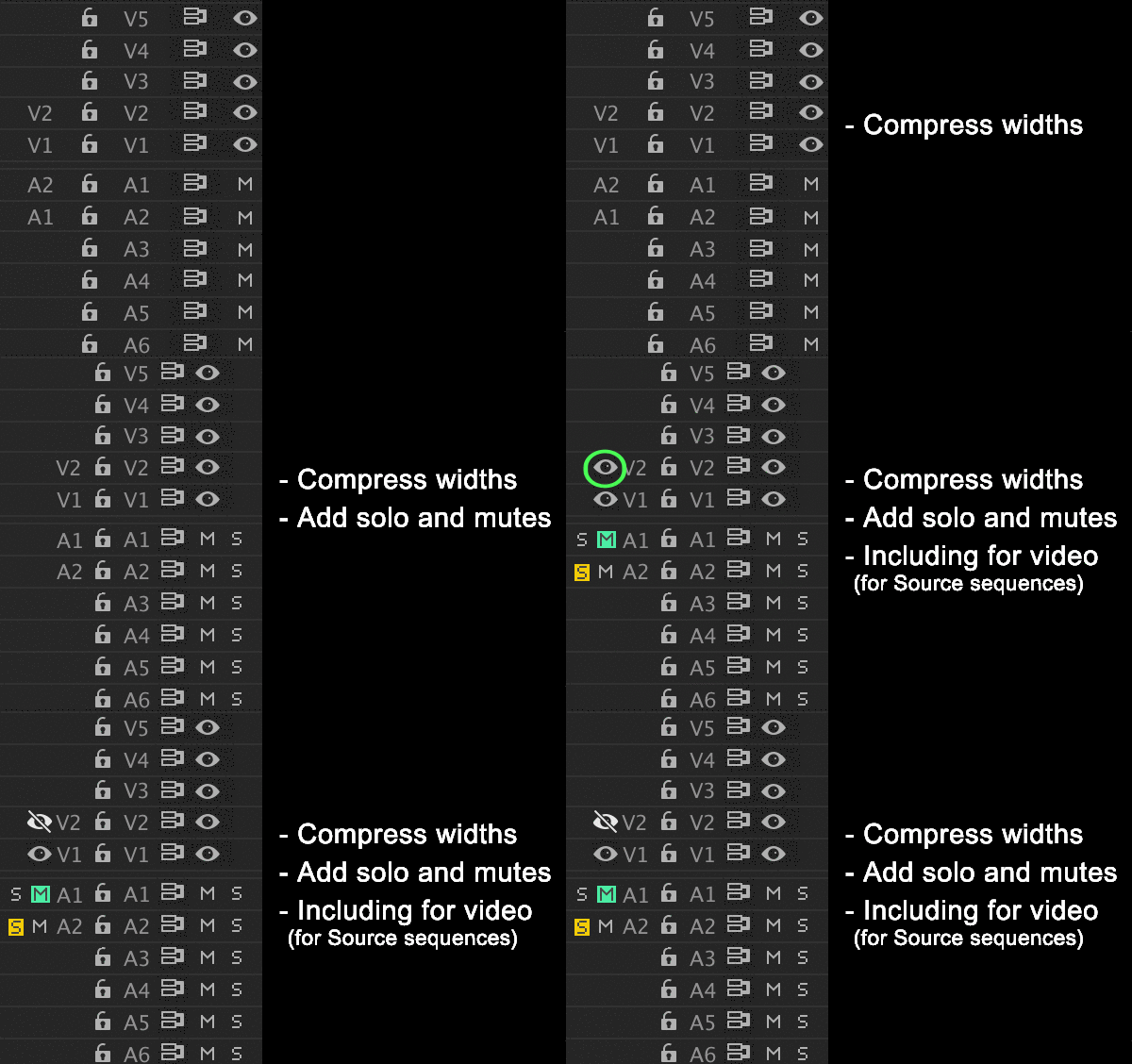
Taking this to the Timeline Panel would make it even more powerful, convenient and efficient, basically giving the same "S", "M" and Video muting buttons to Source-side tracks.

Since that would considerably widen the track control area of the timeline, a little column-tightening wouldn't hurt either.

Posting at http://www.adobe.com/products/wishform.html

How would you like the feature to work?

Add the same Audio "Solo", "Mute" buttons, as well as the video muting to source-side tracks of the Timeline Panel

Why is this feature important to you?

The ability to monitor, sample, isolate -- basically know what's going on in a source clip  or sequence is an big efficiency/power boost when editing.

Simple concept illustration below...
This topic has been closed for replies.

3 replies

Legend
October 16, 2017

We already have Solo buttons on the Audio Meters which function on either timeline or Source Monitor, whichever is active, so I think below would be the best solution here.


Legend
October 15, 2017

This would be useful... although be good to be able to hide elements of the UI if not needed.

Avid have the solo and mute buttons stacked (plus you Command+Click on Video monitor to solo that)

jimc16072663
Participant
May 23, 2022

Yes. This. Please.


Legend
October 14, 2017

I think this FR would be the wrong way to go about fulfilling this request.  The Patch bay determines Insert and overwrite behavior.  Adding this functionality there doesn't seem logical.  Further, is there really a need to turn off the video in the Source Monitor?  Even if someone does want that, we can already achieve it by switching to waveform view.

A volume slider under the Source and Program Monitors would probably be the best solution.  This allows full and independent control over the volume from clips and sequences separate from the System volume.

Premiopolis
Inspiring
October 14, 2017

Jim_Simon  wrote

The Patch bay determines Insert and overwrite behavior.  Adding this functionality there doesn't seem logical.

It's already there -- Program/Record side.  So this feature request would merely be adding the same functionality source side.

The logic of it.

Production hired the sound crew equivalent of the muppet Animal to record sound, meaning from shot to shot the track dedications change: Character A Lav on mix track 2, then 5, then 1, then 8, from clip to clip.  Character B Lav dedications are equally predictable, etc etc boom mic.  No track dedication log arrives, or when it does it's either illegible or inaccurate.  So hire sound crew?  Good luck with that.  Track dedication bedlam is increasingly the norm, and shoulder shrugs pass as a skill set on a resume.

Bottom line: the main reasons for soloing/muting Source is to know what the heck is assigned where.  Why cut 8 tracks of sound into a timeline just because solos and mutes are Record side only?

Further, is there really a need to turn off the video in the Source Monitor?  Even if someone does want that, we can already achieve it by switching to waveform view.

It's less about not wanting to see picture playing in the monitor than, again, knowing what's playing on which track.  Admittedly, this is a less-critical feature -- it's less common to source from a sequence in the source monitor with a tower of picture tracks -- but it does happen, and it's convenient to have the  feature.  Taking the cue here from Avid which rather cleverly embeds 2 features in one -- allowing you to either choose the top track of the compositing order OR  solo a picture track which, like sound isolates it entirely.

Inspiring
October 14, 2017

I agree with Jim_Simon.  IMHO the audio monitoring/track visibility controls in the time line should be pertinent to the timeline only - and adding monitoring controls for the source monitor there seems illogical.

Monitoring controls are not the same thing as patching and targeting controls which are pertinent to the timeline.

Since the most frequent complaint posted about this seems to be editors wanting to mute the source monitor when scrolling through the clip, I would be in favor of muting controls being placed in the Source Monitor itself.

The level of complication of the mute buttons could be as simple as a single Master mute button, or an individual Mute button for every audio track the source clip carries.

MtD