
Participant
April 2, 2024
Answered

Speed-Duration - cannot lock percentage

  • April 2, 2024
  • 15 replies
  • 1304 views

Hello, I want to report an error I encountered after installing 24.3.

When we right-click on an image in the Timeline and open the Clip Speed/Duration menu, we cannot lock the % symbol and open it yet. By locking this, we could automatically cut the clips at a certain time. We can't do it now and I have tons of videos I need to use urgently


.
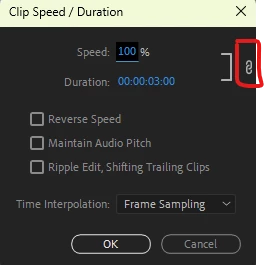
 

Mod note: Title changed. Moved to bugs.

This topic has been closed for replies.
Correct answer Trent Happel

This should now be resolved in 24.4, which just shipped.

15 replies

Trent HappelCorrect answer
Participating Frequently
May 16, 2024

This should now be resolved in 24.4, which just shipped.

Known Participant
May 6, 2024

Thanks, Nana - this works!

Participating Frequently
April 14, 2024

i think they misplaced the icons. i just tried on windows computer, just click on the " ] " icon rather than the chain icon. it's not going to show if you have enabled it or not, but just change either of the setting and it will work accordingly


spennyb123
Participant
April 11, 2024

Did you find an alternative way to unlink Speed & duration?

Participating Frequently
April 11, 2024

Project panel and Source Monitor should now be fixed with 24.5 beta build 003.

Participant
April 9, 2024

Same here unlink is in the wrong place

Participating Frequently
April 9, 2024

Note: There is still an issue with Speed/Duration initiated from the Project panel and Source Monitor. This should hopefully be addressed soon.

Participating Frequently
April 8, 2024

If you would like to verify, the fix is in 24.4 beta build 038+. The beta version is separate from the shipping version, so there shouldn't be any conflict between versions. We hope to ship this fix as soon as possible.

Participant
April 7, 2024

i have the same exact bug  

Participant
April 7, 2024

i have the same exact bug  please fix thank you