
Inspiring
October 24, 2024
Answered

Start Probleme mit Adobe Premiere Pro 2024

  • October 24, 2024
  • 15 replies
  • 891 views

Hallo zusammen,

Ich hoffe, mir kann jemand helfen, denn ich weiß es nicht mehr woran es liegen könnte. eine komplette neu Installation von Adobe Premiere Pro 2024 hat nicht geholfen.
Dieses Problem tritt auch nur an meinem Rechner auf. Am Laptop funktioniert es.

Wenn ich das Programm öffne, bekomme ich mehrere Fehlermeldungen:
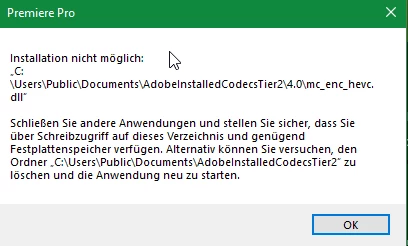
Ich habe dem Ordner, der auch leer ist manuell alle Rechte gegeben und der Ordner ist nicht schreibgeschützt. Die Löschung des Ordners hat ebenfalls nichts gebracht.
Wenn ich auf "Ok" klicke, kommt sofort folgende Meldung:
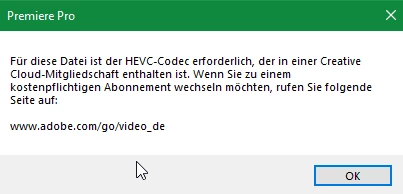
Wenn ich zu dem Link gehe, komme ich auf eine 404 Seite...

Wenn ich beide Meldungen weg geklickt habe, habe ich teilweise große schwierigkeiten Videos im Schnittprogramm abzuspielen. Ich hoffe, mir kann jemand helfen!
Ich nnutze Windows 10 64Bit neuste Updates sind auch Installiert.

Gruß,
Florian


This topic has been closed for replies.
Correct answer PlerTanix

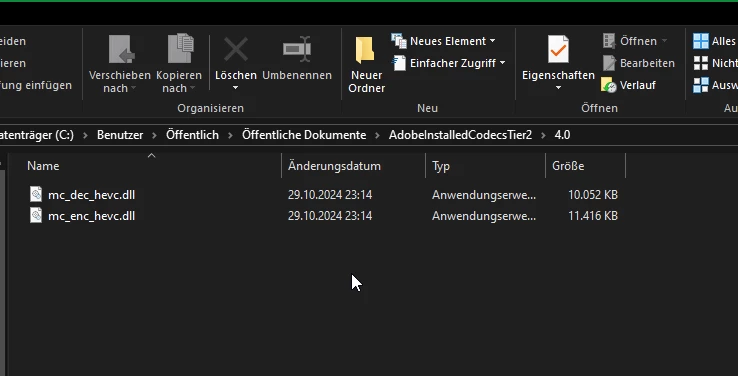
Problem is solved. I used the remote support from Adobe. They told me to create a new user so that the following files are regenerated:


15 replies

PlerTanixAuthorCorrect answer
Inspiring
October 29, 2024

Problem is solved. I used the remote support from Adobe. They told me to create a new user so that the following files are regenerated:


jamieclarke
Community Manager
Community Manager
October 30, 2024

Hi @PlerTanix - Thats great to hear, I'm glad support was able to help you!

PlerTanixAuthor
Inspiring
October 29, 2024

Hello,
I have the latest Creative Cloud app (6.4.0.361). From there I logged in and then installed Adobe Premiere Pro 2025.

jamieclarke
Community Manager
Community Manager
October 29, 2024

Hi @PlerTanix - Can you walk me through the exact steps you took to install Premiere Pro starting with the browser you used to download Creative Cloud Desktop app?  Which version of creative cloud desktop app are you using?

PlerTanixAuthor
Inspiring
October 28, 2024

Hello,
I have tried a new user, but this has not helped either.

jamieclarke
Community Manager
Community Manager
October 28, 2024

Hi @PlerTanix - Can you try creating a new user and seeing if that helps.

PlerTanixAuthor
Inspiring
October 28, 2024

Not working. I See the same error 😞

jamieclarke
Community Manager
Community Manager
October 28, 2024

Hi @PlerTanix - Can you try going to C:\Program Files\Adobe\Adobe Premiere Pro 2025 and right click on Adobe Premiere Pro 2025 app and select "Run as administrator"

PlerTanixAuthor
Inspiring
October 25, 2024

Hello,
No. I have the purchased version or I have an Adobe subscription, which includes Premiere Pro. A new installation of Adobe Premiere Pro did not help. I currently have the latest version of Adobe installed.

jamieclarke
Community Manager
Community Manager
October 24, 2024

Hi @PlerTanix -  are you on a trial?  Can you try reinstalling?  Have you tried 25.1 the beta?

PlerTanixAuthor
Inspiring
October 24, 2024

I have applied this to all folders, but without success....