


Participant
August 17, 2020
Answered

System compatibility report: Unsupported Video Driver Intel HD graphics 520 [PP 2020] [Windows 10]

  • August 17, 2020
  • 3 replies
  • 12532 views


Hi All


I just got Premiere Pro 2020 but when I launch it it says that intel hd 520 graphics are not supported.
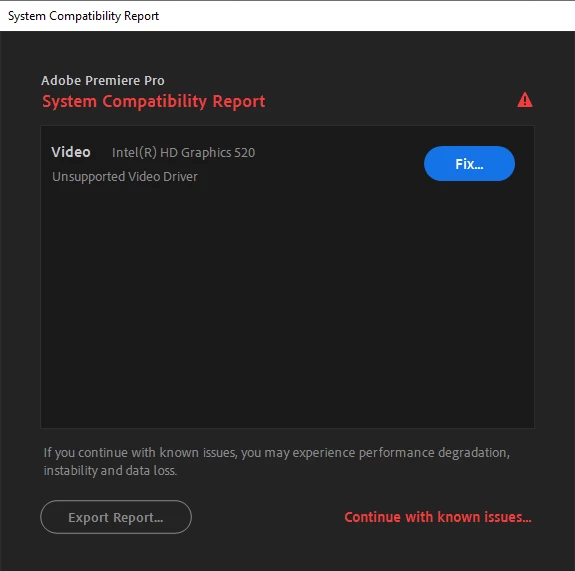


                                                        I updated that my drivers too but it still shows this error.

                                                        I have another graphic card NVIDIA GeForce 940 MX..

                                                       which i think is compatible for Premiere pro.

                                                       maybe premiere pro is using intel graphic card instead of nvidia


               can you guyzz help me plzz...


System specs:


12 GB DDR4 RAM

Intel i7 6500U

Nvidia GeForce 940MX

Premier Pro 2020 version 14.3.0 (BUILD 38)

  

Correct answer John T Smith

Do not count on Windows to be fully up to date when it comes to device drivers
Go to the vendor site to be sure you have an updated driver for your graphic adapter
Also check (copied link) https://www.tomshardware.com/reviews/gpu-hierarchy,4388.html
.
nVidia Driver Downloads https://www.nvidia.com/Download/index.aspx?lang=en-us
-for all Adobe programs use the STUDIO driver, not the GAMING driver
-To achieve the highest level of reliability, Studio Drivers undergo extensive
-testing against multi-app creator workflows and multiple revisions of the top
-creative applications from Adobe to Autodesk and beyond
.
If you have a laptop you MAY also need to check for a laptop specific nVidia driver
-SOME laptops require an approved driver from the laptop company, not nVidia
.
AMD/ATI Driver https://www.amd.com/en/support
.
Intel https://downloadcenter.intel.com/product/211969/Intel-HD-Graphics-Family
https://www.askwoody.com/newsletter/free-edition-working-with-the-intel-driver-support-assistant/
.
ALSO... this 'not up to date' driver was for sound, not video
https://community.adobe.com/t5/premiere-elements-discussions/premiere-elements-2021-crashes-windows-11/m-p/15227609

3 replies

Participant
March 30, 2025

what can i do 

John T Smith
Community Expert
John T SmithCommunity ExpertCorrect answer
Community Expert
March 30, 2025

Do not count on Windows to be fully up to date when it comes to device drivers
Go to the vendor site to be sure you have an updated driver for your graphic adapter
Also check (copied link) https://www.tomshardware.com/reviews/gpu-hierarchy,4388.html
.
nVidia Driver Downloads https://www.nvidia.com/Download/index.aspx?lang=en-us
-for all Adobe programs use the STUDIO driver, not the GAMING driver
-To achieve the highest level of reliability, Studio Drivers undergo extensive
-testing against multi-app creator workflows and multiple revisions of the top
-creative applications from Adobe to Autodesk and beyond
.
If you have a laptop you MAY also need to check for a laptop specific nVidia driver
-SOME laptops require an approved driver from the laptop company, not nVidia
.
AMD/ATI Driver https://www.amd.com/en/support
.
Intel https://downloadcenter.intel.com/product/211969/Intel-HD-Graphics-Family
https://www.askwoody.com/newsletter/free-edition-working-with-the-intel-driver-support-assistant/
.
ALSO... this 'not up to date' driver was for sound, not video
https://community.adobe.com/t5/premiere-elements-discussions/premiere-elements-2021-crashes-windows-11/m-p/15227609

Participant
November 2, 2020

I had the same problem. I have a Surface Book. I installed the latest Nvidia GeForce 940M drivers and it solved the problem.  It looks like Microsoft default does not install the preferred driver, but once I found the driver on the site have not had problems.

nishu_kush
Community Manager
Community Manager
August 18, 2020

Hi Sugandha,


Thanks for reaching out.

Please check out the following article for more information on System Compatibility Report and instruction to update GPU driver: https://community.adobe.com/t5/after-effects/faq-what-is-system-compatibility-report-in-after-effects-and-premiere-pro/td-p/11200108?page=1

Let us know how it goes.


Thanks,

Nishu

Known Participant
October 22, 2020

same here. it happened after new update 14.5

its weird becuase it was working after update then after few hours it crashed leaving me with that message after reopening PP.