Participating Frequently
December 15, 2016
Question

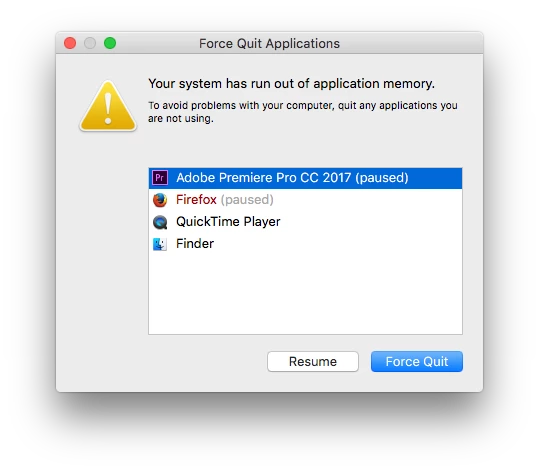
System has run out of application memory Premire Pro CC 2017

  • December 15, 2016
  • 6 replies
  • 8341 views

Hi,

I am running to this problem

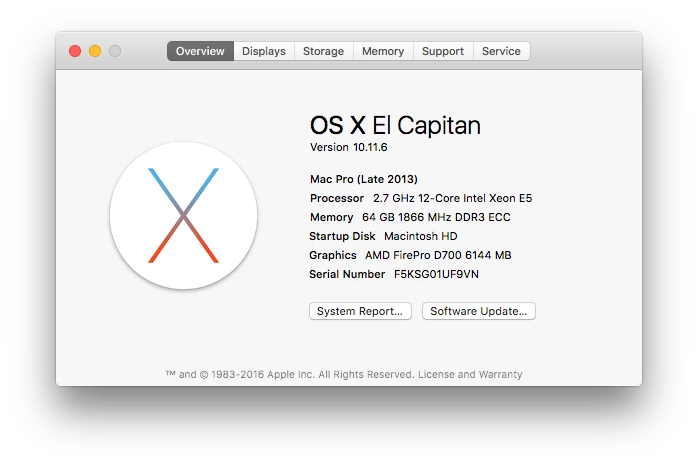
I have 64 GB of memory.
Please Help

    This topic has been closed for replies.

    6 replies

    elements_shane
    Participant
    August 29, 2017

    I found a solution that worked for my project and it's the OPPOSITE of what you would think.  Apparently some effects render OUTSIDE of the allotted memory given to Adobe products.  Once I gave more Ram to "RAM reserved for other applications" then my rendering out to H.264 worked.

    Originally: Adobe 25GB, Other apps 7GB  (Memory would MAX out and crashed Adobe when I had effects on)

    Solution: Adobe 12GB, Other apps 20GB  (Rendered efficiently while still leaving 3GB of Memory free for Windows)

    Bottom Line: It sounds like the memory you set for Adobe apps is primarily used for the creating/editing, but for rendering, some effects uses memory outside Adobe's allotted memory, THUS you need to keep enough memory available for those effects when rendering.  If there is not enough memory those effects, they max out the system and crash your render.

    If this solution works in other projects, let us know! katejones1015Kevin-Monahanagbanksjwarren

    Hardware:

    Intel i7 6700K

    32GB RAM

    GTX 1080

    Inspiring
    August 29, 2017

    Thanks. I'm running windows and have not faced this EXACT scenario, but some very similar ones. I'll now reduce Adobe PPro memory next time I'm having trouble, and see what happens. Certainly a new thing to try.

    rebeccak_camco
    Participant
    May 2, 2017

    I'm having the same problem! I updated to Sierra 10.12.4 the other day, I have Premiere CC 2017.1, 32GB of RAM and the past couple days, whenever Premiere and After Effects are running at the same time, the RAM goes way down and everything freezes up and gives me that message. I edit for a living, so I need to be able to do my job. What's the fix?

    Participant
    January 16, 2017

    I have received this error three times in the past day. The project has simply been generating peak files (for hours) and eventually freezes my whole system.

    I am running a MacPro 10.10.5

    3.1 GHz 16 core Xeon

    64GB Ram 2133

    980 ti 6GB (x3)

    My project runs off of its own 6TB HDD, with 2TB of free space.

    Footage is mainly MXF from the Sony F55.

    I did not get these freezes with these project files until updating to 2017.

    I don't get the opportunity to send in crash reports because the whole system locks up and I am forced to crash the computer.

    Thanks for any help.

    JJ

    Kevin J. Monahan Jr.
    Legend
    February 7, 2017

    Hey JJ,

    I had a similar issue today on my own project. Let me see if I can reproduce the bug. Thanks for reporting.

    Regards,
    Kevin

    Kevin Monahan - Sr. Community and Engagement Strategist – Adobe Pro Video and Audio
    Participating Frequently
    March 30, 2017

    HI Kevin. Any progress on this thread? I've been getting "system has run out of application memory" since the last Premiere Pro CC (2017) update; never seen it before. 24GB RAM, 8GB reserved for other apps.

    This is on a 3.4GHz i7 iMac 27in (Mid-2011), OS X 10.12.4. Timeline has two video tracks, one nested with an adjustment layer for colour corrections, plus an adjustment layer in the timeline, and two audio tracks with some fx. I have a couple of common plug-ins installed (no recent changes) but none applied in this project. Out of memory error always appears the same way when it happens, which is every 15 minutes or so: after moving playhead, then hitting spacebar to restart playback, nothing at all happens for a few seconds, UI responds to some input (including Cmd+S, yay) but nothing will play and no changes to panels take effect, then the alert pops up. Shutting down other apps never enables Premiere to resume.

    Thanks very much for your help.

    Adam

    UrbanToledoGang
    Inspiring
    December 16, 2016

    Check the memory portion of Preferences.

    In there you'll see how much ram is reserved for other applications. The lower the number, the more ram is taken up by premiere. This spreads across all Adobe applications that are currently running. You can see in my settings, 6GB of ram are reserved for all non-adobe programs, leaving 18GB for Premiere and Encoder.

    Rameez_Khan
    Legend
    December 16, 2016

    Thanks for your input, UrbanToledoGang.

    Much appreciated!

    Rameez

    Inspiring
    December 15, 2016

    I'm using PPro in Win10 also with 64GB RAM. Windows is telling me (repeatedly under many circumstances) that PPro is not responding. I wonder if OSX is being a bit more verbose about the situation telling you the system has run out of application memory while not telling me.

    Is there an indication anywhere how much memory your PPro is consuming as it freezes? Because for me it never remotely approaches the 60GB I've dedicated to Adobe products.

    I'm running the very latest build of 2017. (Checking every day for updates.)

    MarufNAuthor
    Participating Frequently
    December 15, 2016

    Gordon,

    My Premiere Pro uses up 58-60GB of memory according to my Activity Monitor.

    Maruf

    Kevin J. Monahan Jr.
    Legend
    December 16, 2016

    What kind of footage, Maruf?

    Thanks,
    Kevin

    Kevin Monahan - Sr. Community and Engagement Strategist – Adobe Pro Video and Audio
    Rameez_Khan
    Legend
    December 15, 2016

    Hi marufn,

    Thanks for the screenshots!

    What's the version of Premiere Pro CC 2017 that you're using, precisely? FAQ: How to find the exact version of Premiere Pro you're using?

    Premiere Pro CC 2017 fixed memory leak issues. I'd be interested to know what's going on here.

    Thanks,

    Rameez

    MarufNAuthor
    Participating Frequently
    December 15, 2016

    Hi Rameez,

    I am using Premiere Pro CC 2017.0.1