
Participant
July 1, 2025
Question

Text teleporting to corner during playback.

  • July 1, 2025
  • 2 replies
  • 124 views

Hi there, I'm pretty new to Adobe premiere pro and was trying to make an edit. I have a few different effects on my video right now, and during one of my shots, when i'm on a still frame the text sits in the middle how it's supposed to. However, when i look at the video in playback, it changes size, and teleports to my upper left corner. I used a youtube tutorial on how to add transparent inverted text to my shot, but i think my bug has something to do with the track matte key effect. I am kinda lost here and was wondering if there was any advice on how to fix this. Thanks in advance for any tips. 
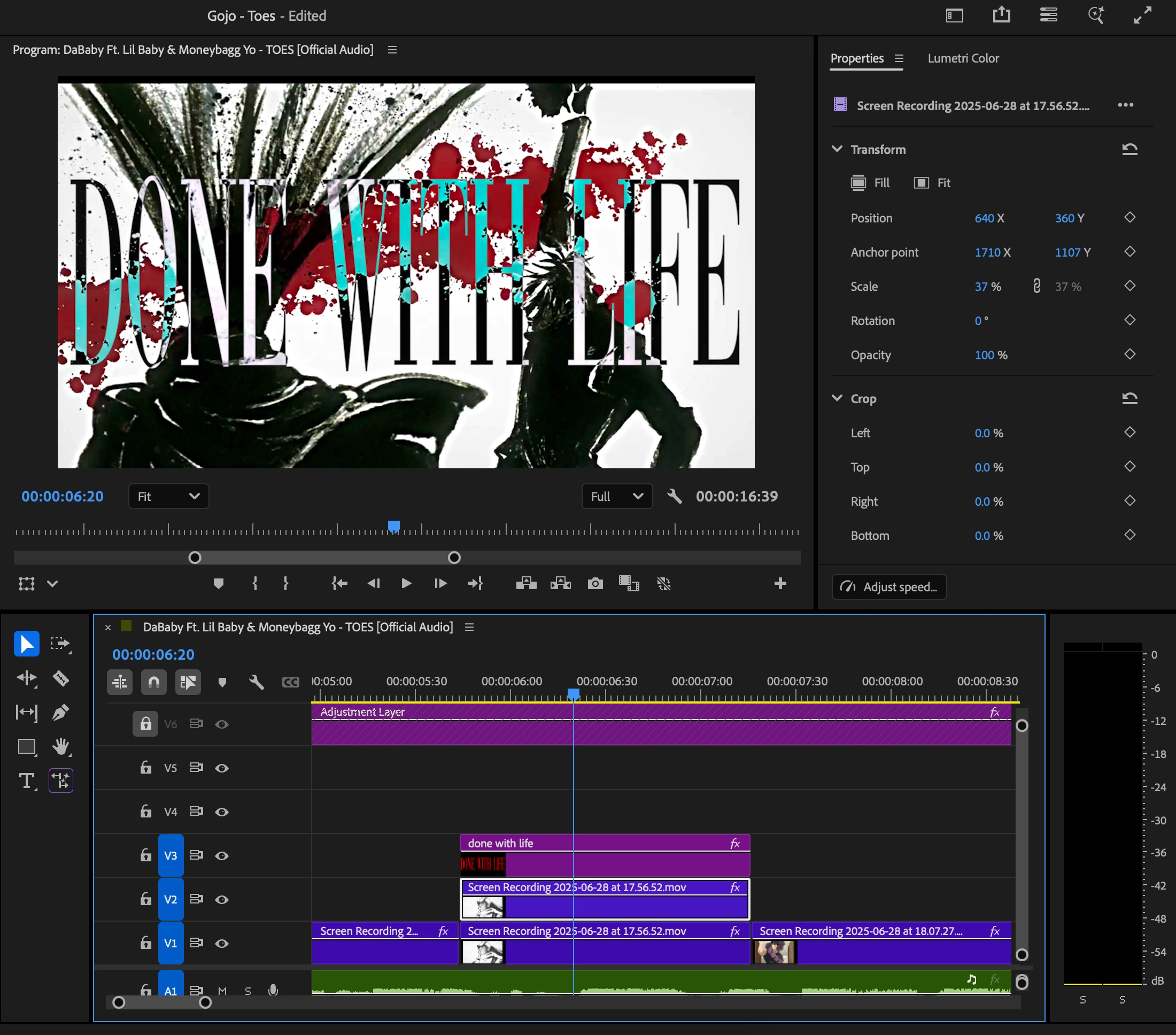
2 replies

MyerPj
Community Expert
Community Expert
July 4, 2025

As @Sumeet Kumar Choubey asked, what version of PP are you using? Get it from the HELP/About screen. Also, see this post regards the info needed for some help: Info needed for a bug / tech support


Finally, what's the track matte for? Also, did you see these:


Community Manager
July 4, 2025

Hi jack_2905,

Welcome to the community! Which version of Premiere Pro are you using, and are there any keyframes applied to the text layer? If possible, please share a screen recording showing the change in preview between the paused and playback states.


Thanks,

Sumeet