Participant
May 25, 2021
Question

Thai language not correctly displaying in Adobe Premiere

  • May 25, 2021
  • 2 replies
  • 2891 views

Thai language not correctly displaying in Adobe Premiere. The top Glyhs over lapping the lower Glyhs. The font displays correctly in Word. And no its not the font. As you see with Thai word below is displaying correctly (3rd character).

การเชื่อมต่อสินค้า


I have large project with subtitles and titles in the videos. So if anyone can help, thank you.


Also attached images as well for reference. 


Correct (3rd character)
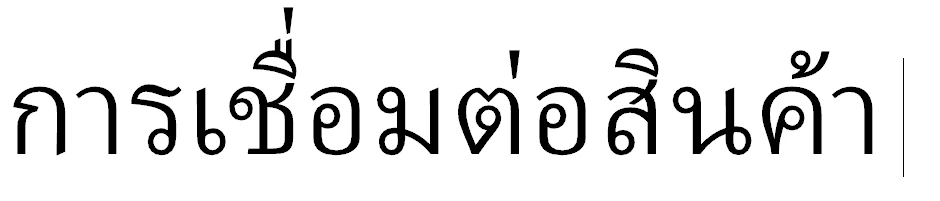
Not correct (3rd character)

This topic has been closed for replies.

2 replies

Stan Jones
Community Expert
Community Expert
May 25, 2021

You mention subtitles. If these are PR 2021 caption/subtitles, be sure you have the correct setting there as well. It appears independent of the regular graphics font setting.


See this post:

https://community.adobe.com/t5/premiere-pro/arabic-characters-not-joining-correctly-in-the-new-captioning-tool/m-p/11912711#M336357


"Right-click on the Caption track header, choose Track Settings... and then under Styling Options > Text Engine, click button for South Asian and Middle Eastern."


Stan

Participant
May 25, 2021

Hi Stan

Thank you. I have got the sub-titles working correctly. That leaves the titles. The project is using 'Legacy Titler' So if you can help thank you.

Participant
June 2, 2021

Hi Stan


Sorry the problem has not gone away. It works on some characters and does not work on others.

I have attached two images. Both used the same font. One in photoshop (correct) and the other in Premiere (not correct). Please advice on correcting the problem, thank you.


Correct


Not correct

Ann Bens
Community Expert
Community Expert
May 25, 2021

Did you select the correct settings for Asian and ligatures in Graphics settings in the Preferences?

Participant
May 25, 2021

Hi Ann


Thank you for your reply. Yes I did.


Attached screengrabs

Ann Bens
Community Expert
Community Expert
May 25, 2021

If you have Ps I would do the text there and import as psd.