


Answered
The Ripple Edit [ B ] tool no longer works the same in Premiere 25.6
Am running Premiere 25.6.1 [ Build 2 ]
The Rippled Edit ( B ) tool no longer works the same way that it's always done. With the tool selected and you move the track, it slides/moves the clip dynamically on the timeline, similar to the Slip ( Y ) tool, and this is hurting my muscle memory ... badly to give me an anxiety attack. I have used the Ripple Edit tool for 20+ years, and I fear that this isn't a bug, but a deliberate change.
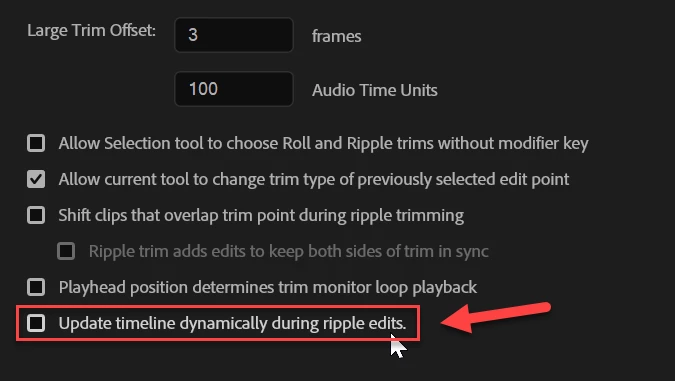
If you're trying to edit based on audio waveforms, it's particularly bad as it's hard to see the leading edge of the waveform against the cut point. Is there a setting to revert this to the way it's literally been for 20 years. Please don't break my muscle memory, Adobe. Please!
thanks.
Geoff

 AdChoices