Participating Frequently
November 21, 2025
Question

The Ripple Edit [ B ] tool no longer works the same in Premiere 25.6

  • November 21, 2025
  • 25 replies
  • 3368 views

Am running Premiere 25.6.1 [ Build 2 ]


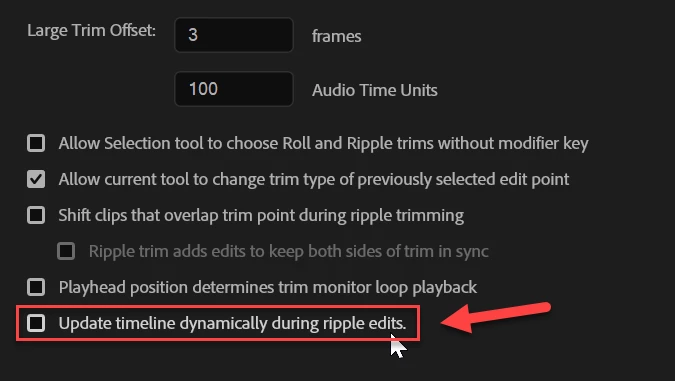
The Rippled Edit ( B ) tool no longer works the same way that it's always done.  With the tool selected and you move the track, it slides/moves the clip dynamically on the timeline, similar to the Slip ( Y ) tool, and this is hurting my muscle memory ... badly to give me an anxiety attack.  I have used the Ripple Edit tool for 20+ years, and I fear that this isn't a bug, but a deliberate change.


If you're trying to edit based on audio waveforms, it's particularly bad as it's hard to see the leading edge of the waveform against the cut point. Is there a setting to revert this to the way it's literally been for 20 years.  Please don't break my muscle memory, Adobe. Please!


thanks.

Geoff



25 replies

JonesVid
Community Expert
Community Expert
January 3, 2026

@Adolfo H. 

Here see attached - see difference in 24.6.8 and 25.6.3.

It should work like 24.6.8 this is the correct way for a long time

Why change something that works

Beta version different again as that changes right to left ripple edit behaviour too


Please respond on this thread

New Member
January 3, 2026

so they still have this thing broken... I had to roll back to v24 and I guess I'll have to stick with v24 for a while 

Participant
December 21, 2025

This is a terrible design change that broke something that wasn't broken. This is 10 steps backwards for a daily fundamental tool. Who thought this was a good idea? 

Community Manager
December 22, 2025

Hi @FILMS  thanks for the feedback. Would you be able to share a quick video showing how the live feedback is affecting your workflow? In this update we did not change the actual behavior of the tool. We only added live feedback, which is something most NLEs support and has been a highly requested feature for years. I would love to understand more about the areas that are causing issues for you so we can look into it.

Participant
January 6, 2026

If I wanted to use Davinci, I would use Davinci. I want to use Adobe Premiere, stop punishing loyal customers. The live feedback doesn't even work the way it does with other NLEs, this is the worst possible implemenation of it. if you're going to copy other NLEs at least do it right, or better.

December 12, 2025

It has been a few weeks of daily use now so I can confidently say it's not just the initial shock anymore. This new way is just really annoying.  Please allow us to toggle the way this works.

Kevin J. Monahan Jr.
Legend
December 12, 2025

Hey All,

Thanks for the feedback. I let the product team know about your dissatisfaction. Sorry for the frustration.


Cheers,
Kevin


Kevin Monahan - Sr. Community and Engagement Strategist – Adobe Pro Video and Audio
Participant
December 12, 2025

Thank you for your work Kevin. I appreciate you being a voice for us. I usually never leave feedback on here but I'm sorry for my frustrations as well. We are long time users and if I can offer any help please let me know.

quote

Hey All,

Thanks for the feedback. I let the product team know about your dissatisfaction. Sorry for the frustration.


Cheers,
Kevin


By @Kevin-Monahan


Participant
December 12, 2025

The new ripple is VERY disorienting. I've been noticing a pattern of these changes to UI (the first one was import window,  and recently this ripple change). It's really frustrating especially when you're in a project and go to update the program you've used for a years and the core experience is changing. I just don't understand the logic to change fundementals that are legacy tools you guys made so well. Please man. Come on.

Inspiring
December 12, 2025

Ripple edit is about as foundational a tool as is possible. A ripple edit has got to be damn near the second most used tool I use behind the selection tool. This change represents a sizable philisophical adjustment. I am CONSTANTLY dragging to a specific waveform. Now, instead of accurately dragging to in front of an audio peak, I am disoriented by the entire track moving.

To whomever decided to make this change: is there a reason why we're changing this behavior? I understand that it shows the timeline's final form more quickly, but it has the side effect of removing accuracy in making the edit. Very "final cut-y"  in behavior. I would strongly suggest that this become an option. I LOVE an option. Heck, there may even be times I WANT the new behavior. But for my current project outlay, I am very disoriented and would like to have the old way back.

The people on this thread may not be a majority voice, but they sound like the experienced core of your community—I'd guess everyone commenting on this page are among your 1% users. This is that sort of an issue.

Thank you for your consideration.

December 10, 2025

15+ year Premiere user here adding my to the choir of distaste with this update. The problem with this design change is that it appears to be attempting to mimic the way ripple edits look in Da Vinci Resolve's Edit panel. However, there's a key element missing in Adobe's implementation: the ability to snap to the playhead. 


In Resolve, the cut point and playhead can be snapped together in a ripple edit, even with the similar dynamic visual, but this is now not possible in Premiere, even with snapping turned on. The way that I make ripple edits most often is to find the approprate frame, set the playhead there, and ripple trim the cut point to the playhead. This workflow was no different between the two softwares; it just looked different from one to the other. However, I now need to figure out another way of using ripple edits in Premiere, for no identifiable user benefit in return.


I get that Resolve has boomed in popularity in recent years, but that's no reason to poorly mimic its UI. The result is a new Premiere update that's unnecessarily more frustrating to use.

Known Participant
December 10, 2025

This is exactly the point! I 100% agree with this. This is the explanation.

December 8, 2025

Adobe, please don't ignore this thread. This is something that needs to be addressed, please.

December 6, 2025

this update has me ready to cancel my subscription, adobe sort it out

December 2, 2025

YES. Can we please GO BACK to the legacy Ripple Edit tool? Or offer a change to remove the "slip" feature. VERY hard to use.

Anya Anti
Participant
December 2, 2025

YES. Can we please GO BACK to the legacy Ripple Edit tool? I just updated my Premiere and it was soooo confusing. I always ripple edit based on where my playhead is and now it's almost impossible and leaves me guessing where my cut goes! I had to downgrade to older versions because I can't work like that.

Known Participant
December 2, 2025

Same for me: I used it in combination with playhead and it was amazing! Please give us the possibility to choose between the new and legacy version!