Participating Frequently
November 21, 2025
Question

The Ripple Edit [ B ] tool no longer works the same in Premiere 25.6

  • November 21, 2025
  • 25 replies
  • 3368 views

Am running Premiere 25.6.1 [ Build 2 ]


The Rippled Edit ( B ) tool no longer works the same way that it's always done.  With the tool selected and you move the track, it slides/moves the clip dynamically on the timeline, similar to the Slip ( Y ) tool, and this is hurting my muscle memory ... badly to give me an anxiety attack.  I have used the Ripple Edit tool for 20+ years, and I fear that this isn't a bug, but a deliberate change.


If you're trying to edit based on audio waveforms, it's particularly bad as it's hard to see the leading edge of the waveform against the cut point. Is there a setting to revert this to the way it's literally been for 20 years.  Please don't break my muscle memory, Adobe. Please!


thanks.

Geoff



25 replies

January 27, 2026

I am just getting back into editing projects after taking a break for the holidays. This change is AWFUL!! I can't even get it to work properly at all. Maybe it's just me? I am trying to use the ripple/rolling tool to edit ONE track  (That already has video transititions that I want in the timing that I want). When I use the ripple tool, it doesn't change that track, but instead does the track above it in the OPPOSITE direction. When I try to use the rolling edit tool, it won't work due to their being a transition there. However, I used to be able to do this every time before without an issue or messing up my work flow. What the heck is going on?! I can't ripple/roll edit anything properly. I have the newest update as of 2 days ago. How the heck do I ripple/roll edit one track alone? Are we not able to keep current transitions and just roll edit anymore? I am so frustrated. I was hoping it was a glitch, but this thread is making me concerned that this is an intentional change. Is anyone else able to use the rolling edit tool with already-existing transitions in place? Maybe I lost my touch in the time I took off. (Hoping that's the case!)

January 27, 2026

Okay, nevermind the rolling edit tool issue. I restarted the program and now it works all of a sudden (with my transitions in place). I am still having an issue with the ripple tool, but maybe it will fix itself when I reboot and try again tomorrow.  I was going to edit my initial comment or delete it for now, but apparently I am unable to do so.

January 21, 2026

It's so annoying and uneccesary, worked perfectly before. please put it back the way it was.


Thanks,

Rob D

January 17, 2026

Completely agreed - new tool makes you have to "guess" what frame you are ripple editing to. Please revert or give us the option already!

JonesVid
Community Expert
Community Expert
January 10, 2026

Slight typo above

In V26.x you don't get this : 

Should read In 25.6.3 and 26.x beta you don't get this.


JonesVid
Community Expert
Community Expert
January 10, 2026

Hi @Adolfo H. 

I think based on user feedback most would like it to go back to the way it was

 in 24.6.8

I'm curious what design criteria and justification were scoped out to make this change on the Ripple Edit tool in the first place.

Users were also not warned. (No documentation from what I have seen).

Most of the feedback here from the user community has captured the essence of the problem - you are effectively working blind when editing left to right with the new mechanism.

You will see in the videos I sent,  the trailing or forward edges of clips are defined as you drag right to left or right to left in 24.6.8. This gives definition where you are dragging to and can be monitored.

In V26.x you don't get this.

The behaviour should be selectable and ideally (as default)  just go back to the way it was in the first place please.

Please keep the thread updated with any progress.

If you release a test fix can this be released  in a beta V26.x update version please.

Let us know so we can test it

Thanks again for your support.

Community Manager
January 9, 2026

Hi all! Thanks so much for the feedback. The team is actively looking into this, and I’ll update the thread as soon as we have more to share.


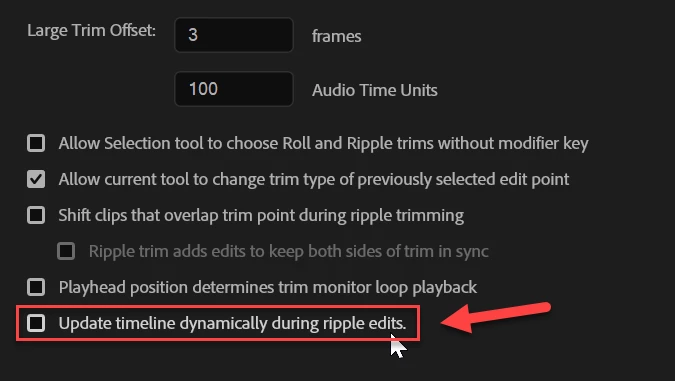
Real time feedback is something that’s been requested for quite a while, and we know that introducing it can feel jarring at first, especially when it affects muscle memory. One of the options we’re exploring is offering a preference so users can choose the behavior that works best for them.


Thanks again for taking the time to share your thoughts.

Participating Frequently
January 9, 2026

Just want to add my voice to the thread here.  I'm just getting back to editing projects after a long break at the end of the year, and all of a sudden, after updating, this tool seems nearly unusable for me (as others have mentioned, the old way of dragging to a point in the waveform and/or to the playhead allowed for a lot more control and precision in the edit).  I guess I'll look at rolling back to the previous version, but hopefully Adobe will take this feedback and undo this change in a future update!

Community Manager
January 9, 2026

Hi @FrameShop the team is lking at it. You can still drag to the playhead. Is that not happenning to you?

January 6, 2026

Quick way to lose me as a paying customer, Adobe. Imagine if the basic function of hammers changed while you're roofing a house. Cut it out!

January 6, 2026

Just chiming in to say I liked this better before, too. I wouldn't mind having the new behavior as an option, but I liked the old behavior much better and would rather use it almost all of the time. The new behavior makes it difficult to see your edits in relation to other tracks already situated on the timeline, and it makes it harder to tell how much you're actually trimming.

Participant
January 4, 2026

I just wanted to second this and here's a thread I started without noticing this one: https://community.adobe.com/t5/premiere-pro-ideas/premiere-25-6-ripple-trim-sucks/idc-p/15651086
Adobe should address this