


New Participant
August 27, 2024
Answered

The write on effect not showing in the effect panel

  • August 27, 2024
  • 11 replies
  • 32095 views

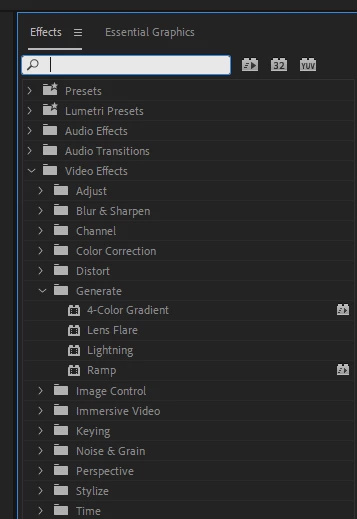
I'm trying to use the write on effect on a video but it does not appear in the effects panel. Even searching write on or write-on makes it not appear. I tried to ''manually'' look for it by going into, video effects > generete, but no where to be found. I am new to the software so I might be doing something wrong but even searching online I can't find a solution.

Thank you for your time


Correct answer jamieclarke

Hi @lex_3121 - This effect is part of the Obsolete Effects.  As part of ongoing work to modernize Premiere Pro, the Obsolete Effects folder and plug-ins, Obsolete Transitions folder and plug-ins, and presets built from the obsolete effects are now removed.  Please see this article for more information. Obsolete Effects, Transitions and Presets

11 replies

New Participant
September 23, 2025

write on effect

Community Manager
September 23, 2025

Hi there,

In Pr v25.5, you may use the Shape Flow transition to create a write on effect. To know more about the transition, you may refer to this video. I hope it helps.


Thanks,

Sumeet

New Participant
September 23, 2025

Yeah, no. That's not going to work. I have a science video where a doctor is showing a brain and where a precise cut is to be made. I can't rely on some clunky transition tool like this. I need to write, right on the image like with photoshop, and it has to be precise.

New Participant
September 11, 2025

This feels like an attempt to remove a perfectly useful effect in Premiere to force creators into a license with After Effects. Very upsetting as a user to have to go into another app to do something I used be able to do natively in Premiere. 

MyerPj
Community Expert
September 11, 2025

Yeah... but it's not.

Adobe are doing a lot of changes to PP and those outdated (code wise) effects needed to go. Plus they were in the "Obsolete" folder for a number of years. Did you see the 90 new effects added basically this week... very cool stuff.

https://blog.adobe.com/en/publish/2025/09/09/introducing-more-than-90-new-effects-transitions-animat...


MyerPj
Community Expert
September 10, 2025

@Pierraxl And there is more.

It's in the shipping version now... WOW! Adobe so nailed it with this... 

Check these links:


My post and @Fergus H his response just now.

https://community.adobe.com/t5/premiere-pro-beta-discussions/awesome-thanks-very-much/m-p/15499311#M12147


And his link to an announcement:

https://blog.adobe.com/en/publish/2025/09/09/introducing-more-than-90-new-effects-transitions-animations-in-premiere-pro


Couldn't get a better move than this Adobe, really cool and smart.

New Participant
September 11, 2025

[Edited by moderator]

R Neil Haugen
Brainiac
September 11, 2025

[Edited by moderator]

Everyone's mileage always varies ...
MyerPj
Community Expert
September 10, 2025

BTW: @Pierraxl 

Here's a screenshot of my project with every 'obsolete' effect, I can use to make presets should I ever need to. 

I haven't yet. 🙂 Thanks again... 🙂


MyerPj
Community Expert
September 10, 2025

Hi @Pierraxl, thanks very much! 🙂


The effect worked really badly, and the AE one works really well. It depends on how much you want to get into it. I haven't seen any anouncements yet on the Film Impact transitions, but I have them in my latest Beta build. SO AWESOME! These are certainly the best effects/transition packages available. All in PP. You should shout for joy. 


Anyway, I'll say it directly now, since you're so late to the party, they've been gone for awhile.


Open a project with any 'obsolete' effect and save it as a preset. Then it will be there in there for your other projects to use. Adobe said so in their announcement of the removal of obsolete effects (finally 🙂 ) the original projects using those effects will continue to be compatible. So, that was the key to know they are still around. Just no shortcut / preset for them. Just make your own, and thanks for the kind words, I'm sure you know all this, you must be a smart person. 🙂

New Participant
November 1, 2024

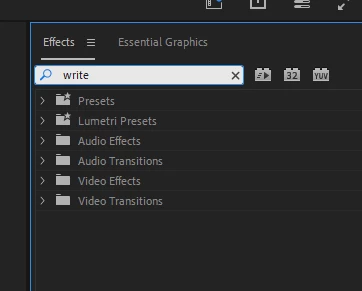
I'm trying to use the write on effect on a video but it does not appear in the effects panel. Even searching write on or write-on makes it not appear. I tried to ''manually'' look for it by going into, video effects > generete, but no where to be found. I am new to the software so I might be doing something wrong but even searching online I can't find a solution.


Thank you for your time
MyerPj
Community Expert
November 1, 2024

Mercifully, Adobe removed that effect from Premiere. It's far better to use the one in After Effects. If you read this thread you would see from the linked correct answer, right under the original question, that it has been removed, along with many other effects Adobe had labeled 'Obsolete' for a long time. Write-on was one of them.


Also above is a link for a very good tutorial, about 4mins to do it in AE. Here's the post above:

https://community.adobe.com/t5/premiere-pro-discussions/the-write-on-effect-not-showing-in-the-effect-panel/m-p/14905447#M532274


MyerPj
Community Expert
November 18, 2024

thank you soo much! I tried the tutorial and it worked really well 🙂 


Very cool, that didn't take long! 🙂

MyerPj
Community Expert
October 25, 2024

Of all the effects you shouldn't use in PP, the Write-On effect is at the top of the list. Fortunately it was removed from the Obsolete folder. Use After Effects, it works excellently. I linked a 4 minute tutorial in a post above.

calumm79481591
Known Participant
June 20, 2025

WHY! It worked great. Why would it be good to be forced to open and use a diffent application? What on earth are you talking about. 

MyerPj
Community Expert
October 8, 2024

The Write-On effect can be created simply, using the very good After Effects tutorial I linked to above. After Effects is included in the full CC package.

https://community.adobe.com/t5/premiere-pro-discussions/the-write-on-effect-not-showing-in-the-effect-panel/m-p/14870250#M529727


https://www.youtube.com/watch?v=sArQZnpNY5s


MyerPj
Community Expert
September 19, 2024

Thanks goodness the PP write-on effect has been removed!

🙂

Here's a really good 4min tutorial on how to do it in AE

https://www.youtube.com/watch?v=sArQZnpNY5s


calumm79481591
Known Participant
June 20, 2025

Is that Thank Goodness very obviously sarcastic, or am I missing something??? Why would it be thank goodness. Why would it be good to have to open a seperate application for a simple animation?

New Participant
September 19, 2024

I am trying to use it, but again most good things are taken off by Adobe. Can anyone help me as to how I can get the same effect? is there a different method?