


blumooon
Inspiring
October 21, 2023
Question

Timeline cursor stops, video keeps going, then it jumps forward, stops, then jumps forward

  • October 21, 2023
  • 19 replies
  • 3103 views

This is never going to be resolved until they actually update what is wrong. So I just ahve this to say:


NEVER EVER EVER EVER UPDATE YOUR ADOBE PRODUCTS WHEN THEY FIRST COME OUT. PERIOD. YOU WILL REGRET IT.


On to the rest of the post:

Having weird, going to call it "lag" issues? I hope I can explain it better below.


When I am editing my videos, for some reason now the time line cursor will stop (I uploaded an image to show below, just in case I am not using the correct terminology). The video keeps playing. Then the cursor will jump to the time on the timeline and then stop again. Then it will continue to do it, it will stop for 3-5 seconds, then jump to the correct location.


It is very difficult to edit when you glance down at the cursor line thing in your timeline only to see it lagged or sitting at the wrong place in the video edit and you have to stop the video for it to "catch up."


Now before you say it is the files and the size, wtc, I wanted to remind you, this never happened before even with much more intense videos, and my rig is not to shabby:


i9-10920x

64GB RAM

RTX3080

WIN 10 Pro

Downgraded Premiere back to 23.6.0

Working in only 1080 60fps.


This only happened after I updated to the latest version. I since downgraded my version to the last working one and it is still doing it. Again never happened before, this week it worked perfectly. Just started yesterday after I updated the app.


Any help please?
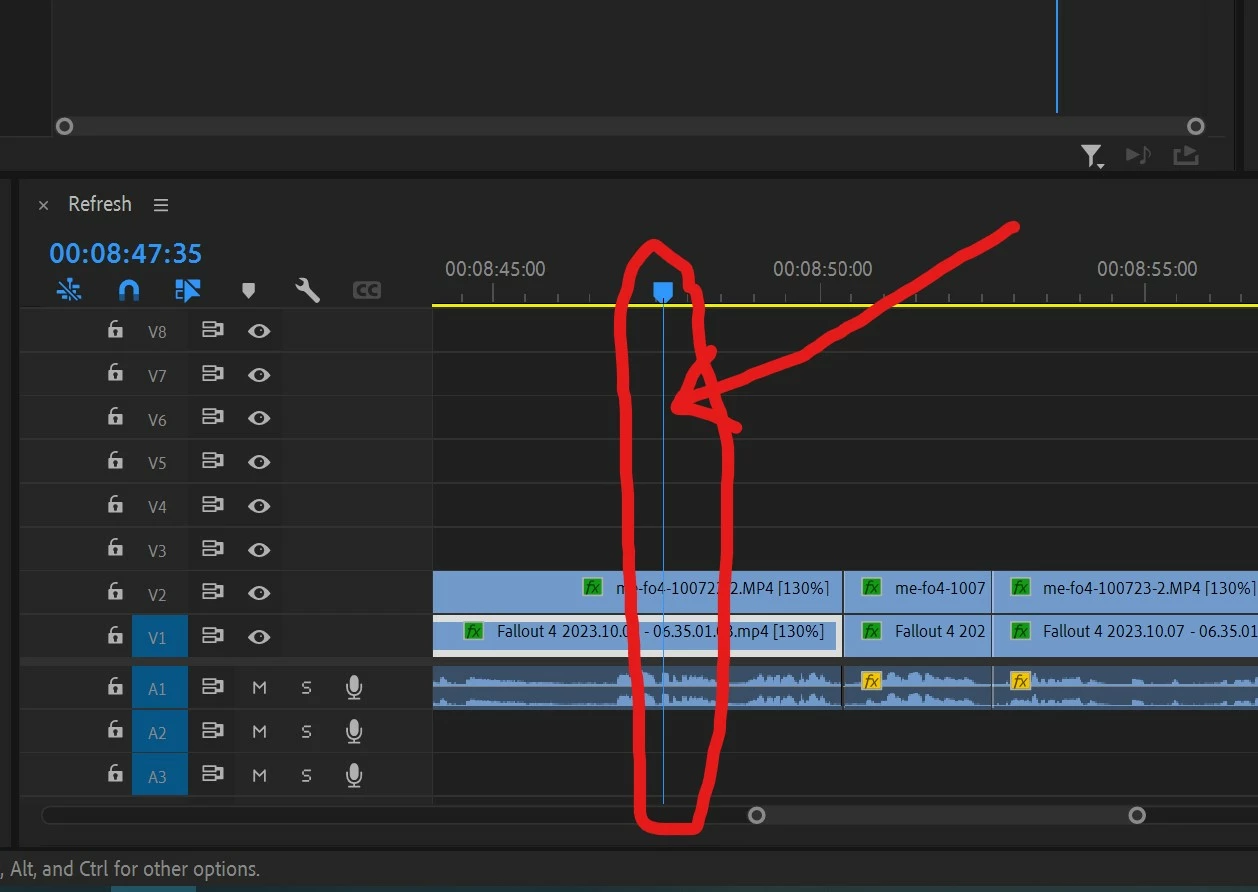
 

I made the mistake of updating my Adobe Products. I will save everyone from the "paying for a product that always has issues" mumbo jumbo that I want to spew, this is not the place to do that.

19 replies

Yasinalpay12
Participant
February 20, 2026


Kevin-Monahan
Community Manager
Community Manager
February 20, 2026

Hi ​@Yasinalpay12,

I appreciate the post. Excuse me, but are you indicating that disabling or enabling that feature helped solve the issue? Please let us know.


Thanks,
Kevin


Kevin Monahan - Sr. Community and Engagement Strategist – Adobe Pro Video and Audio
Yasinalpay12
Participant
February 21, 2026

Yes, once activated, the issue will be resolved, but the problem will persist in the section for adding sound effects; I haven't found a solution for that yet. 


Participant
January 26, 2025

Dear Premiere,

don't know what more I can say other that please fix the issues or I will be on my way. I signed up for Pro mid-year. Spent that time in the hospital going thru seeral major spine surgeries. A real drag. I'm working on railroad projects and have never seen such a desk to mess. Cannot keep the timeline masrker either from crapping out or racing to the end. I'm asking myself why I am spending the money to keep Premiere driving me nuts. The new PC I use has more than enough muscle to keep Premiere running smoothly although I haven't seen it yet. I'm using my dime to fund this mess so please get it fixed or I'll be talking to Pinnacle! Steve Snook

Participant
November 6, 2024

Old post but replying for those still having this issue, as I am.
10+ years using PPro so I'm fully aware of all the things that can cause problems, and how to fix it.
Changing any settings, clearing cache, adding more memory, does not fix this issue. My PC is also pretty hefty and capable.
To be clear, the video playback is program window is flawless, only the timeline cursor/playhead stutters.

The only solution that works for me is to undock the timeline and place it separately to the other windows.
There is no reason this should fix the issue, clearly a bug that still needs to be addressed.

blumooon
blumooonAuthor
Inspiring
November 4, 2023

@mstegner 


I did. Thank you for reaching out.


But I am going to give this other program a shot before rehashing Premiere again. Been through it, wasted a lot of time on it already. This is not an isolated incident with Premiere either, have had my fair share of issues before.


Lastly a small side note


Talking with my other editors at work, and I told them what was happening...


"Wait, didn't you build that computer FOR Premiere?" When talking about my computer in my home office.


I just shook my head and said "yup."

Community Manager
November 3, 2023

@blumooon I sent you an email yesterday trying to follow up.  Did you get it?  It might be filtered as spam since it is an Adobe.com email address.

Kevin-Monahan
Community Manager
Community Manager
November 3, 2023

Thanks for the reply. If you have time, please send me a link to your project file so we can put this investigation into high gear. I hope we can help you, @blumooon!


Kevin

Kevin Monahan - Sr. Community and Engagement Strategist – Adobe Pro Video and Audio
blumooon
blumooonAuthor
Inspiring
November 3, 2023

Thank you @Kevin-Monahan & @R Neil Haugen - I do appreciate you taking the time to help out.


This is the reason I do come here for issues. Even if they don’t get resolved there is a good attempt to figure out what IS going on.


In regards to the Media cache, I have completely, 100% uninstalled Premiere, meaning I went through the computer and deleted anything Premiere, plus ran register checks and any associating files types with it. It was sans-premiere at one point. Then I reinstalled it.  There was no media cache left. Plus I beleive in my workings with the CSR's I did that a couple times too.


The only difference was, after the purge, the video playback was then stuttering more instead. It was like they took turns. One time the video playback lagged and stopped, the next the timeline head would stop and jump. At the time I was using 1 game play video, 1 face cam and the audio that went with it. No extra’s, heck no color corrections or anything. Just straight footage and I still had issues.


With the WIN and Mac thing, you maybe right I know that the one having the same issue as me is using WIN and I am pretty sure one of the other guys is WIN too.


“Normally, I would mention that Long GOP, variable frame rate stuff should be converted (or use proxies). However, if it worked before, it should work better now.”


Thank you. Actually thank you very much. That was my biggest issue with this troubleshoot. It always ended on that, (not that I am opposed to it, just didn’t need it before). I call it the, "I don't know whats going on so it's teh easiest thing I can point at then," syndrome. heh heh.


It was working fine and when I say fine, it was long term fine. It was running great for at least a year or more.


I am holding out hope in the next month or so something changes. But I am gearing my time now to learn the “other” program now. If I didn’t waste hours upon hours on this issue already I would take you up on your offer to screen share, etc.


Maybe I still will if this other program doesn’t pan out; it’s interface seems to be put together by a drunk guy with bad vision. But if I can figure that out I might permenantly switch over. 😞


Thank you again for the assist! Who knows maybe Adobe will update the program before 3 months and it will work again?! Or maybe I will take you up on the fofer if the other program falls through.


Best and have a great weekend!

Kevin-Monahan
Community Manager
Community Manager
November 2, 2023

Hey there @R Neil Haugen, Hi @blumooon,

Thanks @Stan Jones for your great summary of the issue. I appreciate @mstegner for joining the thread too. I really appreicate your video @blumooon, as it really demonstrates the issue.


When updating to major new versions, some have found it important to delete all media cache before beginning new projects or continuing older projects on the new versions (when the project format is "converted"). Press Shift at launch for the "Reset Options" dialog box. That allows you the ability to delete all of the cache, reset preferences, and more.


I see the issue was seen back in 23.1 on that Reddit thread. That tells me that something else besides your update to 24.0 is afoot. That's why trying some basic troubleshooting and maintenance during an update is always called for. FWIW, I've never seen this issue but I'm primarily editing on Mac. This also is a hint that it's a Windows only issue and might have more to do with the OS or Windows hardware. I have raised the issue to the staff and Matt is already here.


Normally, I would mention that Long GOP, variable frame rate stuff should be converted (or use proxies). However, if it worked before, it should work better now.


I am so sorry this was such a frustration to you, @blumooon. I hope we can at least get you up and running again in case you want or need to edit upcoming projects using Premiere Pro. I'm glad we were able to extend your subscription. We really appreicate your feedback. If you could upload your project file somewhere (Google Drive, Dropbox, or Creative Cloud) for engineers to inspect that would be great. A couple of pieces of sample media you used would also be key for finding a fix from our end. Feel free to PM me links to those items. Thanks!


I sincerely hope we can help you.


Thanks,
Kevin

Kevin Monahan - Sr. Community and Engagement Strategist – Adobe Pro Video and Audio
R Neil Haugen
Legend
November 2, 2023

@Kevin-Monahan 


I've seen several posts like this here over the last few months, and the same issue pops up on several non-Adobe forums. While it's probably not a "large" segment, relative to the total user base, it is happening to some users and has been for some time.


Can you communicate with the devs about this? Thanks!

Everyone's mileage always varies ...
blumooon
blumooonAuthor
Inspiring
November 2, 2023

One last post.


I have now heard from 3 other editors that they are having issues with speed with Premiere. One said he had the exact same issue as me, and was trying to pick my brain as to what was happening. I shrugged my shoulders and said, don't know and unfortuantely Adobe does not either.


The other two also have issues, but not near as bad. The kicker? They proxie their videos... so that is even worse since they go the extra mile, and they still have speed problems.


Bottomline. Something is going on with Adobe Premiere, especially their last new year update. That is not in question. What IS in question... is it soley Premiere's fault? And when will they acknowledge it and/or fix it?