
Premiopolis
Inspiring
January 3, 2023
Question

Trim flags in filler suddenly stopped working in Premiere 23.1.0 (MacOS)

  • January 3, 2023
  • 3 replies
  • 1268 views

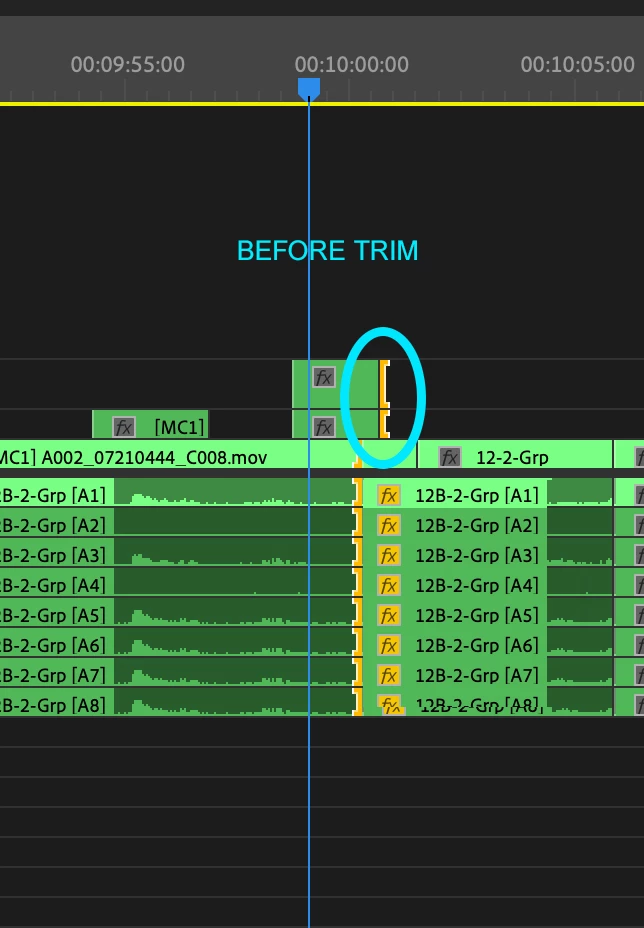
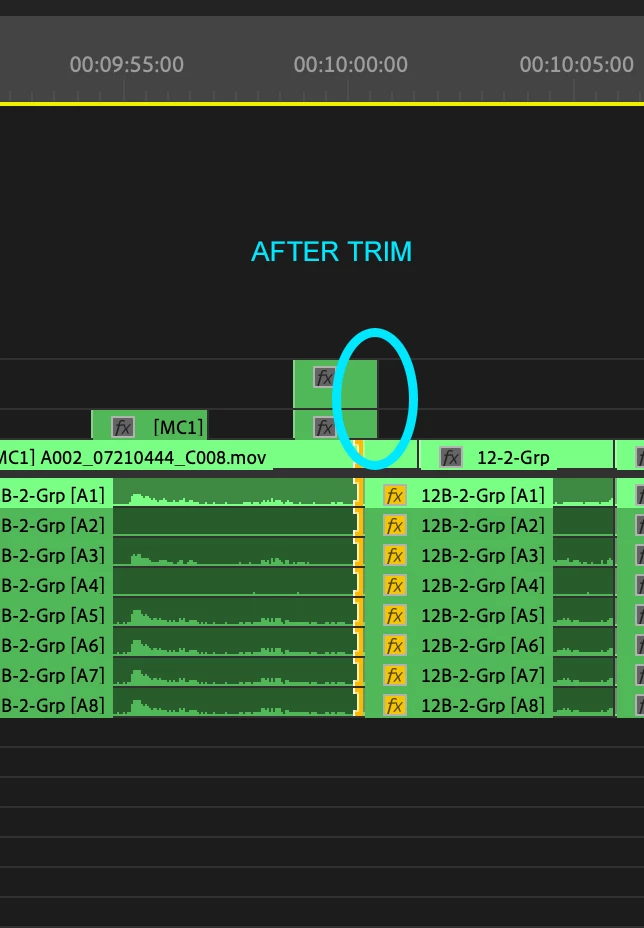
In Premiere Pre 23.1.0 for Mac, trim flags placed in filler will disappear if after a trim.


Happens both in on-the-fly trim mode (setting trim flags on the timeleine outside of official trim mode) and in trim mode (when, say using the +1, -1, +5, -5 buttons)


Makes for a number of problems, particularly on asymmetric trims. If you put a yellow trim flag on on B-Side (i.e. in filler) at tails of a clip on a video track, and A-Side of a a number of audio tracks (not in filler), on first frame of trim (let's say -1), that asymmetric trim will function as expected (Picture will move back 1 frame, audio forward 1 frame), BUT the flag on the video track will have disappeared (images below)


As a result (by example), subsequent -1 trims will move audio back one frame (undoing the forward trim above), and originally-intended trim on the video track becomes an implied (guessed-at-by-Premiere) trim on the video track, which is likely to be at heads on a video clip, where your intention was to handle tails of that very same clip.


This topic has been closed for replies.

3 replies

Kevin-Monahan
Community Manager
Community Manager
April 26, 2024

Hello @Premiopolis,

Thanks for the message. It’s been a long time since you filed this bug, and I apologize for the lack of a response from the team. Are you still having this issue? If so, the team will need more information from you to reproduce the bug. Can you provide the information required here? How do I write a bug report?


I'll move your post to the Discussions board while we await your information.


Thanks,


Kevin

Kevin Monahan - Sr. Community & Engagement Strategist – Pro Video and Audio
Premiopolis
Inspiring
April 27, 2024

Hi Kevin, thanks the followup.   This particular issue has been resolved!!!


I'd love to extend the question and request a more robust trimming environment.  The humble trim, while not exactly the sexiest thing in editing, not compared to a star wipe anyway, is nonetheless one of the most central tools in editing -- the secret weapon -- so the more power given to trimming (the more nuance, features, and systemic coherence) the better the edit system is.

Premiopolis
Inspiring
February 25, 2023

@Kevin-Monahan Thanks for moving that.  I knew user-voice was evaporating, but hadn't noticed the the new "bugs"tab.  Thanks!

Kevin-Monahan
Community Manager
Community Manager
January 6, 2023

Hi, Premiopolis,

Have you tested this in a new sequence or project? How about with other media? I hope we can find the missing piece to this workflow puzzle.


Thanks,
Kevin

Kevin Monahan - Sr. Community & Engagement Strategist – Pro Video and Audio
Premiopolis
Inspiring
January 6, 2023

Hi Kevin, good suggestion.  Just tried both: New sequence in a new project.

I half-expected that to be the solution, but no such luck: Yellow trim flags in filler still disappear.


(FWIW I also tried using different keyboard settings (Adobe default), just in case.  No fix there either.)