Participant
June 14, 2021
Answered

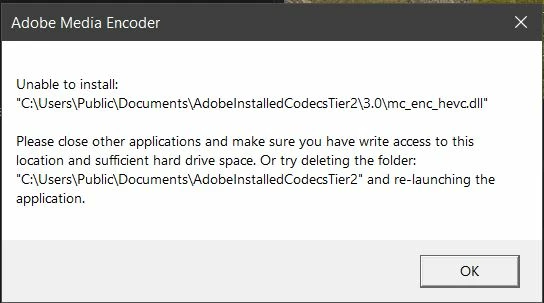
Unable to install mc_enc_hevc.dll
  • June 14, 2021
  • 18 replies
  • 28190 views

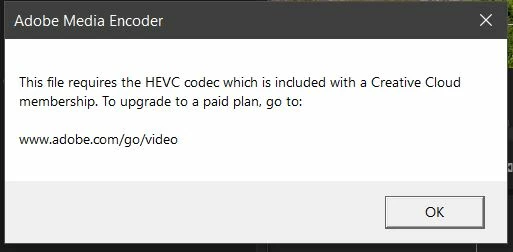
I have tried all solutions found through google and used the adobe cleaner to do a fresh install of premiere, nothing seems to get this DLL to load properly. I do have an active Adobe CC subscription as well.


  1. OS: Windows 10

  2. Version: Adobe Premiere Pro Version 15.2.0 (Build 35)

  3. System: 1700x 32gb RAM RTX 3070rakc

  4. Footage form Canon R5: H.265 4:2:2 10-bit UHD 4k @ 59.94fps

Correct answer marcelov96479431
Logré reparar el problema. Se soluciona creando otro usuario administrador
en windows. Al activar el nuevo uso de Adobe premiere termina funcionando.

18 replies

Participant
April 8, 2025

i need my money back man. adobe just takes takes takes and does not provide any solutions. why do i have to MacGyver software that I am paying for? OP was 4 years ago and this is still an issue adobe is inept at having a solution for or any solution. are there actual humans that work for you guys?????


Mod note: Abuse removed.

Participant
October 17, 2024

Today I have been able to reproduce this error even after using additional administrator account. Then I have set the both .dll files permissions to read-only, and now the process that used to delete them can no longer succeed. In practice, when I render I get the messages pinned on top of this thread, however, render proceeds smoothly with no issues. I hope it helps.

Participating Frequently
June 27, 2023

Hello I found a fix.

u will need to use another pc

instalk adobe and photoshop on another computer, with ur adobe account, then copy the .dll files from ur other pc to the old one with the missing files. And it will work just like butter

Participating Frequently
September 29, 2024

고맙습니다! 당신이 제시한 해결책이 가장 빠르고 쉽고 간편한 방법이었어요!


한방에 해결되었습니다!!!


어도비 직원도 해결 못하는걸 유저들이 해결해야하다니!!!!


당신에게 정말 감사함을 느낍니다!! 

Participant
February 21, 2023

😱😱😱😱I just came with this annoying bug and not even creating another admin user worked. However, If I open Adobe media encoder, then import the premiere .prproj file it will prompt me which sequence from that project I want to render. Just select all of the ones you need to render, and media enconder will render as if nothing. 

So instead of sending the sequences from premiere to media enconder, import the prproj file into media enconder and select your render sequences. If you need to re render something because of a correction, just go to premiere, fix whatever you need, save it and then reimport into Media enconder for rendering. I haven't been able to actually fix the problem, but this helps me get around quickly and fulfill my delivery dates. 

Hope this helps somebody stuck with this 🙂 👍👍👍

Participant
April 7, 2023

It causes me the same issue even in Media Encoder.
Creating a new admin user didn't help as well.

Participating Frequently
January 22, 2023

I have the solution !!!
It's very simple, just start Premiere as an administrator.
Right-click on the Premiere icon and run as admin.
That what

Participating Frequently
January 22, 2023

Sorry

Wrong alarm, it doesn't work.
Where's Adobe help ???


Kevin-Monahan
Community Manager
Community Manager
January 24, 2023

Hey, Rafael,

Sorry, this is a user-to-user forum. You would need to file a bug to get the devs' attention. You can get assisted help from Adobe reps. here. I am here, but I am unfamiliar with this bug as this post is a year and a half old. More info may help us help you. Can you provide it?


Thanks,
Kevin

Kevin Monahan - Sr. Community & Engagement Strategist – Pro Video and Audio
Participating Frequently
December 9, 2022

This has happened to me today. After years of having it work fine now my software is bricked. I hope someone can tell me a support email or a phone number I can call to get this resolved. I was trying to edit a YouTube video but this has made me highly discouraged. I am to be honest at my wits end over this.

Kevin-Monahan
Community Manager
Community Manager
December 9, 2022

Hi,

Sorry about the frustration. Yes, you can contact support if you are a Creative Cloud customer. Please go to this link: https://helpx.adobe.com/support.html. In the lower right corner is the chat pod. You can request to be connected to the video queue to find our video specialists.


Thanks,
Kevin

Kevin Monahan - Sr. Community & Engagement Strategist – Pro Video and Audio
Participating Frequently
January 22, 2023

I have the solution !!!
It's very simple, just start Premiere as an administrator.
Right-click on the Premiere icon and run as admin.
That what

Participating Frequently
November 2, 2022

Of all the software packages that I have, Adobe CreativeCloud is the most disappointing, and I've been using Photoshop since version 1.0   I also have this problem and truthfully, IT ISN'T MY PROBLEM TO SOLVE.   If Adobe made automobiles, they would be in the repair shop 100% of the time.   This isn't the Adobe that I used to know.  This is some monstrosity now.  It does not work.


This specifically includes Premiere Pro, Photoshop, and Illustrator.  They all suck now. Thanks Adobe.


marcelov96479431Correct answer
Participant
November 2, 2022
Logré reparar el problema. Se soluciona creando otro usuario administrador
en windows. Al activar el nuevo uso de Adobe premiere termina funcionando.
Participating Frequently
November 2, 2022

Gracias Marcelo. La solución funcionó para mí también. Algo está terriblemente mal con este software si uno tiene que crear un nuevo usuario para solucionar un problema. Adobe debería dejar de actuar como si esto no fuera un ERROR, porque lo es.

Participant
April 1, 2022

After a long chat and about an hour of troubleshooting, the Adobe Support person and I solved the issue. It appeared that the "AdobeInstalledCodecsTier2" folder had permissions that were not staying set (we checked the boxes, but they became unchecked on their own). It tells you what the issue is: "make sure you have write access to this location..." The support guy used Command Prompt and the "net user" command to create another administrator user. After that, I could swap to the other Administrator account and launch Premiere Pro. I checked the "AdobeInstalledCodecsTier2" folder for the "mc_enc_hevc.dll" file, and it appeared twice. After this, I transferred back to my primary account, and the files were still there. I launched Premiere and everything worked. Hope this helps. 

Kevin-Monahan
Community Manager
Community Manager
April 1, 2022

Thanks for sharing your solution, Kyle!

Kevin

Kevin Monahan - Sr. Community & Engagement Strategist – Pro Video and Audio
Participant
April 8, 2025

this solution does not work kevin, why is it always something new with adobe software all the time? we pay way too much money for all of this hassle and inconsistency

Participant
March 26, 2022

same issue try another 10 time just —


Mod note: Profanity removed. Kindly avoid in the future. Thx.


Participant
March 23, 2022

I am completely stuck with this, Solution, please. 

Any adobe help, couldn't export video.