
Unable to launch Adobe premiere pro, Error is : Initialization Failure Invalid <K, T> key.
After switching to the latest version of adobe premiere pro, I started facing this issue.
Whenever I am trying to launch Adobe premiere pro, the welcome screen appears followed by an error Pop showing the below error.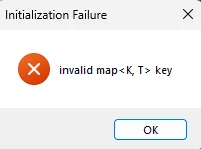
Tried everything to resolve this issue but all turned out to be useless...
If anyone knows solutions to this error please share ASAP.
Below are the solutions I have tried, that didn't worked for me.
1) Uninstalling premiere and installing a lower version then upgrading to the latest one.
2) Resetting the preference while launching the app by pressing Shift key on keyboard.
3) Unstalling and installing premiere followed by a restart of my PC.
Other adobe applications are working fine for me, it's just premiere is causing trouble.
Here are my system config:
Premiere Pro version 25.0
Processor: Intel(R) Core(TM) i7-10700 CPU @ 2.90GHz 2.90 GHz
RAM: 16 GB
Windows Edition: Windows 11 Pro 64 Bit
Version 23H2
Graphics: Intel UHD 1 GB.
Thank you in advance.


 AdChoices