
Participating Frequently
December 2, 2024
Question

Unable to launch Adobe premiere pro, Error is : Initialization Failure Invalid <K, T> key.

  • December 2, 2024
  • 20 replies
  • 2948 views

After switching to the latest version of adobe premiere pro, I started facing this issue.

Whenever I am trying to launch Adobe premiere pro, the welcome screen appears followed by an error Pop showing the below error.
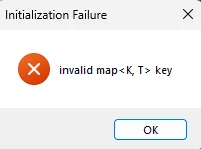


Tried everything to resolve this issue but all turned out to be useless...
If anyone knows solutions to this error please share ASAP.

Below are the solutions I have tried, that didn't worked for me.
1) Uninstalling premiere and installing a lower version then upgrading to the latest one.
2) Resetting the preference while launching the app by pressing Shift key on keyboard.
3) Unstalling and installing premiere followed by a restart of my PC.

Other adobe applications are working fine for me, it's just premiere is causing trouble.


Here are my system config:

Premiere Pro version 25.0

Processor: Intel(R) Core(TM) i7-10700 CPU @ 2.90GHz 2.90 GHz

RAM: 16 GB

Windows Edition: Windows 11 Pro 64 Bit
Version 23H2
Graphics: Intel UHD 1 GB.

Thank you in advance.


20 replies

Participating Frequently
December 13, 2024

Hello @jamieclarke 

1) The first solution didn't worked for me.
2) For the second one - I cannot see the path as you had shared.

I will share a screenshot of my Folder structure below:


Thanks.

jamieclarke
Community Manager
Community Manager
December 13, 2024

Hi @sushant 0D44 - Can you try two things

1. Can you navigate to C:\Program Files\Adobe\Common\ Then delete everything in the common folder, then launch Premiere

2. Can you navigate to C:\Users\<Username>\Appdata\Roaming\Adobe\Premiere Pro\ Then make a new folder and drag all of the <version> folders into the new folder, then launch premiere


Let us know if these help your issue.

Participating Frequently
December 13, 2024

Hello @jamieclarke 
I have not made any changes to the regedit resgistry related to fonts or any other type.
Sharing you the screenshot of it below:


Yes, updated drivers for both Intel UHD and AMD Radeon, but didn't resolved the issue.
Thank you.

jamieclarke
Community Manager
Community Manager
December 12, 2024

Hi @sushant 0D44 - Unfortunately the dump file just shows the aftermath.  We have seen similar issues before, a user was editing their regedit file regarding fonts.  

Have you done anything related to fonts on your system?

Have you tried updating your AMD graphics drivers?

Participating Frequently
December 12, 2024

Hello @IanB_360  and @jamieclarke 
I have tried updating to the latest version 25.1 but still the same issue.
There are no plugins installed.

Here is the crash report link from DMP file.
https://drive.google.com/file/d/10hbF59tuqVhCwNuP1j5qy3wFEqywv6xc/view?usp=drive_link

Thank you.

jamieclarke
Community Manager
Community Manager
December 11, 2024

Hi @sushant 0D44 - Do you have any plugins installed?  Have you tried version 25.1?

IanB_360
Community Manager
Community Manager
December 11, 2024

Hi @sushant 0D44 ,

I am asking the team again to help me look into your issue. Are you able to get a dmp file? Or get to the log crash with Adobe screen at all? Sorry you are still not able to use the product. We will get back to you soon.

Thank you

Ian

Participating Frequently
December 11, 2024

Hello @IanB_360  just wanted to check if there was any update to my request. 
My work has completely came to stand still due to this issue, hoping to get it resolved as early as possible. Thank you.

Participating Frequently
December 5, 2024

Hello IanB_360,
Here is the info you had requested.

Issue - Unable to launch Premiere Pro application, it shows the below error after showing the welcome screen.


Adobe Premiere Pro version number: 25.0
Operating system - Windows 11 Pro 64 Bit
System Info:
CPU:Intel(R) Core(TM) i7-10700 CPU @ 2.90GHz 2.90 GHz
GPU (Intel-based Macs and PCs): AMD Radeon RX 640 and Intel (R) UHD Graphics 630
RAM: 16 GB
Hard Drive: 1.8 TB Free space in C Drive 726 GB
Hard drive is connected through USB Root Hub (USB 3.0).

Video format: Haven't started the project yet.
Workflow details: Not started yet.
Steps to reproduce - Not applicable.
Expected result - Allowed me to work on video editing.
Actual result - Crashing at the launch.


Below are the solutions I have tried, that didn't worked for me.
1) Uninstalling premiere and installing a lower version then upgrading to the latest one.
2) Resetting the preference while launching the app by pressing Shift key on keyboard.
3) Uninstalling and installing premiere followed by a restart of my PC.
4) Updated drivers for both Intel UHD and AMD Radeon.
5) Updated Visual C++ files.

Video fil of the error:


IanB_360
Community Manager
Community Manager
December 4, 2024

Hi @sushant 0D44 

Welcome to the Premiere Pro forums! We are glad to see you here. We need a few more details to try to help with the issue. Please see, How do I write a bug report? Are you getting any pop ups before the crash happens that are asking if you want to report the issue to Adobe? Or are you just seeing this initialization failure message?

Thanks for submitting your bug report. I hope we can help you soon. Sorry for the frustration!

Thanks,

Ian