


Beckerle Media
Participant
May 19, 2018
해결됨

Unable to modify text/revert back to original

  • May 19, 2018
  • 1 답변
  • 536 조회

First time user!

A long lurker of Photoshop and Premier, I finally took the plunge and became a user. It's a lot to learn. Holy smokes.

Most of what I do involves moving text in and out of images and graphics, and I can't seem to get the text stamp to change back to it's original state. Also, I don't have the font, size, and other attributes in the right frame like I see in many of the tutorials. I'm probably missing something simple, but I looked all over and couldn't find it 😕😕
    이 주제는 답변이 닫혔습니다.
    최고의 답변: Meg The Dog

    OzarkDaily  wrote

    Most of what I do involves moving text in and out of images and graphics, and I can't seem to get the text stamp to change back to it's original state.

    I don't know what "text stamp" means. Can you post screen shots of what your problem is?

    OzarkDaily  wrote

    I don't have the font, size, and other attributes in the right frame like I see in many of the tutorials.

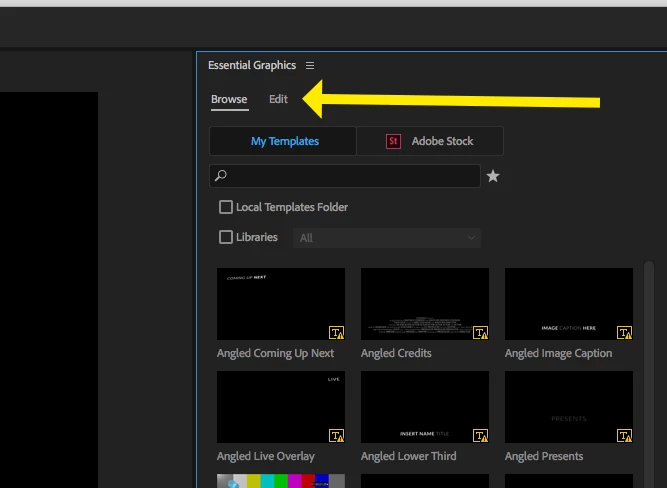
    Are you working in the Graphics Workspace? Do you have the Essential Graphics Panel open? If so, make sure in the Essential Graphics Panel you click on the Edit Tab, next to the Browse Tab.

    MtD

    1 답변

    Inspiring
    May 19, 2018

    OzarkDaily  wrote

    Most of what I do involves moving text in and out of images and graphics, and I can't seem to get the text stamp to change back to it's original state.

    I don't know what "text stamp" means. Can you post screen shots of what your problem is?

    OzarkDaily  wrote

    I don't have the font, size, and other attributes in the right frame like I see in many of the tutorials.

    Are you working in the Graphics Workspace? Do you have the Essential Graphics Panel open? If so, make sure in the Essential Graphics Panel you click on the Edit Tab, next to the Browse Tab.

    MtD

    Beckerle Media
    Participant
    May 19, 2018

    That was it! Essential graphics was what I missed.

    Sorry for the loose, made-up terminology. I'm still poking and feeling around. Out of all the tutorials I've looked up this Premier Bro site has been great. Most of the stuff I've come across is way too advanced for me at this point.

    Thank you for being so quick! I'm not used to such a quick forum response. It's refreshing. Hopefully some day I can pay it forward.