

Participating Frequently
August 7, 2023
Question

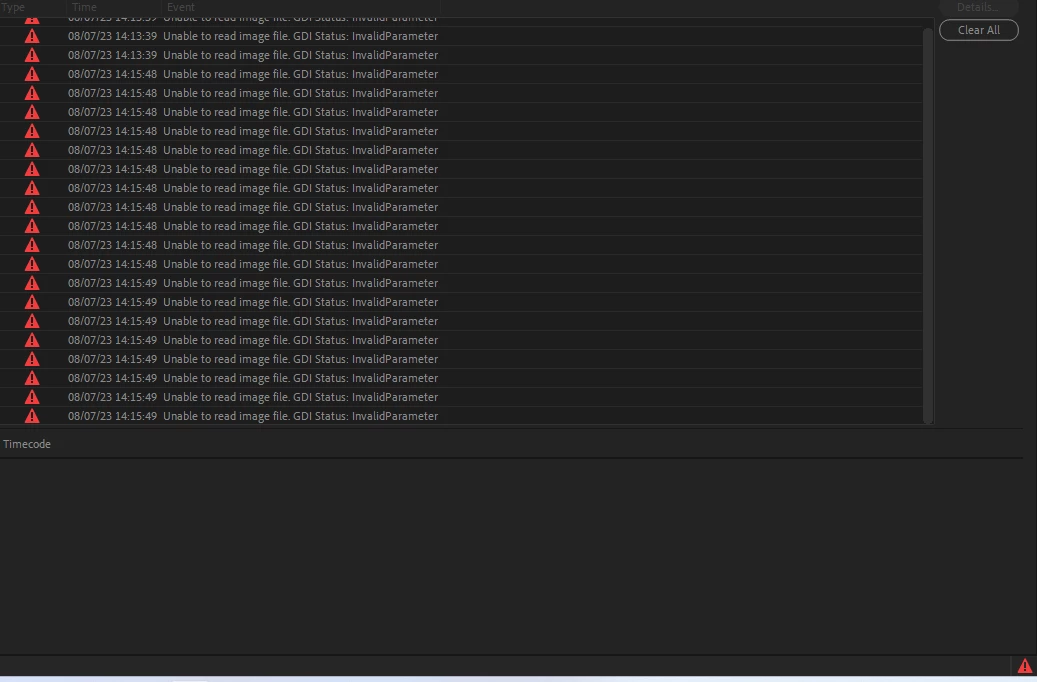
Unable to read image file: GDI status: invalid parameter

  • August 7, 2023
  • 5 replies
  • 2045 views

Why do I get this coming up and how do I stop it.
 

This topic has been closed for replies.

5 replies

Peru Bob
Community Expert
Community Expert
August 7, 2023

Are there any unusual characters in the file names?

Participating Frequently
August 7, 2023

Nope, just video from a gopro. 

Kevin-Monahan
Community Manager
Community Manager
August 9, 2023

I started it up today and no issues at all for a while and then it came up with Video Scheduler error and crashed.

Does Premiere Pro have issues with Windows 11? 


Hey @Byron31533955pvga,

See this KB doc from Microsoft: https://answers.microsoft.com/en-us/windows/forum/all/windows-10-bsod-video-scheduler-internal-error/9c7e98ea-43db-47ef-85c3-8e2898dcb018


Thanks,
Kevin

Kevin Monahan - Sr. Community & Engagement Strategist – Pro Video and Audio
Ann Bens
Community Expert
Community Expert
August 7, 2023

What kind of files are you trying to import or edit? Be specific.

Any strange UI behavior?

Participating Frequently
August 7, 2023

a 30 second mp4 video taken on a gopro, the file names have not even been changed. 

Sorry, what is UI? 

Participating Frequently
August 7, 2023

I can see the video and play as a preview but as soon as I try to import it into a project it doesn't want to know. 

kglad
Community Expert
Community Expert
August 7, 2023

i assume you mean premiere pro, not premiere elements.  if incorrect, state that.


in the future, to find the best place to post your message, use the list here, https://community.adobe.com/

p.s. i don't think the adobe website, and forums in particular, are easy to navigate, so don't spend a lot of time searching that forum list. do your best and we'll move the post if it helps you get responses.


<"moved from using the community bugs">


Participating Frequently
August 7, 2023

Ok so newbie here and yes Premiere Pro

kglad
Community Expert
Community Expert
August 7, 2023

no problem.  (now just wait for one of the premiere pro experts to help...)

Participating Frequently
August 7, 2023

 Premiere

kglad
Community Expert
Community Expert
August 7, 2023

what app?
