


Participating Frequently
August 6, 2013
Answered

Unbelievably slow audio render times!

  • August 6, 2013
  • 30 replies
  • 75112 views

I've been dealing with his for a while now on this documentary I've been working on. When I export my timeline which is right around an hour, it takes around 2 HOURS just to render audio previews before it will export! The bulk of my timeline is a single track with no effects at all. Video renders faster than the audio! The only thing unusual about my project is it is largely composed of longish multi-cam sequences - about 30 sequences ranging from 30 mins to 90 mins. It's appears PP is rendering audio for every bit of my source sequences even though only a few seconds or minutes of each one is actually being used. I don't know what else could be happening.

I was thinking that since some of the audio was recorded at 44.1K maybe that was a problem and some of the sequences had several tracks of audio so to solve this I went through every sequence and rendered out a stereo mix at 48/16 and deleted the old audio. That seemed to help for a while as with CS6 I was getting a very annoying "rendering required audio files" message every time I hit play until I rendered the audio which as I said takes a really long time. Also I can render this but if I close Premiere and re-open I have to render it all over again. It is not keeping the audio render files. Premiere CC is better about playing back without the render message but it still needs to render for export. I have no idea why it would need to render audio from 48/16 source files.

I have reported this to Adobe but just thought I'd put this here to see if anybody else is having issues. If any audio rendering should ever be required in this day and age it should be extremely fast. This problem has really brought exporting to a crawl for this project.
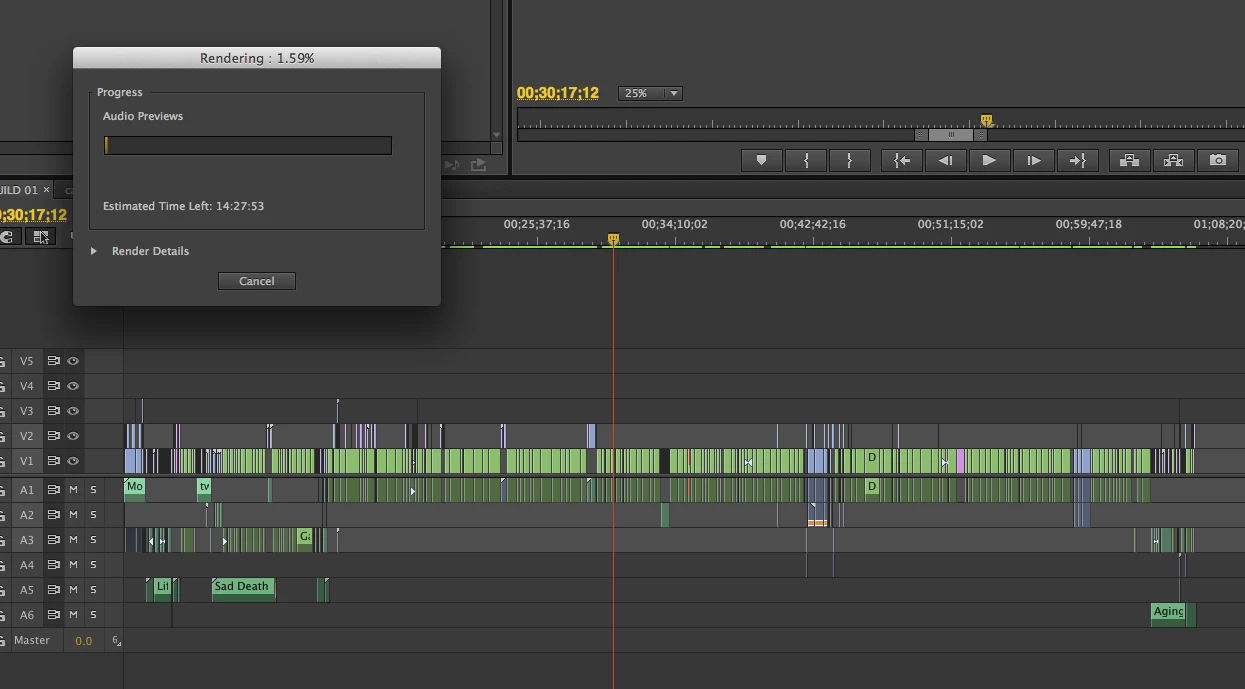
Adobe CC, OSX 10.8.4 on a 12 core Mac Pro with a GTX 570 32GB ram, and BM Studio. My RAID is a 3 disk internal raid with 3 3TB disks in RAID 0. The video renders reload properly. The situation would be better if the audio renders reloaded at least but why it needs to render "audio previews" for such simple audio is beyond me. And as I mentioned I went through quite a bit of trouble to make it as easy on Premiere as possible by replacing all of the 44.1 audio with 48/16 wavs.

    This topic has been closed for replies.
    Correct answer Adam Carrel

    I mean seriously... So I would get mine to export faster by just sending it straight to AME. But it still hangs for a good 20 minutes before even starting the processing (I have no idea why but I'm sure it has something to do with the audio bug). Also - by doing this - I totally screwed up a video because it just didn't export 3 tracks of my project. So I had to re-export a video for work, and end up submitting a screwed up version just because Premiere can't handle audio rending? nested tracks? I'm using the latest updated version of CC btw.


    I found this on another forum:

    There were MANY other problems that came up on this project and as a result I was put on the pre-release group with Adobe, but the cause for the issue described above was due to the audio bitrate for the project not matching the bit rate of the audio clips. It has a resample them as a result.


    This seems to have solved it for me.  I opened my audio files in another program, re-sampled them, and then put them back in to Premiere.


    EDIT:  I can confirm that this worked.

    30 replies

    Participating Frequently
    February 9, 2016

    WOW, just wow. I am having exactly the same mind-boggling render times for audio previews. I am also just incensed that you sit there and let it render (in my case) 1 hour of rendering of 108 audio previews for a 10 min. render of the first part of a 1-hour timeline sequence and ASSUME that it will then save that audio render in the massive preview files (in my case, it ballooned to 83GBs) so you don't have that time-suck happen the very next time you render. But... that proved false and it did exactly the same the very next render.  I just cannot believe this has been going on for so many months!!

    My timeline, btw, is 35 other sequences laid out with no effects applied other than video fades. The audio in each sequence is a separate, mastered WAV file. No magic, no multi-cam sequences either.

    This is really a drag...

    Participating Frequently
    August 13, 2015

    Hi! I have the same problem, and just solved it!

    1. Check the sample rate on your audio clip. (Click the clip and check the "Info" tab).

    2. Change the sample rate of the sequence you want to render from to match the audio. I changed mine from 48000 to 44100hz.

    3. Change the sample rate of the SOURCE SEQUENCE if you are rendering any multicam!!! (This is why so many of us are having multicam issues).

    This solved my issue immediately.

    Participating Frequently
    August 13, 2015

    By the way, if anyone from Adobe is still checking this, I'm still concerned that audio rendering only seems to use about 10-15% of my processor's power, and 0% of my GPU. Is this a Mercury issue?

    hoovdaddy
    Inspiring
    July 30, 2015

    if my audio is 48k and 24bit, and my sequence in CC 2014 is 32bit-floating point, does this mean Premiere has to render this 48k/24bit audio and conform it to 32-bit?

    Properties for one of my source clips

    Source Audio Format: 48000 Hz - 24 bit - Stereo

    Project Audio Format: 48000 Hz - 32 bit floating point - Stereo

    Participant
    March 21, 2015

    FIXED!

    12664172521220448845banana-split-har-dee-har-md.png

    I made a profile just to leave this comment and hopefully spare others who are still suffering from the audio-rendering problem.

    Most of the audio clips in my project were 44100 hz, but there was a batch of them that I had unknowingly brought in at 48000. Other posters had suggested that differing properties could be gumming up the renders, so I converted EVERY 48000 audio clip to 44100 in Audition. Voila! Everything worked as expected! I didn't have to mix-down, flatten, re-import, swap files, or click "match source settings". I just converted the files, Premiere automatically updated them in my project bins, and suddenly everything was peachy.

    At first I converted just one audio clip and tried adjusting the work bar to render it by itself, but Premiere still got stuck. It was only after I made all of the clips match up to 44100 that it worked. Maybe that's overkill and there's some way to use some 41000 and some 48000 files in a single project/sequence, but I have no desire to find out. I just brought down the hammer and converted everything.

    So if you're still having problems, hunt through every audio file you have in your project, find the culprits, and turn them into 44100 clips.

    Good luck!

    Known Participant
    March 19, 2015

    Just encountered this, I feel like I've found my family in this thread...

    Running the new fully specked 5K iMac with R8 Peg Raid 5 drive I was looking at 1 day 17 hours of rendering audio for two tracks of 48kh 16 bit audio on an hour's multi cam edit.

    I've never even heard of rendering audio...

    SOLUTION!

    This is nothing to do with the multi cam, it's the export settings that create this problem.

    I exported just my audio tracks and checked Match Sequence settings - took 4 minutes

    Dropped this back into the project.

    Export w/ vimeo 1080 preset took 27mins

    This is unquestionably a problem the should be leading the list of bugs, right behind why PP doesn't run as well as FC on any of the new macs...

    PULL UP YOUR SOCKS.

    Participant
    March 25, 2015

    How did you check "Match Sequence Settings" and just export audio? When I check it, it automatically exports both audio and video.

    This is a nightmare,

    mukumukas
    Participant
    April 26, 2015

    exactly, this is a nightmare.

    I tried all solutions posted here and it seems I brought down audio rendering time down. Still this is unacceptable. This is a clear bug within super expensive professional software and it shouldn't be like this. PP has to have ability to convert khz and bitrates as easy as all audio programs. It is still too long for audio to be rendered. I'm tired of constant fight with various PP problems.

    Participant
    February 9, 2015

    I have the same problem for 2 years now ... I was having the same discussion on other forums because NOTHING ever happens here. I also have a theory that some people from Adobe are posting "solved problems" and getting instant reply for that nonsense that is so far from problem, wile we all wait for much much longer to get some professional info. I'm an video engineer for 15 years...  There are MANY bad things about Adobe, this one is there to stay for now... Only thing you can do is, like the other guy sad, to delete all audio tracks from all sequences (unlink and delete) and use only the track you exported as audio mix-down from project.  I mix all my tracks in Nuendo and importing them back.

    Participant
    January 3, 2015

    Same problem, multi-cam sequence not set to switch audio or any effects. I tried exporting a short part of the sequence, less than a minute - render times for audio - over an hour... solution was to nest the extract, open in new timeline and export - done in a couple of minutes. But, now I want to export the entire one hour long sequence. What to do?

    Participant
    October 17, 2014

    Adobe I have the same issue and am not editing multicam.  If I try to export out a section of a timeline with NO audio, it tries to render ALL clips on the timeline regardless of what is in the windowed portion of the timeline I selected for output.

    Please fix this.

    Participant
    August 12, 2014

    I stumbled upon this question while I was having Audio issues myself, I was editing a multicam sequence at first but switched because I was having some audio sync issues.

    My Sequence was about 50 min in total and in the past had only taken a few min to export on my souped up Mac Pro. Later on after my last export, I discovered that my audio was out of sync somehow AGAIN so I had to go back through and Match Frame on all the clips. When finishing I tried to export the Sequence to find that it was going to take over 8 hours to render Audio Previews. What I did was select all (audio and Video) and switch it to Multicam and Flatten Audio. After this my audio render for 280 clips was less then 2 min.

    Hope this helps.

    Nick

    kelvinli
    Participant
    August 13, 2014

    Hey Nick,

    How to you actually flatten the audio? I dont see the option at all in the menu. Hope you can help. Thanks.

    Participant
    July 30, 2014

    I was just having this same issue. I had to slow down one audio clip to match up to another, multi-clipped them together and for some reason it wanted to take 16 hours to do a 12 minute clip. I'd removed the slowed down clip and it rendered fine.

    I saw a staff member suggest flattening the multi-clip, so I tried that and I'm at a shorter rendering time than I had before!

    Thanks!

    -Joe

    Kevin-Monahan
    Community Manager
    Community Manager
    July 30, 2014

    Glad to hear it, Joe.

    Kevin

    Kevin Monahan - Sr. Community & Engagement Strategist – Pro Video and Audio
    Participating Frequently
    December 15, 2014

    This is my second time editing something for a DVD, and I only have one track of audio and one track of video, no multicam, all the audio is the same, from the same source. The time line is split up into 13 parts, all in the same track. When I start exporting it says "Rendering 1 of 13 Audio Previews).

    Now I'm exporting one of those 13 parts alone to test something, it's a part that is 5 minutes long, or less, it takes 45 minutes it says to render the audio previews, and it still says 1 of 13 audio previews, but now it's at 74%, and still says 15 min 30 seconds left. My CPU (i7-4930K) is running at 22.something %. This must be a bug, cause I've been encoding audio for many years, and it has never even been close to this slow, even 15 years ago.

    Are they even working on this at all? This thread was started around 16 months ago.