


Participating Frequently
August 6, 2013
Answered

Unbelievably slow audio render times!

  • August 6, 2013
  • 30 replies
  • 75112 views

I've been dealing with his for a while now on this documentary I've been working on. When I export my timeline which is right around an hour, it takes around 2 HOURS just to render audio previews before it will export! The bulk of my timeline is a single track with no effects at all. Video renders faster than the audio! The only thing unusual about my project is it is largely composed of longish multi-cam sequences - about 30 sequences ranging from 30 mins to 90 mins. It's appears PP is rendering audio for every bit of my source sequences even though only a few seconds or minutes of each one is actually being used. I don't know what else could be happening.

I was thinking that since some of the audio was recorded at 44.1K maybe that was a problem and some of the sequences had several tracks of audio so to solve this I went through every sequence and rendered out a stereo mix at 48/16 and deleted the old audio. That seemed to help for a while as with CS6 I was getting a very annoying "rendering required audio files" message every time I hit play until I rendered the audio which as I said takes a really long time. Also I can render this but if I close Premiere and re-open I have to render it all over again. It is not keeping the audio render files. Premiere CC is better about playing back without the render message but it still needs to render for export. I have no idea why it would need to render audio from 48/16 source files.

I have reported this to Adobe but just thought I'd put this here to see if anybody else is having issues. If any audio rendering should ever be required in this day and age it should be extremely fast. This problem has really brought exporting to a crawl for this project.
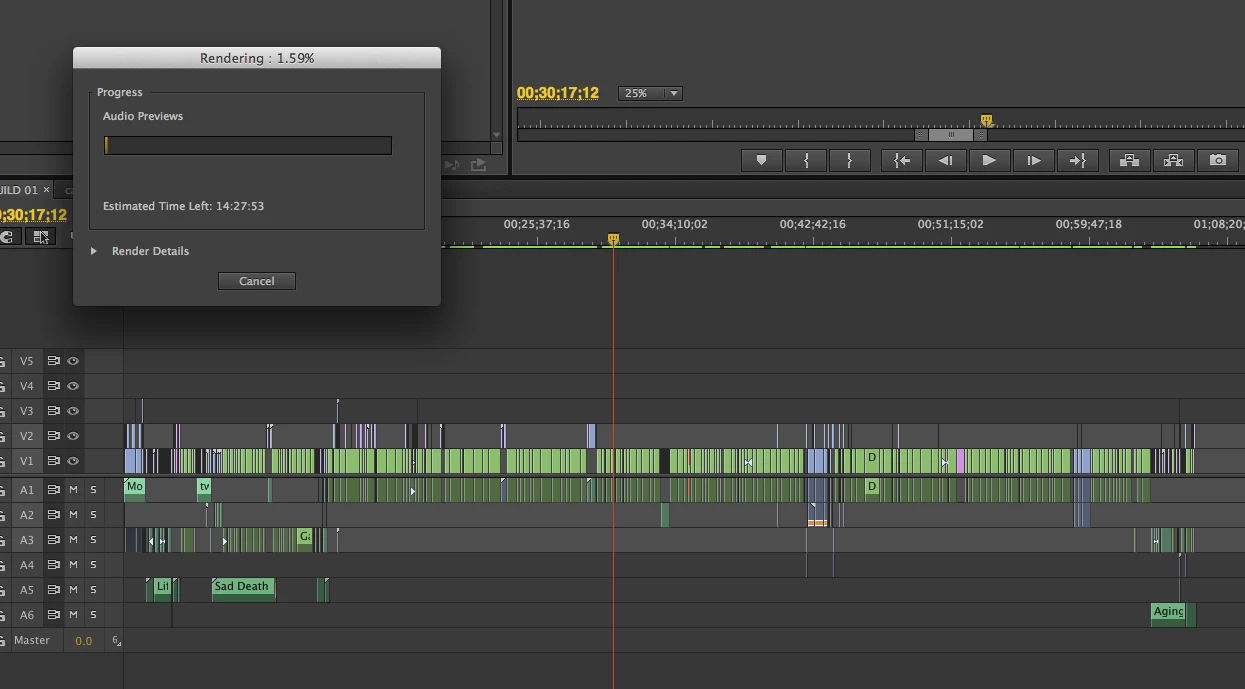
Adobe CC, OSX 10.8.4 on a 12 core Mac Pro with a GTX 570 32GB ram, and BM Studio. My RAID is a 3 disk internal raid with 3 3TB disks in RAID 0. The video renders reload properly. The situation would be better if the audio renders reloaded at least but why it needs to render "audio previews" for such simple audio is beyond me. And as I mentioned I went through quite a bit of trouble to make it as easy on Premiere as possible by replacing all of the 44.1 audio with 48/16 wavs.

    This topic has been closed for replies.
    Correct answer Adam Carrel

    I mean seriously... So I would get mine to export faster by just sending it straight to AME. But it still hangs for a good 20 minutes before even starting the processing (I have no idea why but I'm sure it has something to do with the audio bug). Also - by doing this - I totally screwed up a video because it just didn't export 3 tracks of my project. So I had to re-export a video for work, and end up submitting a screwed up version just because Premiere can't handle audio rending? nested tracks? I'm using the latest updated version of CC btw.


    I found this on another forum:

    There were MANY other problems that came up on this project and as a result I was put on the pre-release group with Adobe, but the cause for the issue described above was due to the audio bitrate for the project not matching the bit rate of the audio clips. It has a resample them as a result.


    This seems to have solved it for me.  I opened my audio files in another program, re-sampled them, and then put them back in to Premiere.


    EDIT:  I can confirm that this worked.

    30 replies

    Inspiring
    July 20, 2014

    I am struggling with this, too, with my brand new 2.8 ghz MacBook Pro. The audio render files are enormous. I am just trying to export a rough cut for a screening.  3 hours to render audio files for a 53 minute project. Unacceptable.  I promised my clients a DVD and may not be able to deliver. 

    Wyatts
    Participant
    May 8, 2014

    I'm having the same problem as well.

    My computer uses around 4-14% of its CPU rendering audio (it took about 7 minutes to render a 10 second clip). And then the CPU usage spiked up and almost instantly rendered the .h264 video.

    Pretty frustrating. I am not using multicam, but I have 20 or so audio tracks nested in sequences.

    Known Participant
    May 20, 2014

    It's now started happening to me as well. Just in the last day. Even with all clips flattened into V1, and only one audio clip in A1, the render time for a 5-second sequence is well into 2 hours. The only workaround I can imagine is to export an XML and go over to Final Cut Pro.

    This is not just a bug; this is an unusable application.

    Wyatts
    Participant
    May 20, 2014

    I mean seriously... So I would get mine to export faster by just sending it straight to AME. But it still hangs for a good 20 minutes before even starting the processing (I have no idea why but I'm sure it has something to do with the audio bug). Also - by doing this - I totally screwed up a video because it just didn't export 3 tracks of my project. So I had to re-export a video for work, and end up submitting a screwed up version just because Premiere can't handle audio rending? nested tracks? I'm using the latest updated version of CC btw.

    Participant
    April 3, 2014

    The Reason for me was:

    - Mixdown all the audio tracks to one WAVE or MP3 file

    - Re-Import it to the multicam sequence

    - Delete all the audio tracks of the sequences, that are used in the multicam sequence (muting is not enough...)

    - Export the multicam sequence.. and voi-là.. my sequence was rendered in 3 minutes instead of 2h30...

    And at last, report this bug to adobe.. It can not be, that "professional editing software" causes such issues.. It's a shame, that adobe knows this issue since over half a year, but does not fix it until this day..

    Hope this soultion works for you too guys...

    Known Participant
    April 6, 2014

    I am using multi-cam, only 4 cameras.The audio is not set to switch. In fact the camera audio is muted and I am using a seperate stereo mixed track of the band.

    Every time I export a single song (from a set work area) Premiere renders 'required audio file'. It even says it is rendering six Audio Previews. I am sure it is re-rendeing the whle of my imported stereo audio as the single track has been cut into segments for each song.

    I can't charge the client for this rendering as it is a technical issue. A song that should take about a minute to export is taking over half an hour.

    This has not happened with any previous version of Premiere, even with very complex projects.

    By the way, I don't seem to be able to dynamically link to Audition to refine my audio tracks. The link is greyed out in the menu.

    Known Participant
    April 6, 2014

    BTW I am using a high end i7 Windows 8 machine with RAID 0 disks and an Nvidia  Quadro 4000 video card.

    Kevin-Monahan
    Community Manager
    Community Manager
    February 22, 2014

    Hi,

    I looked into this a little closer. Are those of you with this problem using multicamera editing? If so, when you set up the Multicamera Source Sequence, is Audio set to "Switch Audio" in Sequence Settings? See image below.

    When Switch Audio is used, all source audio tracks are available in the nested sequence and since multicam is enabled for the audio portion of the nested sequence, audio belonging to each video track needs to be rendered separately.  So if you have 4 cameras, it will take 4 times as long to render than if you had multicam disabled on the audio portion of the nested sequence.

    I think that is why when I suggested flattening audio, the rendering time was as expected. 

    For locking tracks causing longer audio rendering times, or if you would like to see the "Switch Audio" feature designed differently, please file bug reports: http://adobe.ly/ReportBug

    Sorry for any trouble this has caused you.

    Thanks,

    Kevin

    Kevin Monahan - Sr. Community & Engagement Strategist – Pro Video and Audio
    Participant
    February 22, 2014

    My instance, noted above, does not involve multi-cam or any nesting of any kind.  I have filed a bug report.  Thanks.

    Participant
    February 22, 2014

    Let me start by saying I am only a hobbyist and do this more for my son and niece since they are musicians and play live in a number of venues.  I am not an electrical or audio engineer (I am an aeronautical engineer) so what I am about to say is based only on what seems logical to me…  First rendering audio should simply be faster than rendering video given the amount of digital data that needs to be processed.  That stated, I know that the Mercury engine using CUDA to process video vastly speeds the rendering of video.  Regardless, using today’s CPUs (i7 3930K in my case) should and does more than make up for the additional processing power for rendering video using CUDA. 

    It seems to me that there is a bigger problem than whether or not we are flattening, nesting or locking our tracks.  It shouldn’t take as long as it is taking for some of us to render audio!!!

    I only experienced this problem one time.  I am not even sure what I did to change the outcome on the same project that I have since edited and rendered many times.  But now the audio renders very quickly (less than a minute).  I will say that in almost all cases my music videos have different audio sources (44.1KHz, 48KHz 16bit, 48KHz 24bit, and 96KHz 24bit) and that I set all my sequences to 96KHz since my master audio sources are recorded at that.  I use an external firewire RME Fireface 800 using RME ASIO divers to handle all audio.  I do find that this setup can be stubborn in that there are times PPro CC doesn’t know what to do regarding my audio so simply won’t allow me to play any track.  When this happens I simply remind PPro CC of my settings by going to Edit/Preferences/Audio Hardware then check that the Adobe Desktop Audio is set to ASIO FireFace and click on ASIO Settings to check that the buffer size and sample rate are correct.  If they are not I read the flash from the RME and all is good. 

    But I diverge, there is a problem Adobe and it needs to be fixed.  This never happened to me using CS6…

    Participant
    February 21, 2014

    We have exactly the same issue, the audio render files never save and when we want to export the sequence it takes 20 minutes to 'render required audio' before the export starts. Its a fairly simple sequence audio-wise, 6 audio tracks, with some reverse speeding on some audio tracks, video footage is RED, no difference if I nest video it still needs to render audio on export. I've not been using Premiere Pro for long, migrated from FCP7 so no great depth of knowledge of it as yet. I thought to 'nest' the audio but seems that isn't an option. Super annoying issue, only have it in this 1 project, all other projects we have no issues like this - surely it can't be the reverse-speed effects?

    Participant
    January 28, 2014

    For me, when I use Sequence->Render Audio in Premiere Pro CC, there is a huge difference in rendering time depending on whether the audio tracks are locked or not.  This is obviously a bug, because clicking the lock icon on/off shouldn't affect anything about the audio itself.

    Inspiring
    January 28, 2014

    Which is it? Do you get faster renders with locks activated or locks deactivated?

    Participant
    January 30, 2014

    Just to give a few more details, the project is 100 minute film with 22 audio tracks, and stereo master output.  The audio is fairly complex, but no nesting.  With all tracks unlocked it takes less than 5 minutes.   With all the tracks locked it went for almost 2 hours before I cancelled it; I've never had the patience to see it all the way through. 

    After rendering all audio with the tracks unlocked, if I then switch even one track to locked, it will re-render, even if that newly locked track has no audio on it.  Again, no sound is being moved or modified in anything I am doing. 

    Participant
    August 15, 2013

    I am having the same problem with a fairly high end rig...  i7-3930K, 32Gb RAM, GTX 780 with MFE on, OCZ Revo system drive, SSD scratch drive, 3 7200RPM project disk and 1 7200 disk where I write my rendered files to.  With my old projects and multiple videos and separate audio recorded at 96K never have a problem after importing from CS6 to CC.  With a new project that had 3 video sources and one audio source I used PluralEyes 3 to sync the files. Worked great, but when I went to render the final video which is 47 minutes long, the video took maybe 10 minutes and the audio and hour…  

    Help!!!

    Participating Frequently
    September 1, 2013

    I have had this problem too ever since upgrading to CC from CS6.  I always use nested sequences for syncing up my system sound, so I have not tested if this bug or 'feature' is premiere feeling the need to make audio previews for nested sequences vs other ways of syncing sound with video clips.  I did an experiment. One sequence had 192 sequences, but only 33 within the work area for rendering.  When I went to render, premiere wanted to render 192 audio previews.  When I copied just the work area to its own new sequence, premiere wanted to render 33 audio previews. So annoying that it wants to render a 'preview' for every sequence on the timeline, not just only what is in the work area. Why is that, Adobe?! Do you understand how much editing time this wastes when I can't be using my machine?  I think from now on, I will be sure to keep a fresh sequence only for rendering out from. 

    And I too can confirm CC renders audio slower than video.  Just got my new core i7. The video encodes soo much faster than my old rig, but the audio seems to be stuck in molasses.  Would really love to hear an answer from the high software paid engineers at Adobe who get health insurance why they have taken audio rendering back 20 years.  What do we have to do to not get this annoying glitch?  Not use nested sequences? That makes keeping sync soo much harder if that's the case.  

    Message was edited by: Kevin Monahan

    Abusive language. Please do not use profanity.

    Kevin-Monahan
    Community Manager
    Community Manager
    August 9, 2013

    Hi robmbrown,

    Sorry about your experience. Have you tried to flatten your multicamera sequence before rendering and exporting?

    Thanks,

    Kevin

    Kevin Monahan - Sr. Community & Engagement Strategist – Pro Video and Audio
    robmbrownAuthor
    Participating Frequently
    August 9, 2013

    Would flattening affect audio?

    the_wine_snob
    Inspiring
    August 6, 2013

    Just an observation. The 44.1KHz Audio should not be an issue, since PrPro Conforms that to 48KHz 32-bit floating point in the CFA files, upon Import. I think that you can rule the 44.1KHz material as the cause of the bottleneck.

    However, I do not have any thoughts on what the issue could be, unfortunately.

    Good luck,

    Hunt

    shooternz
    Legend
    August 6, 2013

    How do you know that it is rendering audio files as opposed to video files?

    Try a test and turn of all audio tracks (test export or render of a section (shortWork area bar).

    Try a test an Delete Render Files. (ie start a fresh render)

    Try exporting Audio Track only and re laying that into the Sequence.

    Exports do nor rely on Render filesu nless you want them to. (ie a fresh render occurs when exporting)

    robmbrownAuthor
    Participating Frequently
    August 6, 2013

    Well if you took a look at the little screen grab I sent you would see it says rendering audio previews. If I delete the audio from the timeline I don't get the rendering audio previews message and it goes straight to exporting my video. I have tested this a bit and it's definitely the audio that is the bottleneck.

    shooternz
    Legend
    August 6, 2013

    I have never seen a separate Audio Render Window (and progress bar).

    Its also interesting that you are saying Export ..yet I am seeing the Timeline (Seq) in your sreen grab.  Not sure what to make of that because I would expect to see AME???

    Any how...there is a Preference Setting that says something like "Render Audio with Preview".

    Try it OFF or vice versa