Participant
August 17, 2023
Question

Video files not loading into Premiere Pro, some importing as audio in the bin

  • August 17, 2023
  • 4 replies
  • 234 views

The error that I'm getting out of premiere pro is "the importer reported a generic error". Also getting this error now: "The file has an unsupported compression type."


The files I am getting this error with are .mov video files that I have used for a lot of video content. I have used these video files in the past with PrPro on this very PC and they worked fine, I have multiple projects that worked fine with these video files and I can still play and watch the video files on my computer with VLC. But when I import them into Premiere Pro they import as audio files, with no video.


For reference, everything works fine when I load the same files on another PC onto premiere pro.

I’m guessing it’s a codec issue, but not quite sure how to fix it. I have tried every fix I found by searching around on google and none of those have worked. Also re-installed Premiere and tried previous versions of the software, all with the same issue. 

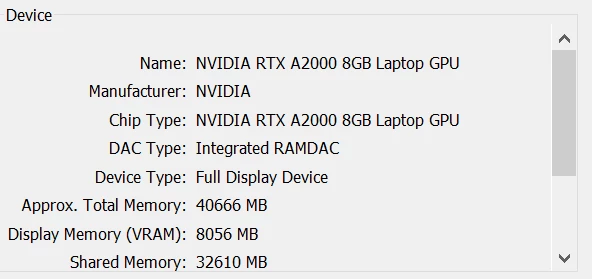
PC specs:

Any ideas?

    This topic has been closed for replies.

    4 replies

    Peru Bob
    Community Expert
    Community Expert
    August 17, 2023

    Please use the free MediaInfo and post a screenshot of the properties of your media in tree view:
    https://mediaarea.net/en/MediaInfo

    Many users are having issues with VFR. If the file is variable frame rate, use Handbrake to convert to constant frame rate:
    https://handbrake.fr/downloads.php
    Here is a tutorial:
    https://www.youtube.com/watch?time_continue=34&v=xlvxgVREX-Y

    Shutter Encoder may also be used to convert to Constant Frame Rate:
    https://www.shutterencoder.com/en/

    Kartika Rawat
    Community Manager
    Community Manager
    August 17, 2023

    Hi Sumit31721753fnbw!

    Thank you for reaching out. What's the source of the media files? Can you share media properties? You can also try transcoding files: https://handbrake.fr/


    Let us know how it goes.

    Kartika

    Ann Bens
    Community Expert
    Community Expert
    August 17, 2023

    If the footage is variable framerate convert to constant framerate with Handbrake or Shutter Encoder before bringing into Premiere.

    Community Expert
    August 17, 2023

    Moved to Premiere Pro forum for better help

    -Manan

    -Manan