Participant
March 31, 2021
Answered

video not showing on timeline

  • March 31, 2021
  • 2 replies
  • 4501 views

Hi! 

I've been using premiere for some time now, but I´m far from being an expert, and i´m having some trouble. 

I´m trying to drag a clip for the timeline and i can only drag the audio, why is this happening? does this happen to anybody else? 

I think i´ts not because of the format, because I always use the same format and it always works, but not today.

Thank you for you time!
This topic has been closed for replies.
Correct answer Ann Bens

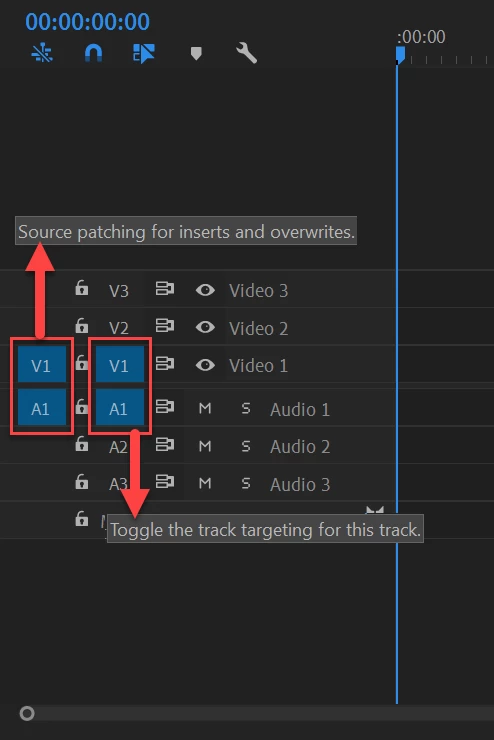
Most common user error is not source patching the track.
Solved by first opening clip in Source Monitor, set in and out point. Then drag/insert into timeline.

2 replies

Ann Bens
Community Expert
Ann BensCommunity ExpertCorrect answer
Community Expert
March 31, 2021

Most common user error is not source patching the track.
Solved by first opening clip in Source Monitor, set in and out point. Then drag/insert into timeline.

Inês5EC2Author
Participant
March 31, 2021

thank you so much!!! that was it, it works now!!! whising you the best!

Inês5EC2Author
Participant
March 31, 2021

thank you so much!!!