
Legend
June 4, 2023
Question

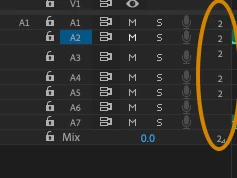
what do these little 2's mean in the track panel

  • June 4, 2023
  • 3 replies
  • 826 views

I never have a problem admitting my "possible" ignorance... don't worry about appearing stupid (that ship has sailed).   Noticed this recently (have these always been there?) and wondering what they mean.  Nothing happens when I mouse over them (I always have "tool tips" enabled).    Thanks as always.
This topic has been closed for replies.

3 replies

Remote Index
June 19, 2023

Hello Michael Grenadier,


Those '2's are indicating Multi-channel audio tracks - in this case, 2 channel tracks.

The editing tracks are adaptive audio multi-channel tracks. By right  clicking on the '2' you can see and change "track output channel assignments".

The mix track shows the number of channels available per track. By left clicking on this, it can be changed.


Audio has to be one of the most poorly documented aspects of Premiere Pro. I have written about parts of this problem here.


Also, I contend, the audio throughput design (from source clip through timelines to hardware) - while somewhat flexible - is poorly designed and extremely convoluted in ways that it should not be for users of Premiere Pro. I have written about this issue in the past and suggested further thought on re-design, but all that is no longer posted with the change-over of forums. The interface elements you have identified are part of that design problem.


R.

Legend
June 19, 2023

Thanks for you tip.  I agree with you whole heartedly regarding Adobe documentation, but I imagine it would take a great deal of time and money to generate a comprehensive manual and who knows how many users would spend the time consulting it.    When I started working with Avid Media Composer many years ago, I would skim the manual every 6 months or so to find features and workflows that would be useful.    Can't tell you how many editors would turn to me when they didn't know how to do something... 


as to your other point about audio interface design, Premiere is an extremely complex program and it may not be simple to reprogram specific features without causing issues...  And, the user base is extremely varied when it comes to skill/knowledge level and what may seem complex to a neophyte may be necessary for professional use...    I've been accused here of being an adobe "apologist" but I've been doing this for a very long time, starting with early version of avid Media Composer and really don't find the problems in Premiere out of scale compared to other solutions.   

Remote Index
June 19, 2023

"I imagine it would take a great deal of time and money to generate a comprehensive manual."


Adobe has both of these resources.


I think both Adobe and users should be aware that Premiere Pro has been available for 20 years - that's 20 years that Adobe has had to develop both a manual and a process for keeping it up to date.


Current estimates put paying users of Adobe Creative Cloud at 30 million. I'll let you do the math on revenue.


R.

Averdahl
Community Expert
Community Expert
June 4, 2023


quote

...wondering what they mean.  


By @Michael Grenadier


It indicates that the audio track is an Adaptive track.

Legend
June 4, 2023

hmm..  more stuff to figure out.  Oh for the days when we had the budgets to go to and audio house...  and didn't have to know all this.  

R Neil Haugen
Legend
June 4, 2023

Got me too, Michael!

Everyone's mileage always varies ...