Ann Bens
Community Expert
Community Expert
June 25, 2025
Answered

Where are the local text styles stored?

  • June 25, 2025
  • 3 replies
  • 529 views

Where are the local text styles stored?

How to delete text styles from the properties panel one does not use anymore?

Correct answer Theresa Rostek

Hi @Ann Bens

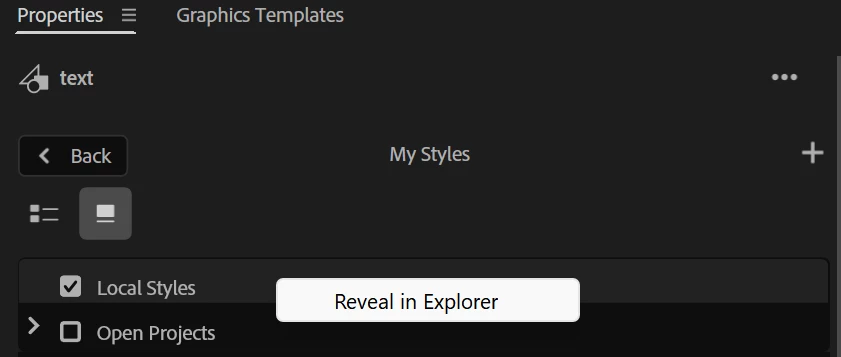
You can also right click on Local Styles in the Style Browser and it'll bring up "Reveal in Finder/Explorer" which will bring you to that folder. 


I've also brought the feature request to the team for consideration.

Theresa

3 replies

Theresa Rostek
Community Manager
Theresa RostekCommunity ManagerCorrect answer
Community Manager
June 25, 2025

Hi @Ann Bens

You can also right click on Local Styles in the Style Browser and it'll bring up "Reveal in Finder/Explorer" which will bring you to that folder. 


I've also brought the feature request to the team for consideration.

Theresa

Motion Graphics, Premiere Pro
Ann Bens
Community Expert
Ann BensCommunity ExpertAuthor
Community Expert
June 25, 2025

It would never have crossed my mind to right-click on the Local Styles......................................

Right-click on the style's itself yes but this no.

Stan Jones
Community Expert
Community Expert
June 25, 2025

With the style browser, the ones saved "locally" are at Users/username/Documents/Adobe/Common/Assets/Text Styles. The ones saved to project only are still saved in the project (only).


There is still no way to delete styles saved locally from PR.


Feature request:

https://community.adobe.com/t5/premiere-pro-ideas/deleted-font-style-button/idi-p/15255132


I think we're the only 2 that upvoted it!


Stan


Ann Bens
Community Expert
Ann BensCommunity ExpertAuthor
Community Expert
June 25, 2025

@Sumeet Kumar Choubey thanks

@Stan Jones 2 upvotes one of them is me 😉


Just tried this: If you delete the styles from the given path, they will also disappear from the properties panel

Community Manager
June 25, 2025

Hi Ann Bens,

Local text styles are saved under /Users/UserName/Documents/Adobe/Common/Assets/Text Styles.

Hope it helps.


Thanks,

Sumeet