


Participant
December 19, 2017
해결됨

Zoom in on one part of the video, but not everything

  • December 19, 2017
  • 1 답변
  • 10227 조회

Hi! I'm relatively new to Adobe Premier (only been with it for 2 months), and I have different clips in my timeline for one video. I want to have one clip zoom in, but not all of them, as what happens in the Select Zoom Level dropdown menu. A selected zoom level is applied to all the clips. Is there any way to get it for just one clip? Thanks!
이 주제는 답변이 닫혔습니다.
최고의 답변: Meg The Dog

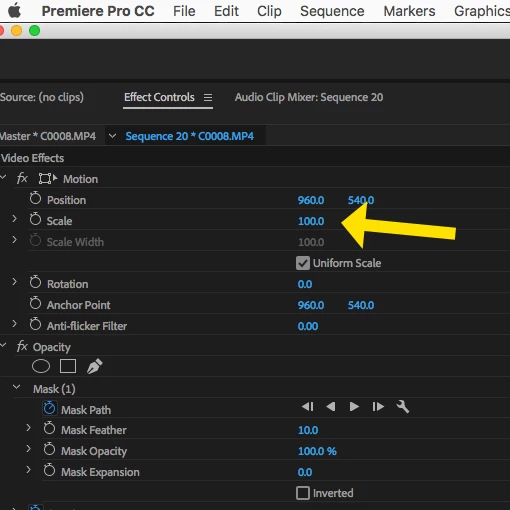
The "Select Zoom Level" has nothing to do with the scaling of the clips. It only controls how the clips are displayed within the program monitor. To adjust the actual scale of the clip within the sequence frame, select the clip on the timeline you wish to adjust by clicking on it, and once it is selected, go to the Effect Controls Pane and adjust the clips Scale:

MtD

1 답변

Inspiring
December 19, 2017

The "Select Zoom Level" has nothing to do with the scaling of the clips. It only controls how the clips are displayed within the program monitor. To adjust the actual scale of the clip within the sequence frame, select the clip on the timeline you wish to adjust by clicking on it, and once it is selected, go to the Effect Controls Pane and adjust the clips Scale:

MtD

blueshirt_mac작성자
Participant
December 19, 2017

That did it! Thank you so much! (I actually am new with the software, I didn't mark it as correct to quiz you on it so don't worry :-) )