



Ann Bens
Community Expert
Community Expert
January 13, 2024
Question

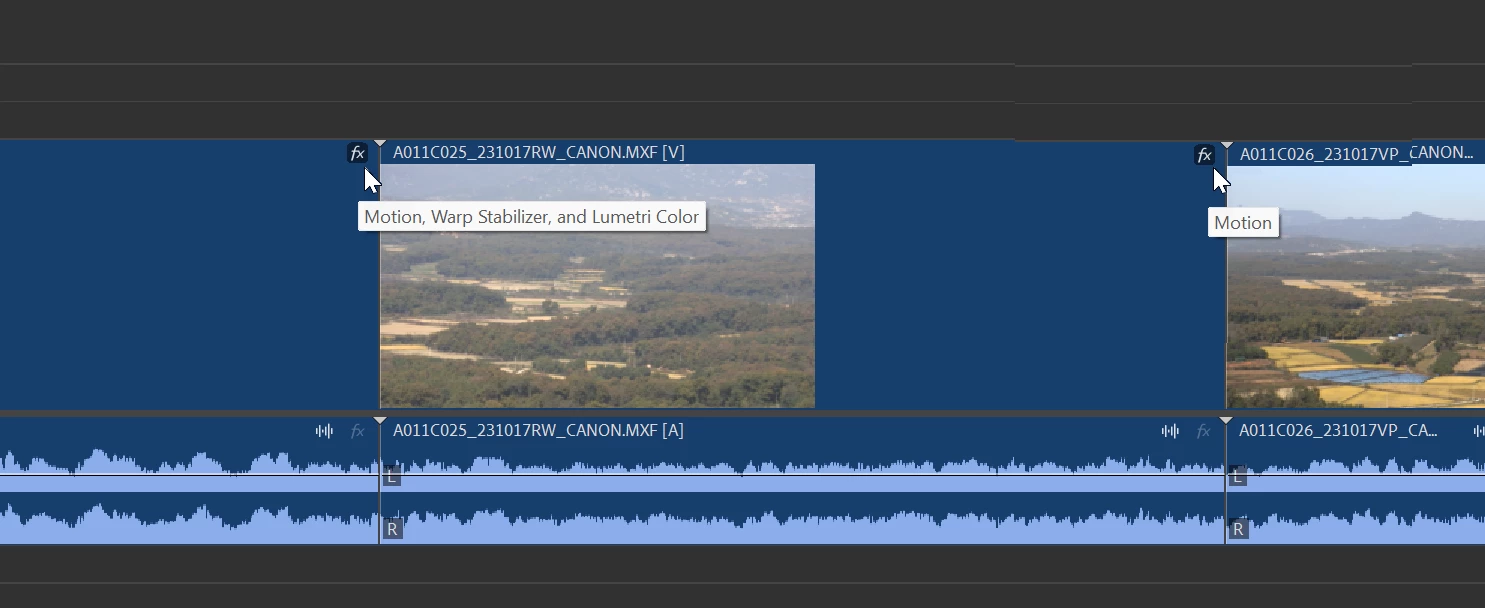
FX badge color code missing in new clip redesign

  • January 13, 2024
  • 31 replies
  • 10682 views

Been mucking about with this, but

I do miss the color code (gray, green yellow, purple)

I used them to see in a glance if an effect was applied or not.

Now I have to mouse over the FX badge as they all have the same color

Or make sure the ECP is open and clip is selected.

Or am I missing something here............


31 replies

Participant
December 18, 2024

Yes please! I work in a high-volume, high-speed environment and those little badges were invaluable to me and my coworkers. This and not being able to choose what layer copied meida should appear on when pasting to the timeline are our biggest gripes with 2024. (looking for that thread next!)

Participant
December 18, 2024

Not 100% sure this is what you're referring to, but you can indeed paste to targeted tracks. Premiere changed the shortcut names a bit. If you go to map your Keyboard Shortcuts you might need to remap your shortcuts for "Paste to Target Track" and "Paste Insert to Target Track."

Participant
December 18, 2024

Thank you kind stranger! My whole shop will be glad when I point this out to them!

Participant
December 13, 2024

Reiterating the desire for color-coded FX badges to be brought back into Premiere, please. They are essential to my workflow to be able to identify which clips do/don't have effects on them.

Participating Frequently
November 6, 2024

ADOBE! Stop trying to be like DaVinci only because it's taken off. I cry here of frustration to this FX badge change. There's more, when a clip is selected it now only borders the clip with a thin grey line, like in DaVinci (!!).. the way it was before was perrrrfect. Really.
Its November, everyone here's been polite but they also warned you about angry users if you roll this out of beta.. and I'm furious with this very very dumb change, so useless and UN-CALLED FOR. Stop. Trying. To. Look. Like. DAVINCI!!! 

Participant
October 18, 2024

Adobe’s decision to remove the color from the Fx badge and move its position to the right is, in my opinion, a major mistake.


Without the color, it’s difficult to quickly identify what effects have been applied. And because the badge’s position has been moved to the right, when viewing longer clips, you need to unnecessarily scroll the timeline to the right just to check if an effect has been applied (which is made even more difficult due to the lack of color differentiation).


I fail to understand why Adobe made such a change.


Were they trying to emphasize, “Look, I’ve changed!”? Is the person who redesigned the new timeline an influential figure within Adobe? Did Adobe internally think there were truly no issues with this?


This update has thrown countless video creators into frustration, changing something that didn’t need to be changed.


One of Adobe Premiere Pro’s strengths is allowing users to freely customize their workspace.


However, Adobe has diminished this advantage.


Adapting to the new label colors is something we can manage. It’s not a difficult issue.


But the changes to the Fx badge’s position and color have actually taken a step backward, making it clear that this update is not something users can adapt to comfortably, but rather a patch that introduces inconvenience.


Let me reiterate:


There’s a difference between something that can be adapted to and something that is difficult to use. Adobe needs to clearly distinguish between the two.


Despite numerous users expressing their discomfort over the past few months, Adobe has not taken any action, instead implying that “there’s no problem.”


Additionally, there is a bug where the clip height randomly increases. Why does this happen?


Adobe needs to think deeply about these issues.


I’m seriously considering switching to Apple’s Final Cut Pro.

Shebbe
Community Expert
Community Expert
October 18, 2024

The sad answer is this: https://spectrum.adobe.com/

Someone / several at Adobe have decided that everything needs to be streamlined across apps. In some ways commendable but the reality just shows that a lot of design decision can simply not be generalized to a single principle. Different apps have different needs and UI design should be built to fit those needs in a way that makes users able to see clearly what's going on and work fast. 

On one hand I'd like to see their UIs be improved on many fronts, but I don't want functional design that existed before to be nuked just because of some holy bible.


One of those disasters is also the dropdown menu of the export window.
I can see exactly 2 of my favorited presets and I already need to scroll. Who even cares about Recent? They will just end up being repeats of what you've favorited already if you have a workflow with fixed deliverable types...


Meanwhile Media Encoder simply shows a sane compact listing with the width adapting to the longest entry in the list.

s

And that's all because they've decided that font size and margins should be massive as if it's an ipad app. And the width never exceed the menu itself causing entries in the list to take up 2 lines. Making matters worse is you can actually make the export column wider diminishing the issue but this is not saved so jumping back to edit and back to export resets it again. The whole Spectrum UI is riddled with small issues like this that aren't being accounted for on an individual app basis.


Known Participant
October 2, 2024

Adding another cry of frustration to the thread. Working on turnovers for a series that will be running through much of next year and can no longer tell a repo/rescale apart from a lumetri at a glance like before. Really frustrating that there is no way to bring these color codes back

BrianLevin
Known Participant
October 2, 2024

Doing turnovers right now as well on a weekly show, feeling your pain. Have been pushing for this to get reverted or modified since it was first announced. It makes our job harder for no useful reason. In fact, not only do the color no longer appear on the badges, but if the badges are even turned on on small clips in the audio it makes it so you cannot see any waveforms at all, so I just run with FX badges turned off entirely.

Inspiring
July 31, 2024

How has it been over 6 months since this unanimously agreed on misstep has been around

Just revert it already lol

R Neil Haugen
Legend
July 31, 2024

Because while some of us clearly don't like the change, a lot of other users either don't care or even like the changes. Including some long-time editors I know. (No accounting for taste, clearly ... ahem.)


Those of us complaining, as always, are more easily "seen" here. The others don't post because why would they? They think it's great.

Everyone's mileage always varies ...
MyerPj
Community Expert
Community Expert
July 30, 2024
BrianLevin
Known Participant
July 4, 2024

Late to the game here but I STRONGLY agree with all of this. The new colors, the new FX badges and the updated UI simply make it HARDER to use the program. Previously we could use color coding to quickly identify something in the timeline even on collapsed tracks, but now the FX badges both get in the way of single clicks and drags, AND they don't provide useful info. I have simply turned them off and just had to get used to not having access to them anymore, and it really stinks. This slows me down. Been using Premiere day in day out for almost a decade, this change is a major step backwards unfortunately.

Community Expert
July 4, 2024
BrianLevin
Known Participant
July 4, 2024

Yep done, and now that I have a bit of free time I'm playing with the Beta and finding even more distressing visual changes that I'm calling out in the Beta forum. Yikes, the new changes from FX badges to murky color labels (both of which I called out in the Beta forum) are a massive step backwards.

FunFürFelix
Inspiring
July 1, 2024

You can't make this sh*t up! How can stuff like this happen EVERY update?

Known Participant
June 11, 2024

Is this where we're still discussing this? it's in the main version of Premiere now. Please bring back the badge colors.

Pierce Klinke
Inspiring
June 15, 2024

THIS!! I came here hoping someone had a fix for this issue but annoyingly it seems Adobe has stuck to their guns on this one. Would love for them to revert back to the old system of color coding, so much easier to tell at a glance what is going on with each clip

Ann Bens
Community Expert
Ann BensCommunity ExpertAuthor
Community Expert
June 15, 2024

@Pierce Klinke

Dont count on it. When its gone its usually means it is gone forever.

This new FX feature is completely useless to me.