


Known Participant
February 7, 2022
Question

Depth Map Adjustments in Photoshop render file [Duplicate locked]
  • February 7, 2022
  • 2 replies
  • 256 views
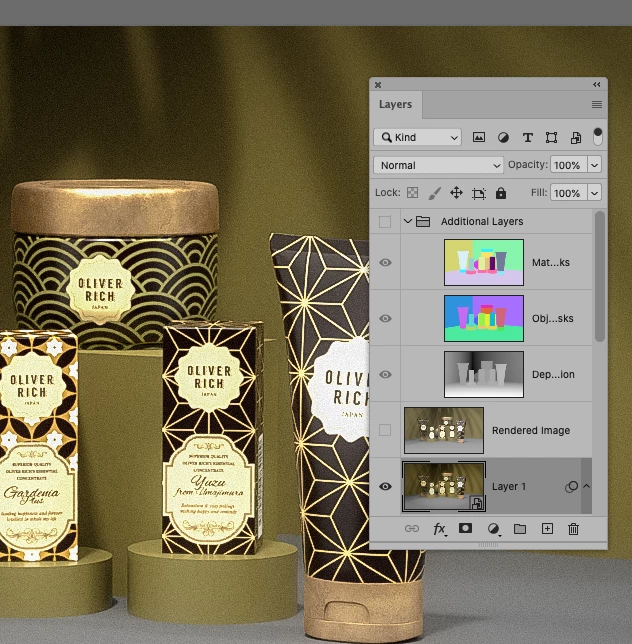
Stager Photoshop render file contains a "Depth Information" layer.
If I make 'changes' in the Depth Information layer?
 
How to I reapply this depth info change back in the rendered output layer?
This topic has been closed for replies.

2 replies

davescm
Community Expert
Community Expert
February 7, 2022

Hi

You already have another thread open on this subject. I'll lock this one so the conversation can continue in the other.

https://community.adobe.com/t5/dimension-discussions/changing-the-depth-information-in-photoshop-render-file/m-p/12734907#M6798


As explained in that other thread, you don't modify the depth map and feed it back into the render.

The depth map is an output from the render. It is just a greyscale map representing how close each point in the image is to the camera. It only changes if you move objects around in the scene and re-render. That would output a new depth map because objects in the scene have moved.


You can though use that output depth map, either as it is or with further tweaking, to control a filter or an adjustment layer applied to the rendered image. Effectively you use it as a mask to control effects or adjustments on the 2D rendered image, based on how far away from the camera each pixel in the scene represents. So you could turn far distant objects bluer (just as in nature), you could blur distant objects (to simulate depth of field). Do this using adjustment layers and smart objects so that the original rendered layer is not altered but the composite view of all the adjustments creates the image you want to see.


Dave

Ares Hovhannesyan
Community Expert
Community Expert
February 7, 2022

In Ps changing Dept Map layer have to change the entire image autimaticaly.