



hjl67936945
Inspiring
March 2, 2023
Answered

Model circle animation in vertical direction

  • March 2, 2023
  • 3 replies
  • 2155 views

Hi community,

I imported a model from dimension.

I did some work on model and started circle animation, but model circles vertical and not horizontal.

Trying to rearrange model to the ground failed.

Now I see strange xyz signs never seen before. see screenshot.

What´is wrong there.

How can I solve that? Please help.

Thanks

Hans
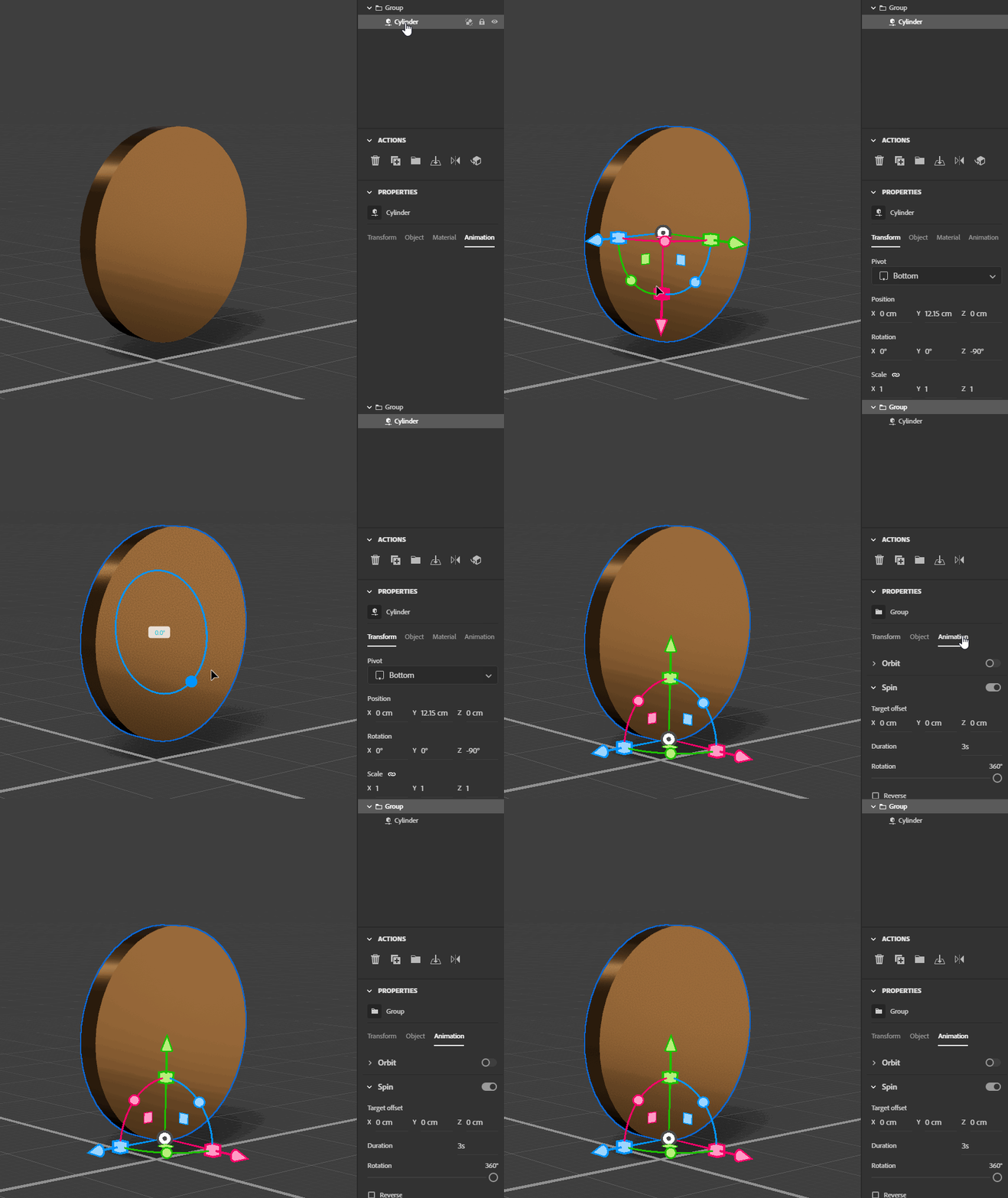
Correct answer AEllard

The current limitation is that both spin and orbit are limited to Y-Up axis.  The work around is to rotate your cylinder the way you want it to be, then put it into a group.  Here's a quick GIF showing the setup.


  • Add your object and use the transform tool to move it "up" orientation as you'd like
  • Put the object in a new group "Cmd/Ctrl + G"
  • Select the group object
  • In the properties panel > Animation tab > add the "Spin" animation to the group


3 replies

AEllardCorrect answer
Adobe Employee
March 3, 2023

The current limitation is that both spin and orbit are limited to Y-Up axis.  The work around is to rotate your cylinder the way you want it to be, then put it into a group.  Here's a quick GIF showing the setup.


  • Add your object and use the transform tool to move it "up" orientation as you'd like
  • Put the object in a new group "Cmd/Ctrl + G"
  • Select the group object
  • In the properties panel > Animation tab > add the "Spin" animation to the group


Inspiring
March 3, 2023

Thanks for posting Angela.

Inspiring
March 2, 2023

Ares is correct, clicking that button "move to ground" will lift your entire 3D model above the plane, so when it spins it is always 100% seen, and never dips below the plane. I had a question perhaps like this, where I wanted rotations to be done on the X axis instead of the Y axis  and you must fool Stager into doing this, you can see the reply from the Adobe employee that helped me in my other thread.  I wanted a simple coin shape to spin on a table, and couldn't figure it out, she helped me and wow !  it was like magic.

hjl67936945
Inspiring
March 3, 2023

Hi David,

I followed your tipp, but still vertical rotation.

See gif attached

Inspiring
March 3, 2023

Hi again, did you look at the thread with the Adobe employee ?

Not sure if you did.  Hmm, maybe you did and it still doesn't work.  You must group the object first

and then apply the rotation. Make sure there is NO rotation ( ANIMATION ) on the model... then

group it..... NOW add the animation ( spin ) and it will work. Try that.  I will try and link to the help I got from the Adobe employee.


Ahh ! here it is, I will paste it here. ( this worked for me ! )

https://community.adobe.com/t5/substance-3d-stager-ideas/no-way-to-spin-an-object-not-rotate-feature-request/idc-p/13611546#M34

Ares Hovhannesyan
Community Expert
Community Expert
March 2, 2023

You have activated align widget. Use Move to Ground tool and try again.


hjl67936945
Inspiring
March 3, 2023

Hi Ares,

this did it half way, still rotates vertical. see gif  attached.

What still goes wrong?

rgds

Hans