


Known Participant
July 25, 2024
Question

403 Error when using Frameless Output Mini-TOC - Part 2

  • July 25, 2024
  • 10 replies
  • 4280 views

I reported this same issue in a different post ("403 Error when using Frameless Output Mini-TOC") searlier this month, and I am still experiencing the issue.  Peter, you and Jeff said no one else had reported the issue. You also suggested in that post that it might be a webserver permissions issue.  I still think it is a RoboHelp issue.  One of our IT people looked at this issue with me today. I showed him a copy of the project generated with an older version of RoboHelp, where the miniTOC links work, and a copy generated with RH 2022.4.179, where the miniTOC links do not work. He had me inspect a miniTOC link in the output that works and in the output that does not work.  In the output that does not work, he found an extra set of span tags. See the image below.
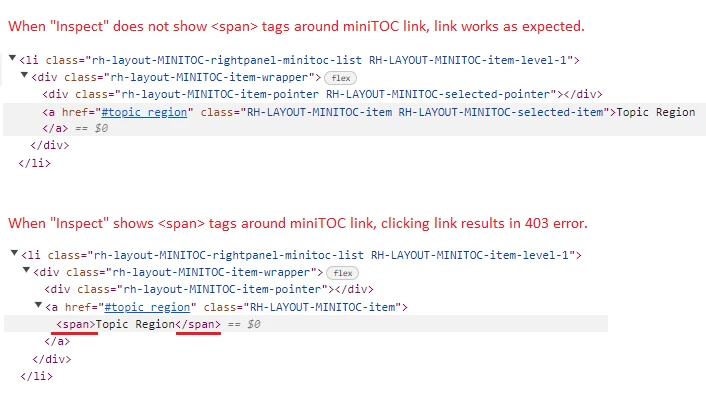
He removed the span tags from the link that did not work, and the link worked again.  Does this still sound like a webserver permissions issue?  Is there something I could have done in the project that would have added the span tags to the miniTOC links?  Given the above, does it sound as if this is an RH bug that I should report? Thanks!

Note: As noted in the other post, the miniTOCs links in a frameless project generated with RH 2022.4.179 work if I test them locally, but they do not work after the project is copied to a server.

    This topic has been closed for replies.

    10 replies

    Peter Grainge
    Community Expert
    Community Expert
    August 27, 2024

    Worth trying an uninstall, reboot and reinstall? Hoping it might update those files.

    ________________________________________________________

    My site www.grainge.org includes many free Authoring and RoboHelp resources that may be of help.


    Use menu (bottom right) to mark as Best Answer or to Highlight particularly useful replies. Found the answer elsewhere? Share it here.
    Known Participant
    August 27, 2024

    I uninstalled RH 2022.4.179. I rebooted.  I downloaded RoboHelp_16_LREFDJ and ran the Set-up.exe file. I checked for updates. The installer installed RH 2022.4.179, so there were no updates to install. I do not have an old copy of my project files to go back to, so I could not update/upgrade my projects from the previous version.  I verified that the source topicpage.ejs file still had the 3/29/2021 11:54 AM date/time stamp.  It does.  I generated the output files from one of my projects.

    I could tell from the file sizes on the two generated topicpage output files that the system had generatted the larger (non-working) files.  I SFTP'd them to our stage2 server anyway, after removing the entire contents of the existing output folder. I am again getting the 403 error on any mini-TOC link I click.


    Jeff, yes, the "good" topicpage output files I sent you were generated from the same topicpage.ejs source file identified above, but were generated using a prior version of RoboHelp.

    Jeff_Coatsworth
    Community Expert
    Community Expert
    August 27, 2024

    I suspect it's time for you to create a small non-working example and send that in as a bug report to the RH folks using the Tracker (https://tracker.adobe.com/) - make a link to this thread for them to use too.

    Peter Grainge
    Community Expert
    Community Expert
    August 27, 2024

    This is what you should see with PMs turned on.


    I'll send Jeff your address.

    ________________________________________________________

    My site www.grainge.org includes many free Authoring and RoboHelp resources that may be of help.


    Use menu (bottom right) to mark as Best Answer or to Highlight particularly useful replies. Found the answer elsewhere? Share it here.
    Jeff_Coatsworth
    Community Expert
    Community Expert
    August 27, 2024

    @Timothy386187870sd3 - if you got the PM notification email, you should have been able to click on the link contained within it to go to your PM inbox. I don't know why your screen doesn't have the envelope icon.

    Peter Grainge
    Community Expert
    Community Expert
    August 26, 2024

    A common theme is H2. It makes no sense that the style should be part of the issue but has anyone tried not using H2 to see if it makes a difference. Stranger things happen at sea, as they say.


    Also has anyone contacted Adobe Support on this?

    ________________________________________________________

    My site www.grainge.org includes many free Authoring and RoboHelp resources that may be of help.


    Use menu (bottom right) to mark as Best Answer or to Highlight particularly useful replies. Found the answer elsewhere? Share it here.
    Known Participant
    August 26, 2024

    My Heading 2 links work as long as they are not associated with a drop-down.  If a drop-down is associated with the Heading 2 style, then the In this topic link does not work when accessed from the server.  Locally, everything works fine.  

    Known Participant
    August 26, 2024

     @Jeff_Coatsworth @Peter Grainge 

    Same as what @Timothy386187870sd3 said, if I remove the span tags that are generated for these H2 drop-downs, then the link works.  I just need to figure out how to prevent those tags from getting added in the first place.  

    Peter Grainge
    Community Expert
    Community Expert
    August 21, 2024

    If a new generation of a project is creating these files that don't work for you, my first thought was to uninstall RoboHelp and reinstall it. The thinking was something screwed in your installation. However, against that is the your generation worked on my server.


    Still worth a try?


    You may have tried these things before and it may be mentioned in the thread, my apologies if they are.


    1. @Jeff_Coatsworth suggested deleting all the contents on the server and publishing again. Did you try that?
    2. Have you tried publishing to a different folder?
    3. When you test after publishing, have you tried leaving the output there for several hours and testing again? JS files can kick in later. Don't ask why but I have seen it.
    4. How are you publishing? What Server Type are you selecting?
    5. Have you tried publishing some other way, a third party tool such as FileZilla or giving IT a zip file to unzip on the server?

    ________________________________________________________

    My site www.grainge.org includes many free Authoring and RoboHelp resources that may be of help.


    Use menu (bottom right) to mark as Best Answer or to Highlight particularly useful replies. Found the answer elsewhere? Share it here.
    Known Participant
    August 26, 2024

    We are experiencing this same issue since upgrading to RoboHelp 2022.4.179.  We deleted all output folders and re-generated all RoboHelp projects locally and then copied over to the server.  We receive a Forbidden error when any "In This Topic" link is clicked, if that link is associated with a drop-down that is assigned to a Heading 2 style.  This was working prior to installing RoboHelp 2022.4.179.  If the link is NOT associated with a drop-down, then the In This Topic link works. Any ideas?  And we even waited to test today after applying files on Friday and that did not solve the issue.  

    Jeff_Coatsworth
    Community Expert
    Community Expert
    August 26, 2024

    @LT Documentation  Is the output behaving when you generate it locally? If not, can you revert back to Patch 3 (watch out for variable damage) and check with that version?

    Peter Grainge
    Community Expert
    Community Expert
    August 8, 2024

    Can you confirm 100% that what you sent me is the same output that failed on your server? I did email you but didn't hear back.


    I haven't checked what you sent for span tags but if they are there and not causing a problem on my server, doesn't that rule them out? 


    Point me a topic to that should have them.

    ________________________________________________________
    My site www.grainge.org includes many free Authoring and RoboHelp resources that may be of help.


    Use menu (bottom right) to mark as Best Answer or to Highlight particularly useful replies. Found the answer elsewhere? Share it here.
    Participating Frequently
    August 8, 2024

    Just an update, our issue has been fixed. It was a conflict in our CSS. We had been adding items like underline to the header that was not in the CSS. When the link was clicked it was reading the linke as blank so it was redirecting to the home page. I agree with Peter I don't believe these are the same issues you are seeing.

    Known Participant
    August 16, 2024

    April, glad your issue has been fixed!

    Peter and Jeff, I spent another chunk of time with one of our IT people trying to resolve our issue. No resolution at this time related to permissions.  I did some additional testing using one of our sites generated with an older copy of RoboHelp where the miniTOC links still work.  I started replacing files to see if I could determine which file(s) cause the links to stop working.  It is one file: /template/scripts/topicpage.js.  This folder also contains a topicpage.js.gz file.  I do not know when that file is used, but replacing only that file did not cause the links to break.  I restored the old topicpage.js file, and the links started working again. I copied the topicpage.js file to a different set of help output folders, replacing the file of the same name.  The links in that folder started working again.  I checked version history on my system to see if I could restore an earlier version of a project's publish\skins\[skin_name]\topicpage.ejs file (which I suspect is the file on which the output folder's topicpage.js file is based). No earlier versions are available. I am not yet sure what the consequences will be if I replace the problematic file in all help outputs where the problem exists with the file that works.  I have not had any additional time yet to troubleshoot the differences in the file that does work and the file that does not work.

    Peter Grainge
    Community Expert
    Community Expert
    August 8, 2024

    I haven't heard back from @Timothy386187870sd3 so I'm not sure what the outcome is at his end. On my server an output that I understood would produce the error did not. I don't know if @Timothy386187870sd3 found otherwise when retesting.


    As far as I can see, it was either a temporary network issue or a permissions issue, not a RoboHelp issue.

    ________________________________________________________

    My site www.grainge.org includes many free Authoring and RoboHelp resources that may be of help.


    Use menu (bottom right) to mark as Best Answer or to Highlight particularly useful replies. Found the answer elsewhere? Share it here.
    Known Participant
    August 8, 2024

    I still don't have anything to report. I informed IT that the miniToc links worked as expected on your webserver, Peter, using the frameless output with the miniToc links that do not work on our web servers.  I have not heard back from IT yet.  The issue I am experiencing is not temporary; it is still occurring. The issue @April38363617si18 reported may be the same as mine. @April38363617si18 reported also finding the span tags when inspecting the miniToc links. The span tags create an invalid link. Our web server is interpreting the invalid link as an attempt to access a page the user does not have access to and so displays the 403 forbidden error. @April38363617si18's web browser may be attempting to display the web page using the invalid link, which is why the system does not jump to the miniToc location on the page displayed. That said, I do not know why the span tags show on our two web servers and not on yours, Peter. 

    Peter Grainge
    Community Expert
    Community Expert
    July 29, 2024

    If what you sent me is what errored on your server but does not error on the server, then it has to be permissions.


    If what I have is not the same source project or the output you sent is not the one that errored, then send me what doesn't work for you.

    ________________________________________________________

    My site www.grainge.org includes many free Authoring and RoboHelp resources that may be of help.


    Use menu (bottom right) to mark as Best Answer or to Highlight particularly useful replies. Found the answer elsewhere? Share it here.
    Participating Frequently
    July 31, 2024

    Hello, We are also experiencing issues with the mini toc. I looked through our "output" which is generated to a private server where the users have to have a login to see the information. I looked for the <span><span> and did find it in the output but not in the individual RH development page.  Thanks for this information it has helped us narrow down where to look. As in above not all of the links have the issue and we are not getting the 403 error. It is redirecting to a different link.

    Peter Grainge
    Community Expert
    Community Expert
    July 31, 2024

    @April38363617si18 Your issue is about going to the wrong topic whereas this thread is about a 403 error. If you haven't solved the issue, then update "your" thread to see if anyone can help further.

    ________________________________________________________
    My site www.grainge.org includes many free Authoring and RoboHelp resources that may be of help.


    Use menu (bottom right) to mark as Best Answer or to Highlight particularly useful replies. Found the answer elsewhere? Share it here.
    Peter Grainge
    Community Expert
    Community Expert
    July 28, 2024

    Tests with a sample project @Timothy386187870sd3 sent me did not give the 403 error. That points to the problem being server permissions. I have asked Tim to confirm he sees the issue with the project he sent me.

    ________________________________________________________

    My site www.grainge.org includes many free Authoring and RoboHelp resources that may be of help.


    Use menu (bottom right) to mark as Best Answer or to Highlight particularly useful replies. Found the answer elsewhere? Share it here.
    Known Participant
    July 29, 2024

    Peter, thank you for testing the project I sent you.  I know it included the error I am seeing on our web server.  I clicked the link you sent me, and the mini-TOC links in that topic work as expected.  I am still at a loss to explain how one copy of the project can work fine on our server and a newer copy of the project on the same server gives the error, but I will go back to our IT team with the new information you provided and see what they can figure out. Thanks!

    Peter Grainge
    Community Expert
    Community Expert
    July 25, 2024

    Leave a "broken" output on the server for an hour or two then test it again. I'll explain in the morning. 

    ________________________________________________________
    My site www.grainge.org includes many free Authoring and RoboHelp resources that may be of help.


    Use menu (bottom right) to mark as Best Answer or to Highlight particularly useful replies. Found the answer elsewhere? Share it here.
    Peter Grainge
    Community Expert
    Community Expert
    July 27, 2024

    I have found that updating the styles applied to the minitoc can take a while before they show. I have been told that depending on server configuration some files may not work for a while. I don't undertand why but have found it to be true.


    Let's now assume you have left it a while and the problem persists. All publishing does is copy the generated files to the server and you say the output works locally. If follows that the problem must be either the server or the publishing.


    As @Jeff_Coatsworth has suggested, trash everything in the target folder and then transfer the files by some other process than publishing from RoboHelp..


    As I said before the reason I don't think it is a RoboHelp issue is no one else is reporting this. Can you create a small project that has this problem that you can share with me? If you can, I will publish it to my server to see if the same thing occurs. If you can, then see the Contact page on my site and send the project as instructed there. Do make sure you include a link to this thread and please do not email the project direct.

    ________________________________________________________

    My site www.grainge.org includes many free Authoring and RoboHelp resources that may be of help.


    Use menu (bottom right) to mark as Best Answer or to Highlight particularly useful replies. Found the answer elsewhere? Share it here.
    Jeff_Coatsworth
    Community Expert
    Community Expert
    July 25, 2024

    Fixed up your post to point to the other thread.
    I think you have a combination of issues going on here -
    1. Whenever somebody says "works locally, but not on the webserver" our instant suspicions are aroused that there's either (a) some file(s) missing or not updated on the web server OR (b) some setting on the web server that is causing the issue.
    2. If some of these links work and some don't, then you are correct in having a look at both to see what's going on. I can't tell, but are you doing this inspect feature on the output (if so, where is it - local or on the webserver?) or are you looking at the source RH project topics? Is there something different present in the source locations between the working one and the non-working one? 

    Known Participant
    July 25, 2024

    I mentioned "works locally" (means the links work if I click them from a topic in the output folder on my PC where I generated the project) just to be clear that the links do work from this location if someone is only testing them from this location.

    I have tested all my stage and production web sites.  The mini-TOC links do not work in every set of output files copied to a stage or production server that were updated (generated) using RH 2022.4.179. The mini-TOCS links do work in every set of output files copied to a stage or production server that have not been updated (generated) using RH 2022.4.179. And, to be clear, both the stage server and the production server contain copies of files that work (generated prior to RH 2022.4.179) and that do not work (generated using RH 2022.4.179).

    As part of my test today with IT, he had me access a mini-TOC link on a server in a project where the link works. He had me regenerate the same project using RH 2022.4.179. I SFTPd the files to the same server. The mini-TOC links no longer work on that server.  He inspected the links using files on the server, not on my local system.

    Jeff_Coatsworth
    Community Expert
    Community Expert
    July 25, 2024

    Back to my point #1 - if it works locally & you've replaced all the files on the web server (safest method for that is to delete them all first, then FTP them up again) and they still don't behave, then it's usually a caching issue on the web server. As Peter says, sometimes leaving it alone for a while will clear the cache; sometimes you have to have IT flush the cache manually if it's set particularly persistently.