


 character auto-added to random topics during Frameless (Orange) generation
Environment
RoboHelp 2019 (New UX - v2019.0.9)
Windows 10
Chrome, Firefox, etc.
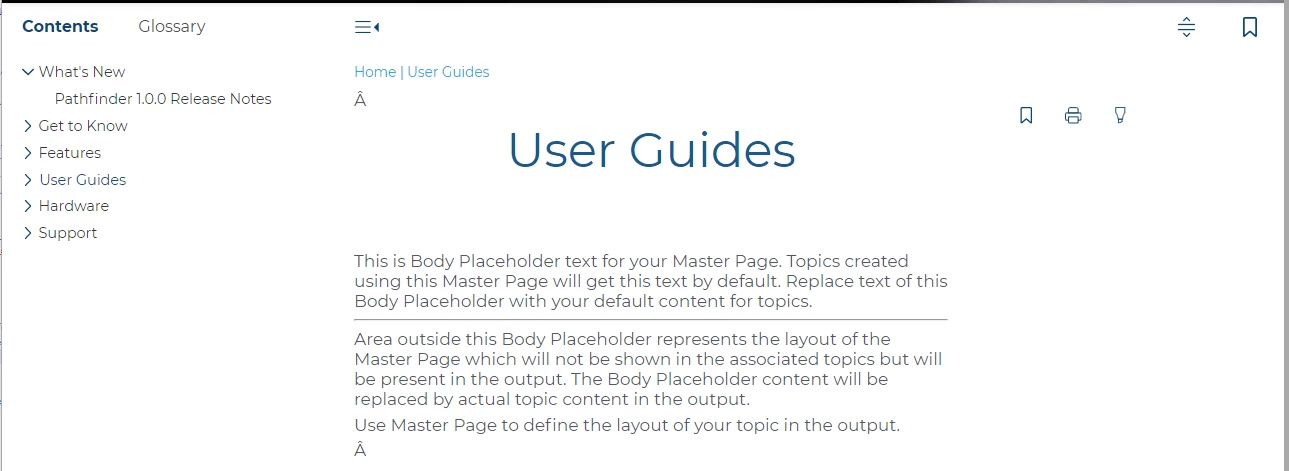
It doesn't appear on all topics. And there's no pattern to which topics it appears on. To make it even more confusing, it often changes which topics it appears on each time I compile. If I edit a topic/htm file in a text editor, this is where the character is being inserted (red, bold text below - note that it appears twice in this example):
<?xml version="1.0" encoding="utf-8" ?>
<!DOCTYPE html>
<html xmlns="http://www.w3.org/1999/xhtml"><head>
<meta http-equiv="X-UA-Compatible" content="IE=edge"/>
<meta http-equiv="Content-Type" content="text/html; charset=utf-8"/>
<meta name="viewport" content="width=device-width, initial-scale=1, maximum-scale=3, user-scalable=yes"/>
<meta name="generator" content="Adobe RoboHelp 2019"/>
<meta name="version" content="2019.0.8"/>
<link rel="StyleSheet" data-skin="true" type="text/css" href="../../template/light/layout.css"/>
<link rel="StyleSheet" data-skin="true" href="../../template/light/userstyles.css" type="text/css"/>
<title>User Guides</title>
<link rel="shortcut icon" type="image/png" href="../../logo.png"/>
<link rel="stylesheet" type="text/css" href="../../assets/css/default.css"/>
<meta http-equiv="Content-Type" content="text/html; charset=utf-8"/>
<meta name="generator" content="Adobe RoboHelp 2019"/>
<title>User Guides</title>
<meta name="topic-status" content="Draft"/>
<link rel="stylesheet" type="text/css" href="../../assets/css/default.css"/><meta name="template" content="../../assets/masterpages/test.htt"/>
<meta http-equiv="Content-Type" content="text/html; charset=utf-8"/>
<meta name="generator" content="Adobe RoboHelp 2019"/>
<title>light-footer</title>
<meta name="topic-status" content="Draft"/>
<link rel="stylesheet" type="text/css" href="../../template/light/default.css"/>
<meta name="template" content="../../../assets/masterpages/home-page.htt"/>
</head>
<body class="rh-BODY-wrapper">
<div class="cookie-widget-holder" id="cookie-status-widget-holder"></div>
<div class="RH-LAYOUT-HEADER-container ">
<div class="RH-LAYOUT-HEADER-logo-box ">
<div class="logo-holder" id="logo-holder"></div>
<div class="topic-title-holder" id="topic-title-holder"></div>
</div>
<div class="search-placeholder-class" id="search-with-help"></div>
</div>
<div class="RH-LAYOUT-BODY-container">
<div class="RH-LAYOUT-SEARCHRESULTS" id="rh-searchresults"></div>
<div class="RH-LAYOUT-LEFTPANEL-container" id="rh-leftpanel"></div>
<div class="rh-layout-BODY-main" id="rh-layout-main">
<div class="RH-LAYOUT-TOOLBAR-toolbar-box" id="rh-toolbar"></div>
<div class="rh-layout-BODY-body">
<div class="RH-LAYOUT-CENTERPANEL-container">
<div class="rh-selectdetails" id="rh-selectdetails"></div>
<div class="RH-LAYOUT-CENTERPANEL-topic-box" id="rh-topic">
<div>
<p>Â </p>
</div>
<div>
<p class="home-title"><span data-field="title" data-format="default">User Guides</span></p>
<p>This is Body Placeholder text for your Master Page. Topics created using this Master Page will get this text by default. Replace text of this Body Placeholder with your default content for topics.</p>
<hr/>
<p>Area outside this Body Placeholder represents the layout of the Master Page which will not be shown in the associated topics but will be present in the output. The Body Placeholder content will be replaced by actual topic content in the output.<br/>
</p>
<p>Use Master Page to define the layout of your topic in the output.</p>
</div>
<div>
<p>Â </p>
</div>
</div>
<div class="RH-LAYOUT-BRS-container" id="rh-brs"></div>
</div>
<div class="RH-LAYOUT-RIGHTPANEL-container" id="rh-rightpanel"></div>
</div>
</div>
</div>
<div class="RH-LAYOUT-FOOTER-container" id="rh-footer">
<div class="section group">
<div class="col span_1_of_3">
<table align="center" cellspacing="0" width="300">
<colgroup>
<col style="width: 100%;"/>
</colgroup>
<tbody>
<tr style="height: 60px;">
<td>
<p class="DocInfo" style="margin-top: 0pt; margin-bottom: 0pt;"><img alt="Company logo" height="" src="../../template/light/drb-logo.png" width="75%"/></p>
<p class="footer-text" style="margin-top: 0pt; margin-bottom: 0pt;">3245 Pickle Rd.<br/>
Akron, OH 44312<br/>
Sales: 800.336.6338<br/>
Main Office Fax: 330.645.2299<br/>
Knowledge Center: 330.645.3299<br/>
Knowledge Center Fax: 330.645.4474</p>
</td>
</tr>
</tbody>
</table>
</div>
<div class="col span_1_of_3">
<table align="center" cellspacing="0" width="300">
<colgroup>
<col style="width: 100%;"/>
</colgroup>
<tbody>
<tr style="height: 60px;">
<td>
<p class="footer-heading" style="margin-top: 0pt; margin-bottom: 0pt;">QUICK LINKS</p>
<p class="footer-link" style="margin-top: 0pt; margin-bottom: 0pt;">Search Tips</p>
<p class="footer-link" style="margin-top: 0pt; margin-bottom: 0pt;">Terms of Use</p>
<p class="footer-link" style="margin-top: 0pt; margin-bottom: 0pt;">Copyright + Trademark</p>
</td>
</tr>
</tbody>
</table>
</div>
<div class="col span_1_of_3">
<table align="center" cellspacing="0" width="300">
<colgroup>
<col style="width: 100%;"/>
</colgroup>
<tbody>
<tr style="height: 60px;">
<td>
<p class="footer-heading" style="margin-top: 0pt; margin-bottom: 0pt;"><strong>IN●KNOW●VATION</strong></p>
<p class="footer-text" style="margin-top: 0pt; margin-bottom: 0pt;">The difference between a good car wash business and a great one.</p>
</td>
</tr>
</tbody>
</table>
</div>
</div>
</div>
<script type="text/javascript">//<![CDATA[
gRootRelPath = "../.."
gCommonRootRelPath = "../.."
gTopicId = "4"
//]]></script>
<script src="../../template/scripts/topicpage.js"></script>
<script src="../../whxdata/layoutconfig.js"></script>
<script src="../../whxdata/brsdata.js"></script>
</body></html>
 AdChoices