


Inspiring
Aug 25, 2020 5:12 PM UTC
Answered

All styles gone (RH 2019, new UI)

Hi, Everyone.


I'm sure I'm just doing something silly. But when I edit a topic and go to the Styles tab, even with "All Styles" selected, the only style that shows is "None" and "RH-layout-centerpanel..." (see screenshot).


SCREENSHOT
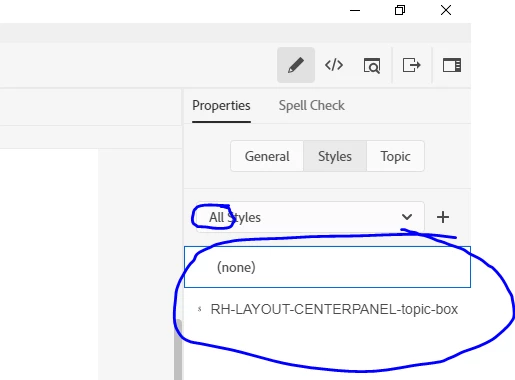
 

Can someone please get me back on track?


Thanks!!

    This topic is closed to new replies. Start a new post to keep the conversation going.
    Peter Grainge
    Peter GraingeCorrect answer
    Community Expert
    Aug 26, 2020 1:47 PM UTC

    Nope but hold up with "wrecked my project". You showed that the CSS file is screwed. What if you copy the CSS from the good project to the rogue one?


    Is that the extent of the problem or are there other issues? A wrecked project is one beyond salvation. It didn't sound that bad.


    Use the menu (bottom right) to mark the Best Answer or Highlight particularly useful replies. Found the answer elsewhere? Share it here.

    23 replies

    Jeff_Coatsworth
    Community Expert
    Community Expert
    Aug 26, 2020 6:46 PM UTC

    Best practices say "short paths with no silly stuff in there are best!"

    Translate
    Inspiring
    Aug 26, 2020 6:44 PM UTC

    Peter and Jeff, thanks a million. My project is back on track.


    The two fixes:

    1. Copying the CSS from my working backup to the "rogue" project.
    2. Simplifying the output path name (removing spaces).


    So grateful for all your help, today! Have an excellent evening.

    Translate
    Jeff_Coatsworth
    Community Expert
    Community Expert
    Aug 26, 2020 5:44 PM UTC

    Ok, so the VPN is a red-herring then 🤣

    Translate
    Inspiring
    Aug 26, 2020 4:58 PM UTC

    Thanks, Gentlemen, I was in a meeting, and now I'm going to lunch.


    To clarify, I'm running RH on my laptop locally, with all RH files and project files on its C-drive, including output files. But I am connected to my org's VPN. (Just FYI, I will ultimately need to publish the completed help project by uploading output to our SharePoint team site.)


    After lunch, I will try to simplify the file path and get back to you all.


    Thank you!

    Translate
    Peter Grainge
    Community Expert
    Community Expert
    Aug 26, 2020 4:17 PM UTC

    The path is the folder where you generate the project. I think this is a VPN issue. I assume you don't have direct access to this machine. Is it located where you or someone else could access the machine directly?


    If not, you know how to send me a project but I may not be able to look at it until the weekend. If it works for me, it will sort of prove it is the way you are accessing the machine hosting RoboHelp, then it will something for your IT people to resolve.


    Translate
    Use the menu (bottom right) to mark the Best Answer or Highlight particularly useful replies. Found the answer elsewhere? Share it here.
    Jeff_Coatsworth
    Community Expert
    Community Expert
    Aug 26, 2020 4:02 PM UTC

    Just to clarify - are you running RH on your office computer that you are accessing via VPN; OR are you running RH on the local computer and VPN-ing to access the project's files on another machine/location?

    Translate
    Inspiring
    Aug 26, 2020 3:55 PM UTC

    Yes, that is correct.  I didn't believe it and suspected my own idiocy -- until seeing it a 4th time.


    Can you please help me with "simplifying the path"? I don't know how (or what exactly that path is).


    The files are all on my C-drive. But I am working remotely on a VPN. Does that matter? 


    I will test out generating the About RoboHelp sample project and let you know.


    Thank you for holding my hand on this, Peter. It's been frightening. 

    Translate
    Peter Grainge
    Community Expert
    Community Expert
    Aug 26, 2020 3:45 PM UTC

    Let me understand this.


    You open the help, use the TOC to move around the topics, then suddenly the styles go wrong. Correct?


    I have never seen or heard of that in 20+ years of using RoboHelp.


    Looking at the path, it starts Outputs but is then followed by various characters and I can't believe you would have named a folder in that way. Try simplifying the path and make sure it doesn't have any spaces as the %20% indicates it does.


    Also generate the About RoboHelp sample project and see if that breaks if subjected to the same behaviour.


    Is this on a VPN or local? If VPN, try it locally instead.


    Translate
    Use the menu (bottom right) to mark the Best Answer or Highlight particularly useful replies. Found the answer elsewhere? Share it here.
    Inspiring
    Aug 26, 2020 3:25 PM UTC

    Peter, I was preparing to try out your suggestion, when the weirdness got even weirder. What's happening now:  the output of my "good" backup is going bad before my very eyes. 


    I generate output from the good backup project and view it. It looks perfect. However, after a few minutes of testing the output's TOC and verifying that the topics look normal, suddenly the styled headers, tables, and images all lose their styling. I've now tested this 4 times, just to make sure I wasn't crazy. 


    SCREENSHOT 1:   OUTPUT INITIALLY LOOKS PERFECT


    SCREENSHOT 2:  OUTPUT SUDDENLY LOSES ALL STYLING

    Translate
    Peter Grainge
    Community Expert
    Peter GraingeCommunity ExpertCorrect answer
    Community Expert
    Aug 26, 2020 1:47 PM UTC

    Nope but hold up with "wrecked my project". You showed that the CSS file is screwed. What if you copy the CSS from the good project to the rogue one?


    Is that the extent of the problem or are there other issues? A wrecked project is one beyond salvation. It didn't sound that bad.


    Translate
    Use the menu (bottom right) to mark the Best Answer or Highlight particularly useful replies. Found the answer elsewhere? Share it here.