
Inspiring
August 25, 2020
Answered

All styles gone (RH 2019, new UI)

  • August 25, 2020
  • 23 replies
  • 370 views

Hi, Everyone.


I'm sure I'm just doing something silly. But when I edit a topic and go to the Styles tab, even with "All Styles" selected, the only style that shows is "None" and "RH-layout-centerpanel..." (see screenshot).


SCREENSHOT
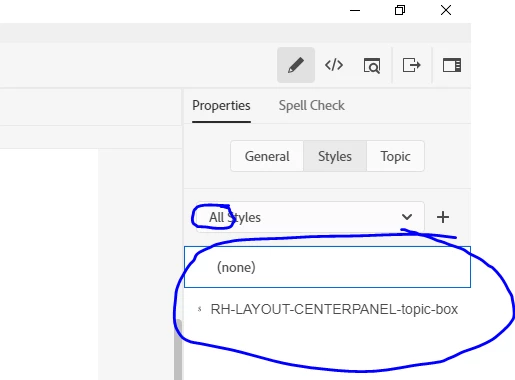
 

Can someone please get me back on track?


Thanks!!

    This topic has been closed for replies.
    Correct answer Peter Grainge

    Nope but hold up with "wrecked my project". You showed that the CSS file is screwed. What if you copy the CSS from the good project to the rogue one?


    Is that the extent of the problem or are there other issues? A wrecked project is one beyond salvation. It didn't sound that bad.


    23 replies

    Inspiring
    August 26, 2020

    I'm back. And I've unzipped a recent backup. It opens and operates as normal. 


    Any suggestions on how to find recent changes that have wrecked my project?  Does RH 2019 have a "history" or log of recent changes?


    Thank you.

    Peter Grainge
    Community Expert
    Community Expert
    August 25, 2020

    I couldn't see from the image that they were zipped. You can't open a zipped project. Unzip them first. Then RoboHelp will see them.


    Use the menu (bottom right) to mark the Best Answer or Highlight particularly useful replies. Found the answer elsewhere? Share it here.
    Inspiring
    August 25, 2020

    Thanks, Jeff. That makes sense.


    I apologize to both of you. I've been confused and have been absurdly trying to open backup project files from within compressed folders. I know, really dumb. 


    My shift ends in 10 minutes. I will check in again tomorrow morning after looking at some backup projects.


    Thank you, and sorry, again.

    Jeff_Coatsworth
    Community Expert
    Community Expert
    August 25, 2020

    I'd say that's working properly - RH can't "see" anything in the zipped folders to open.

    Inspiring
    August 25, 2020

    Hmmm...


    By "additional folders," do you mean the zipped folders? Those are all backups (compressed folders). 


    If you mean the 4 that are visible in RH's Open Project dialog:   one is my primary project. Two are backups (not compressed). And one is a test project.

    Peter Grainge
    Community Expert
    Community Expert
    August 25, 2020

    No. It should see all folders so that you can open them to see if there is a project inside. In Explorer what is in the additional folders.


    Use the menu (bottom right) to mark the Best Answer or Highlight particularly useful replies. Found the answer elsewhere? Share it here.
    Inspiring
    August 25, 2020

    No, it's not. Thank you for checking. I've just finished another reboot of everything. And this time I am on the VPN. But all the conditions I've described, above, are still true.


    Peter, does it tell you anything that RH cannot see 25 of my 26 backups (Screenshot A), even though File Explorer does see them all (Screenshot B)?


    SCREENSHOT A


    SCREENSHOT B

    Peter Grainge
    Community Expert
    Community Expert
    August 25, 2020

    So everything is OK now?


    Use the menu (bottom right) to mark the Best Answer or Highlight particularly useful replies. Found the answer elsewhere? Share it here.
    Inspiring
    August 25, 2020

    (Scratch that. My apologies. I had rebooted my machine two hours ago. But I forgot to reconnect to the VPN.)

    Peter Grainge
    Community Expert
    Community Expert
    August 25, 2020

    At that point RoboHelp is just seeing the folders. If you use Explorerto look at the folder with those backups, you will only see the same. Something is wrong with your environment.


    Reboot and if no change, you need to speak to your IT people to find out what's going on.


    Use the menu (bottom right) to mark the Best Answer or Highlight particularly useful replies. Found the answer elsewhere? Share it here.