


Participating Frequently
Sep 15, 2020 11:56 AM UTC
Question

Application error doesnt allow to establish Sharepoint Connection

Hi,

I first tried to upgrade the 2019 project to 2020. The files were successfully upgraded.

I then tried to Collaborate a connection with Sharepoint. The Sharepoint had the latest 2020 project files. It showed me the following error.
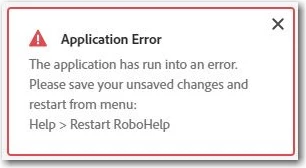
It allowed me to Login and save the collaboration. When I tried to select the folder from the Sharepoint, it selects and clears the check box automatically. SOmehow I selected the folder location, created the repo on my laptop, and initiated the process. The folders and files were getting downloaded on my laptop but I lost the collaboration with Sharepoint and the error kept coming. Once the files were downloaded, it asked me upgrade the project again. Even though the files were latest, it asked me to upgrade. I upgraded but neither I could establish the Sharepoint connection nor I could edit the files. The error keeps reappearing. Even if I try to Restart RoboHelp, it keeps reappering.

Has anyone faced this issues? Any solution?

    This topic is closed to new replies. Start a new post to keep the conversation going.

    21 replies

    Peter Grainge
    Community Expert
    Community Expert
    Sep 22, 2020 10:19 AM UTC

    Sumahesh can help you much better than I can. 


    Translate
    Use the menu (bottom right) to mark the Best Answer or Highlight particularly useful replies. Found the answer elsewhere? Share it here.
    Adobe Employee
    Sep 22, 2020 9:31 AM UTC

    Hi Sheetal,


    Are you facing this issue with any new/already upgraded project? Can you please share a sample rhpj project file with us on which upgrade warning is coming at your end?

    Kindly send the rhpj file to sumahesh@adobe.com and we will look into it.

    Thanks and Regards,
    Surbhi Maheshwari

    Translate
    Participating Frequently
    Sep 22, 2020 10:31 AM UTC

    Surbhi,

    This issue is appearing on each type of project. Sure, I'll email you the project. Hope you may find some solution.

    Translate
    Peter Grainge
    Community Expert
    Community Expert
    Sep 22, 2020 7:52 AM UTC

    If you open the RHPJ file in a text editor, the first two lines are as below.


    <?xml version="1.0" encoding="UTF-8"?>
    <project version="2020.1.0">


    It's the second line that triggers the upgrade warning. If RoboHelp sees 2020.0.0 and you open the project in Update 1, you will get the warning. The only thing I can think of here is that the change is not getting back to the source control server.


    Translate
    Use the menu (bottom right) to mark the Best Answer or Highlight particularly useful replies. Found the answer elsewhere? Share it here.
    Participating Frequently
    Sep 22, 2020 10:14 AM UTC

    Peter,

    The second line isnt there in the source file.

    Not sure what exactly is the issue. As per the Sharepoint Collaboration article on Adobe help, I also whitelisted the mentioned URLs. Still dont know what is triggering this update project error.

    Translate
    Peter Grainge
    Community Expert
    Community Expert
    Sep 22, 2020 7:43 AM UTC

    @Amber It's only the upgrade warning that I'm referring to. I don't do Sharepoint or source control. The source control stuff on my site, such as it it, was with assistance from others.


    Translate
    Use the menu (bottom right) to mark the Best Answer or Highlight particularly useful replies. Found the answer elsewhere? Share it here.
    Community Expert
    Sep 22, 2020 12:03 AM UTC

    I was thinking your Sharepoint might have had old versions of the project in it, which you were trying to open (via xpj), but that doesn't seem to be the case as you've created a new project and I assume uploaded to a new empty Sharepoint folder.


    Hopefully Peter's enquiries turn up something.


    Translate
    Peter Grainge
    Community Expert
    Community Expert
    Sep 21, 2020 11:31 AM UTC

    I am also having suspicions about second warnings. I'll report it but for now you will just have to let it run.


    Translate
    Use the menu (bottom right) to mark the Best Answer or Highlight particularly useful replies. Found the answer elsewhere? Share it here.
    Participating Frequently
    Sep 21, 2020 1:24 PM UTC

    Its not worth, I lose my connection and it keeps asking me to upgrade after selecting the folder while establishing the collaboration.

    Translate
    Peter Grainge
    Community Expert
    Community Expert
    Sep 21, 2020 8:43 AM UTC

    @Sheetal If by "latest version" you simply mean 2020 rather than 2019, then meantime you must have added Update 1 and that will lead to an upgrade message. There are changes in Update 1 that mean you should not later try to open the project on a 2020 machine without the update applied.


    Translate
    Use the menu (bottom right) to mark the Best Answer or Highlight particularly useful replies. Found the answer elsewhere? Share it here.
    Participating Frequently
    Sep 21, 2020 10:21 AM UTC

    Peter,

    I thought the same so I tried the above steps even after applying Update 1, but received the same Upgrade error.

    Translate
    Community Expert
    Sep 21, 2020 6:54 AM UTC

    @Sheetal Can you confirm this is what you did?


    1. Create a Sharepoint Online connection profile

    2. Add a project to Sharepoint Online

    3. Download a project from Sharepoint Online.


    See here for the detailed steps for each task: https://helpx.adobe.com/in/robohelp/user-guide.html/in/robohelp/using/sharepoint.ug.html


    I just want to clarify because I think your post describes steps 1 and 3, but not step 2, so I'm wondering how the files were added to Sharepoint?

    Translate
    Participating Frequently
    Sep 21, 2020 8:36 AM UTC

    Hi Amber,

    Thanks for your response.

    This is the process am following:

    1. Creating a new project in Robo 2020.

    2. Uploading the folder in Sharepoint.

    3. Creating a new collaboration with Sharepoint.

    4. Selecting the newly uploaded project. (While selecting it selects and clear the check boxes automatically but I can still choose that project.)

    5. Creating a repository in local machine. The files are getting download.

    6. A popup appears to upgrade the project. Meanwhile, the connection is closed automatically.

    Translate
    Texas Techwriter
    Inspiring
    Sep 17, 2020 4:29 PM UTC

    This was my solution, I had to have the RoboHelp 2020 update installed. Adobe will do that for you.

    1. Before publishing, clear cache on your browser and reload. Do this every time you publish.
    2. Create a folder in SharePoint Online. You must have admin permissions for this folder.
    3. Set up RoboHelp to publish to this folder.
    4. Publish.

    You can DM me if you need clarification. It's a bit glitchy and sometimes you have to publish multiple times, but it works. By the way, I got this fix from Microsoft Tech support.

    Translate
    Participating Frequently
    Sep 21, 2020 8:32 AM UTC

    Hey,

    Thanks for your response. I tried this method as well. It seems some issue with RoboHelp 2020. I created the new project, uploaded it on Sharepoint and while creating the collaboration, selected the folder to download the files. The files get downloaded but it asks me to upgrade the project, which is strange as it was already created in 2020 latest version only.

    Translate
    Jeff_Coatsworth
    Community Expert
    Community Expert
    Sep 17, 2020 12:08 PM UTC

    @Sheetal - did you apply the update patch that came out for RH2020?

    Translate
    Participating Frequently
    Sep 21, 2020 4:41 AM UTC

    Yes, I did. While establishing the collaboration, the Upgrade Project window appears even for the latest 2020 projects.

    Translate